Load Balancers (Amphora)
With the Amphora provider (amphorav2), each load balancer is implemented as an Amphora, a virtual machine running the
load balancing software. Octavia creates the amphora in your network, applies the configuration
and keeps it in sync with all changes you make. A second amphora is provisioned as backup, so the
load balancer keeps serving traffic if the primary fails.
- Load Balancers - general information and provider comparison
- Load Balancers (OVN) Early Access
List Load Balancers
A Load Balancer is a virtual network device that distributes incoming traffic across backend servers for even load distribution, optimizing both performance and availability. With this provider, the Load Balancer is implemented as an Amphora (a virtual machine running the Load Balancing software).
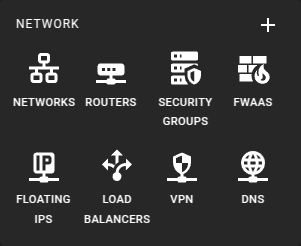 To get a list of all load balancers in a region you can click on the Load Balancers icon in the sidebar.
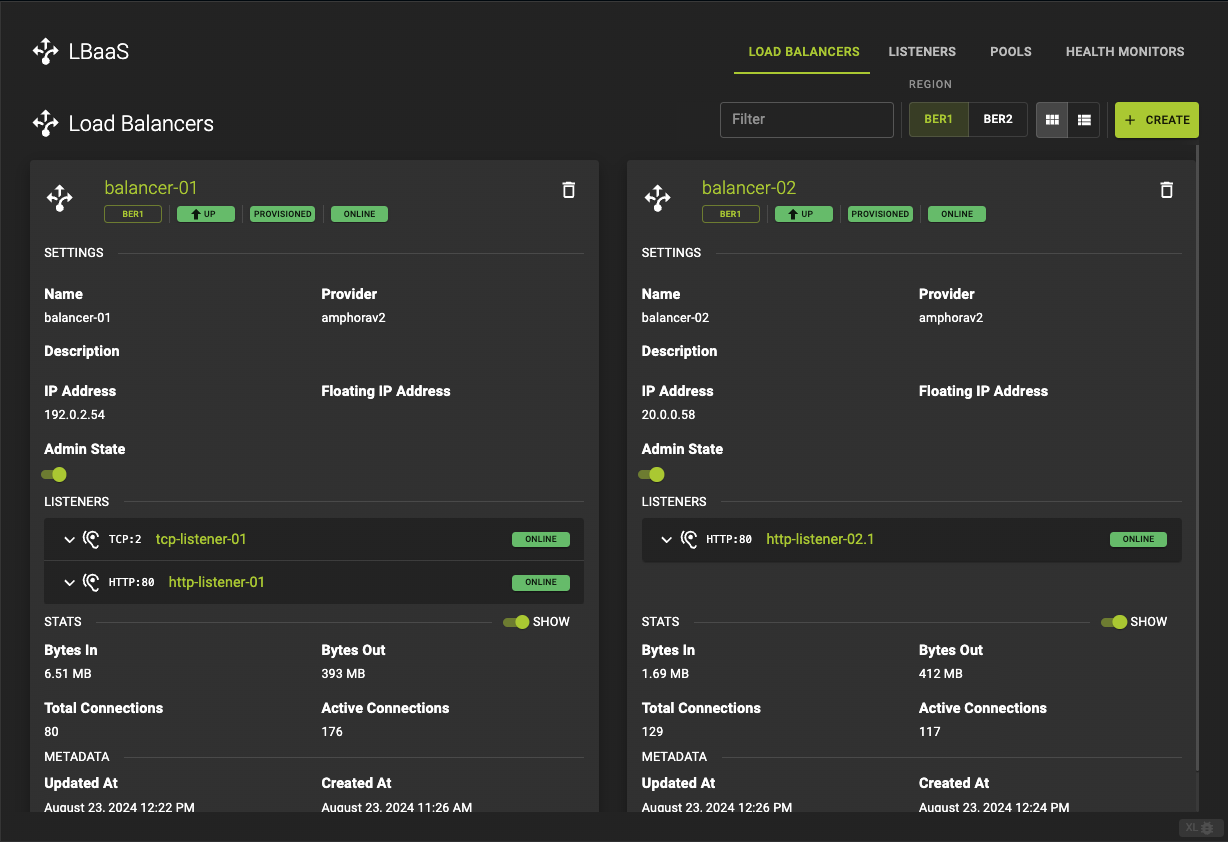 From there you will be linked to an overview page
This view informs you about
- The status of your load balancers
- The listeners of your load balancers
 For the list view click on the list icon in the menu
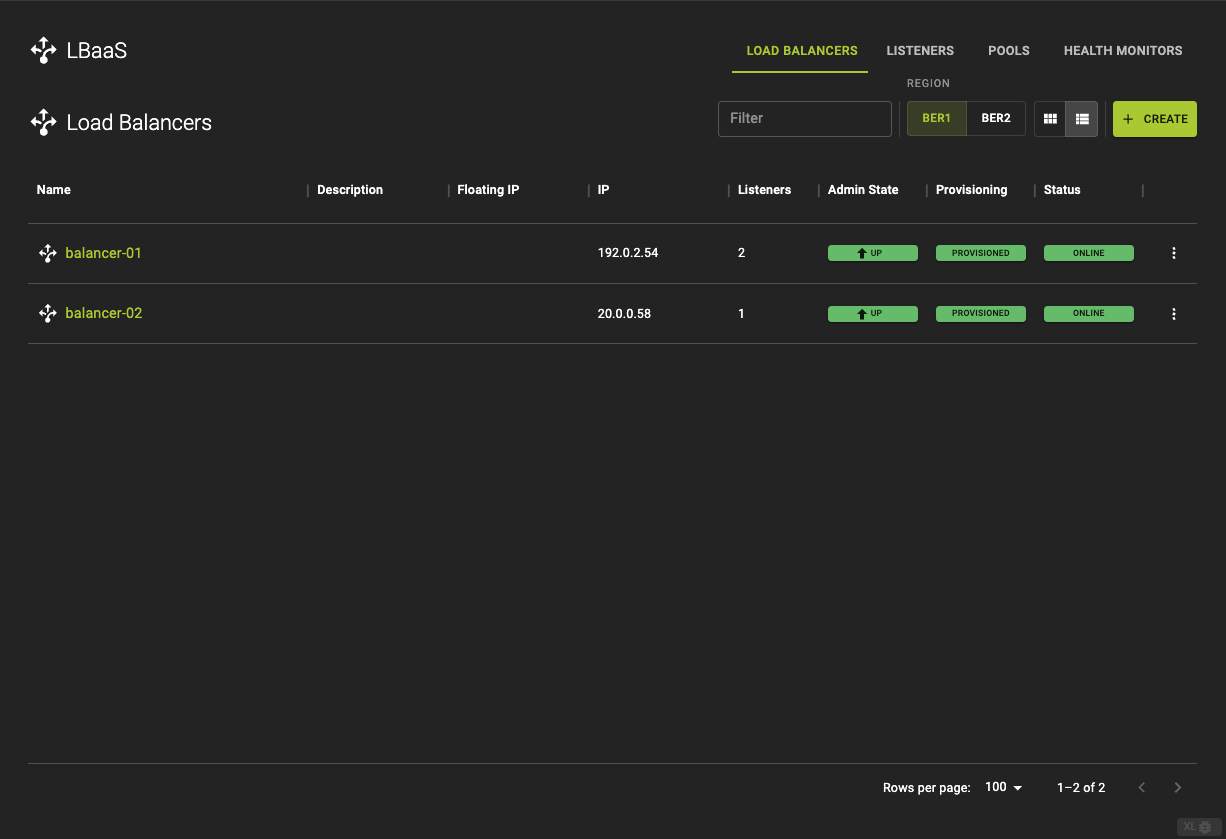 From the list of Load Balancers you can
- Navigate to the details page by clicking on the name.
- Check in which state the Load Balancers are.
Usage
openstack loadbalancer list
Output
+--------------------------------------+---------------+----------------------------------+-------------+---------------------+------------------+-----------+
| ID                                   | name          | project_id                       | vip_address | provisioning_status | operating_status | provider  |
+--------------------------------------+---------------+----------------------------------+-------------+---------------------+------------------+-----------+
| f19a93f0-53a8-4260-adf8-4e900314bde2 | balancer_01   | 0c12ce74a0084c0b8fef8e15d4a3377d | 192.0.2.109 | ACTIVE              | ONLINE           | amphorav2 |
| 36d3a99b-7ad9-42c4-b669-6b19582efcab | balancer_02   | 0c12ce74a0084c0b8fef8e15d4a3377d | 192.0.2.80  | ACTIVE              | ONLINE           | amphorav2 |
+--------------------------------------+---------------+----------------------------------+-------------+---------------------+------------------+-----------+
Create A Load Balancer
You can create a Load Balancer along with all resources at once, including a Listener, a Pool with Pool Members, and Health Monitoring. To create a particular resource, check out the following links:
Prerequisites
- Load Balancer creation involves selection of a network with a subnet the pool members (servers) will be attached to. In case you don't yet have a suitable network the UI can take you to the network creation workflow if necessary.
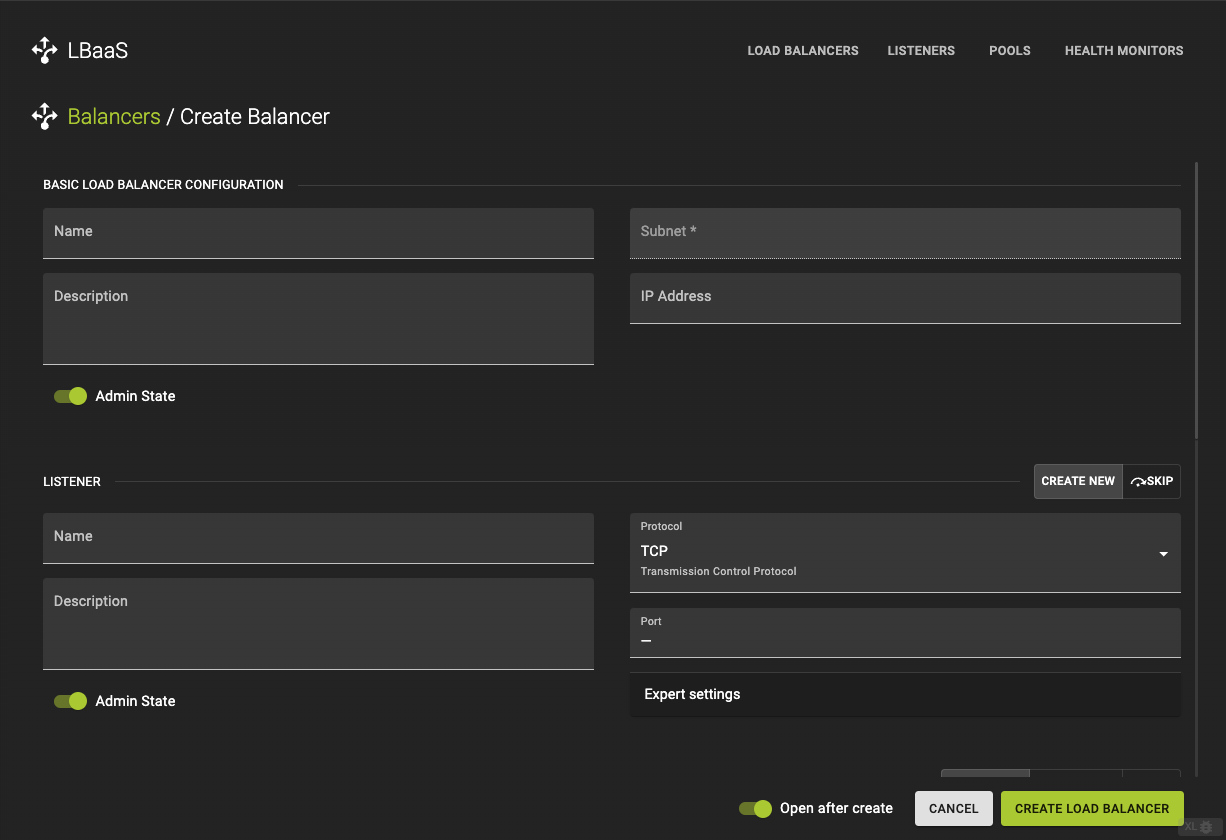
To create a load balancer navigate to the load balancer list or overview and click the Create button in the titlebar.
Basic Load Balancer Configuration
-
Name and describe your Load Balancer (optional).
-
Subnet (required)
- Choose a
Subnetvia the subnet selector. If you do not have one create one now
- Choose a
-
IP Address (optional)
- You can define a specific
IP Address. If this is left blank an IP Address will be provided from the CIDR range of the subnet.
- You can define a specific
-
Admin State
- Toggle between
Admin StateUp and Down
- Toggle between
Listener Configuration
You can either Skip the next steps or go on with configuring a Listener
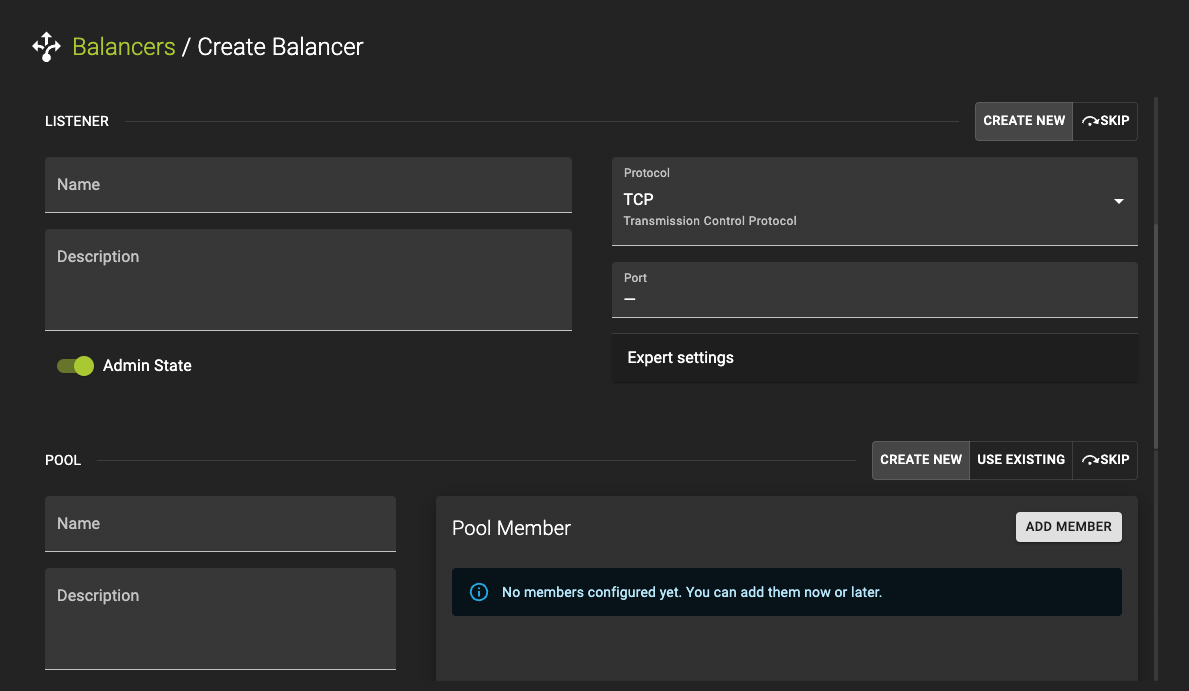
-
Name and describe your Listener (optional).
-
Protocol (required)
- Choose a
Protocol. Options areTCP,HTTPandHTTPs
- Choose a
-
Port (required)
- Define a
Port
- Define a
Expert Settings
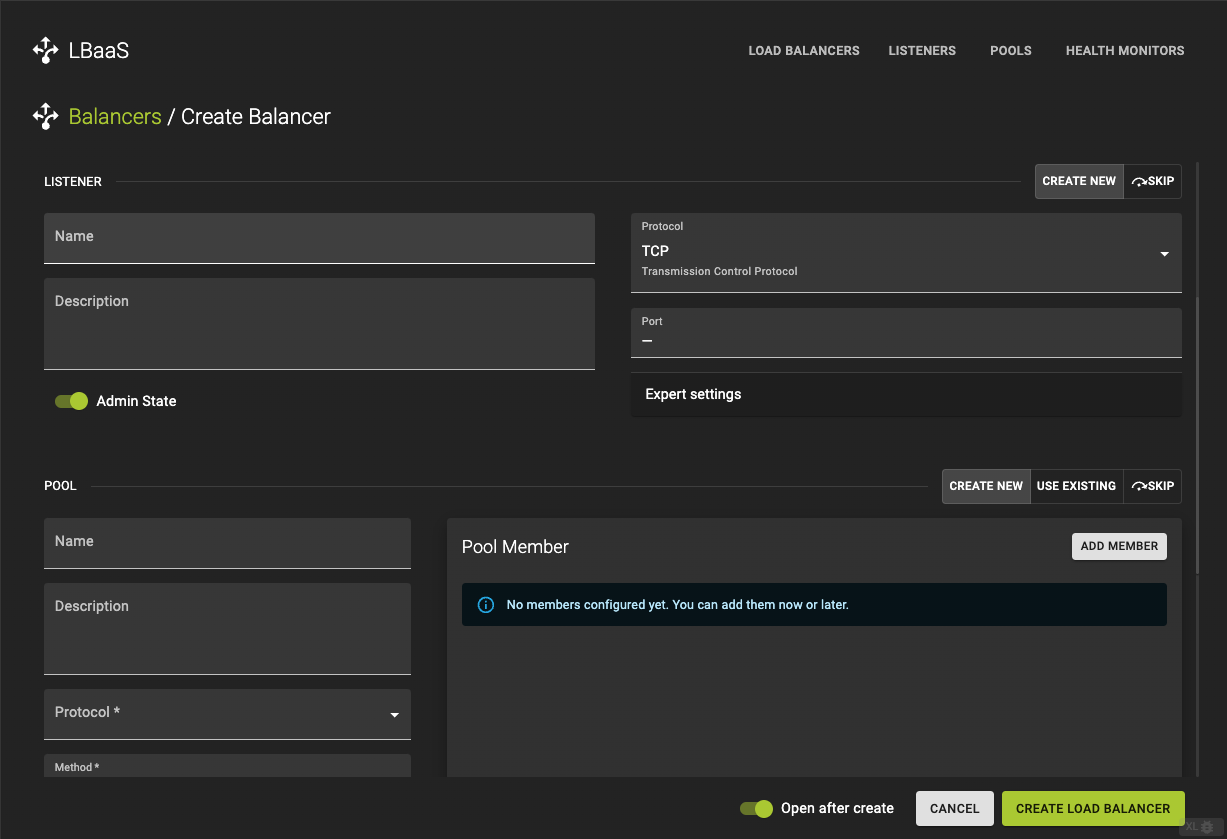
-
Client Data Timeout -
TCP Inspection Timeout -
Member Connection Timeout -
Member Data Timeout -
Connection Limit
If you choose HTTP as protocol you also have the option to define Insert Headers such as
-
X-Forwarded-For -
X-Forwarded-Port -
X-Forwarded-Porto
Pool Configurations
Configures the pool which contains the server Instances which the data requests are distributed to. You can Skip this step or Use Existing pool
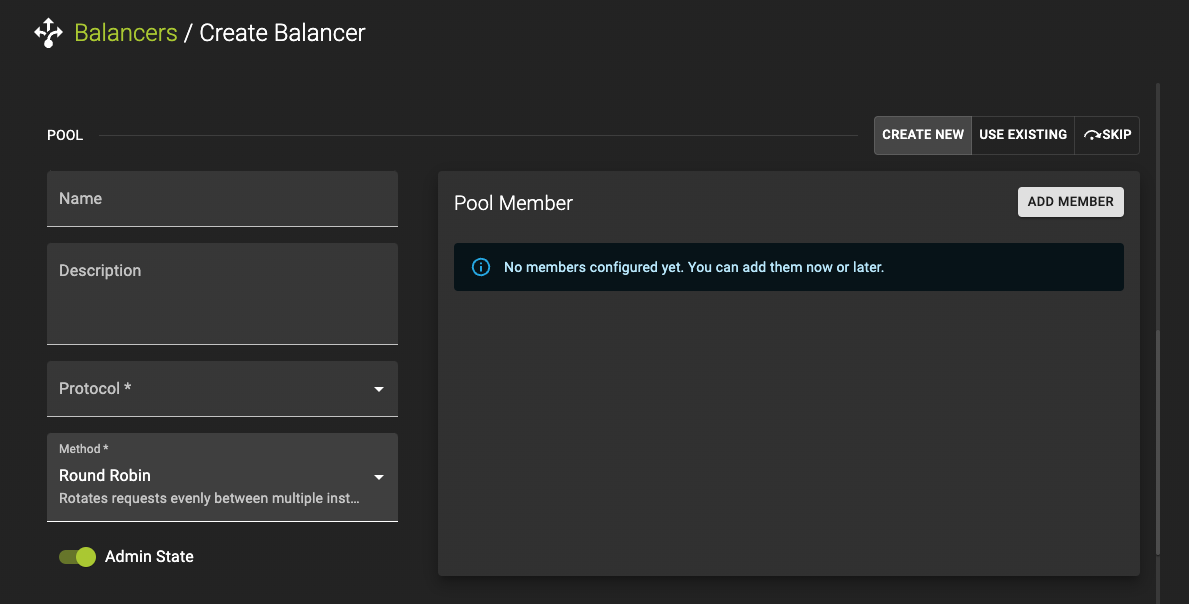
-
Name and describe your Listener (optional).
-
Protocol (required)
- Choose a
Protocol. Options areTCP,HTTPandHTTPs
- Choose a
-
Method (required)
-
Choose a
Methodafter which the Requests are distributed between pool members. Options are: -
Source IP -
Round Robin -
Least Connections
-
Pool Members Configurations
Pool Members are the servers the requests will be balanced between. To add a member to the pool click the Add Member button in the card title.
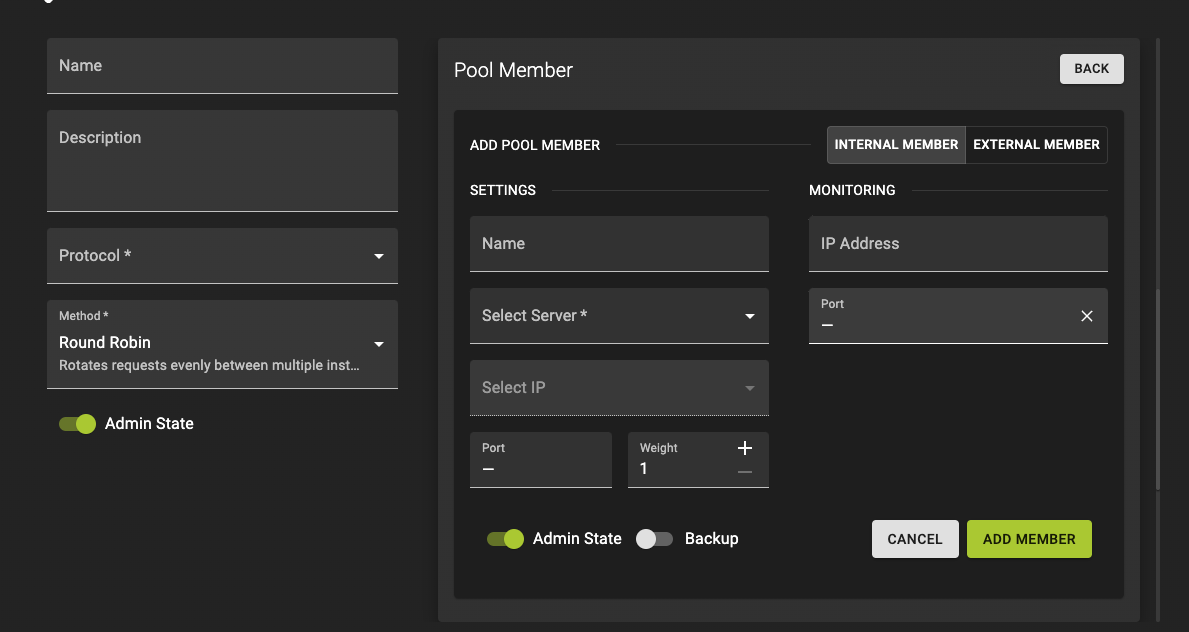
Settings:
-
Name and describe your Listener (optional).
-
Select Server (required)
Select Server: Choose a server from the selector. If you do not have servers configured yet, you can do so here
-
Select Server IP (required)
- Choose a
From Server IPs
- Choose a
-
Select a
port(required) -
Choose
weight: A valid value is from 0 to 256. Default is 1.- The weight of a member determines the portion of requests or connections it services compared to the other members of the pool. A value of 0 means the member does not receive new connections but continues to service existing connections.
Monitoring:
IP Address(Optional): An alternate IP address used for health monitoring a backend member. Default isnullwhich monitors the member address.Port(Optional): An alternate protocol port used for health monitoring a backend member. Default isnullwhich monitors the member protocol_port
Click Add Member button to confirm your configuration.
Health Monitor Configurations
Health monitors define how the load balancer monitors backend servers to determine if they are available to service requests. Health Monitor checks the health of the pool members by a certain type. You can Skip this step.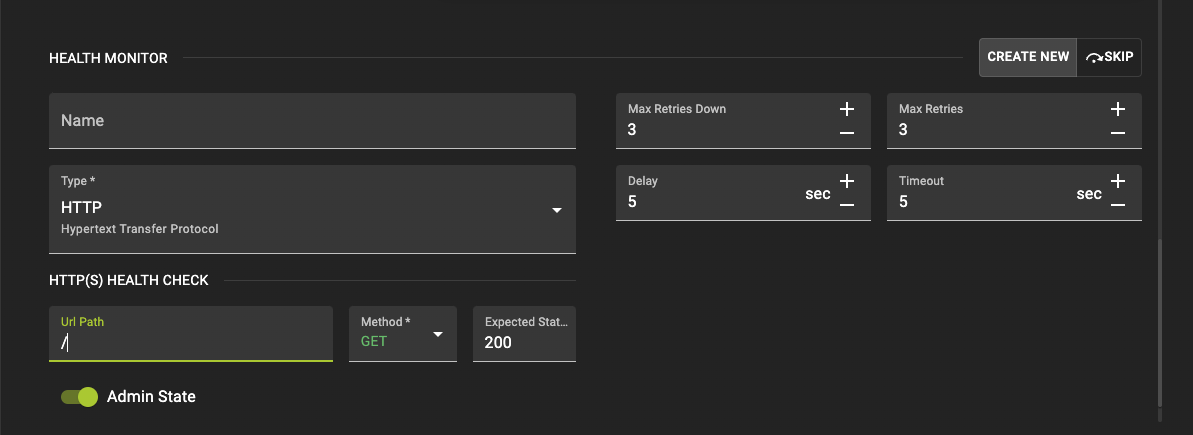
-
Name your Health Monitor (optional).
-
Type(required): Options are:HTTP,HTTPS,PING,TCPandTLS-HELLO.- When choosing
HTTPorHTTPS, you also have the choice of anULR-Path, aMethodand anExpected Statusto get back from the Health Check.
- When choosing
Click Add Load Balancer to trigger the creation of Load Balancer
Creation of Load Balancer with Listener, Pool, Pool Members and Health Monitoring
Usage
openstack loadbalancer create --name <LOADBALANCER_NAME> --vip-subnet-id <SUBNET_ID or SUBNET_NAME> --wait
openstack loadbalancer listener create --name <LISTENER_NAME> --protocol <PROTOCOL> --protocol-port <PORT> --wait <LOADBALANCER_NAME>
openstack loadbalancer pool create --name <POOL_NAME> --lb-algorithm <METHOD> --listener <LISTENER_NAME> --protocol <PROTOCOL> --wait
openstack loadbalancer healthmonitor create --delay <DELAY> --max-retries <MAX_RETRIES> --timeout <TIMEOUT> --type <TYPE> --url-path <URL_PATH> --wait <POOL_NAME>
openstack loadbalancer member create --subnet-id <SUBNET_ID or SUBNET_NAME> --address <ADDRESS> --protocol-port <PORT> --wait <POOL_NAME>
--name: The name you assign to your resources.--vip-subnet-id: The ID of the subnet where the virtual IP (VIP) of the load balancer will be created.--lb-algorithm: The load balancing method used (e.g., ROUND_ROBIN, LEAST_CONNECTIONS, SOURCE_IP).--protocol: The protocol used by the pool members (e.g., HTTP, HTTPS, TCP).--delay: The time in seconds between health checks.--max-retries: The number of failed health checks before a member is marked as unhealthy.--timeout: The maximum time in seconds that a health check is allowed to take.--type: The type of health check (e.g., HTTP, HTTPS, TCP).--url-path: The path that the health monitor will request (only for HTTP/HTTPS monitors).--address: The IP address of the pool member.--protocol-port: The port on which the pool member will accept traffic.--wait: awaits the creation of the prior resource in order to use it for creation of the next one.
Example
openstack loadbalancer create --name lb-02 --vip-subnet-id private-subnet-01 --wait
openstack loadbalancer listener create --name list-02 --protocol HTTP --protocol-port 80 --wait lb-02
openstack loadbalancer pool create --name pl-02 --lb-algorithm ROUND_ROBIN --listener list-02 --protocol HTTP --wait
openstack loadbalancer healthmonitor create --delay 10 --max-retries 3 --timeout 5 --type HTTP --url-path /healthcheck --wait pl-02
openstack loadbalancer member create --subnet-id private-subnet-01 --address 192.0.2.199 --protocol-port 80 --wait pl-02
openstack loadbalancer member create --subnet-id private-subnet-01 --address 192.0.2.241 --protocol-port 80 --wait pl-02
Output
+---------------------+--------------------------------------+
| Field               | Value                                |
+---------------------+--------------------------------------+
| admin_state_up      | True                                 |
| availability_zone   | None                                 |
| created_at          | 2024-08-21T11:50:59                  |
| description         |                                      |
| flavor_id           | None                                 |
| id                  | ac65773e-dc13-4ab3-ab98-dd25f7dd692a |
| listeners           |                                      |
| name                | lb-02                                |
| operating_status    | ONLINE                               |
| pools               |                                      |
| project_id          | 0c12ce74a0084c0b8fef8e15d4a3377d     |
| provider            | amphorav2                            |
| provisioning_status | ACTIVE                               |
| updated_at          | 2024-08-21T11:52:21                  |
| vip_address         | 192.0.2.100                          |
| vip_network_id      | 245a6750-77c5-4701-8df3-4b4ac55295d3 |
| vip_port_id         | 7dc23137-9053-4c80-927c-eec82f01e61e |
| vip_qos_policy_id   | None                                 |
| vip_subnet_id       | a7d7e676-d668-4ec7-8b7d-3c28f68caab3 |
| vip_vnic_type       | normal                               |
| tags                |                                      |
| additional_vips     |                                      |
+---------------------+--------------------------------------+

+-----------------------------+--------------------------------------+
| Field                       | Value                                |
+-----------------------------+--------------------------------------+
| admin_state_up              | True                                 |
| connection_limit            | -1                                   |
| created_at                  | 2024-08-21T11:52:24                  |
| default_pool_id             | None                                 |
| default_tls_container_ref   | None                                 |
| description                 |                                      |
| id                          | 3e54033a-9a7e-4485-a93c-06d3770aed89 |
| insert_headers              | None                                 |
| l7policies                  |                                      |
| loadbalancers               | ac65773e-dc13-4ab3-ab98-dd25f7dd692a |
| name                        | list-02                              |
| operating_status            | OFFLINE                              |
| project_id                  | 0c12ce74a0084c0b8fef8e15d4a3377d     |
| protocol                    | HTTP                                 |
| protocol_port               | 80                                   |
| provisioning_status         | ACTIVE                               |
| sni_container_refs          | []                                   |
| timeout_client_data         | 50000                                |
| timeout_member_connect      | 5000                                 |
| timeout_member_data         | 50000                                |
| timeout_tcp_inspect         | 0                                    |
| updated_at                  | 2024-08-21T11:52:27                  |
| client_ca_tls_container_ref | None                                 |
| client_authentication       | NONE                                 |
| client_crl_container_ref    | None                                 |
| allowed_cidrs               | None                                 |
| tls_ciphers                 | None                                 |
| tls_versions                | None                                 |
| alpn_protocols              | None                                 |
| tags                        |                                      |
| hsts_max_age                |                                      |
| hsts_include_subdomains     |                                      |
| hsts_preload                |                                      |
+-----------------------------+--------------------------------------+

+----------------------+--------------------------------------+
| Field                | Value                                |
+----------------------+--------------------------------------+
| admin_state_up       | True                                 |
| created_at           | 2024-08-21T11:52:28                  |
| description          |                                      |
| healthmonitor_id     |                                      |
| id                   | 96baea90-9655-4c83-829e-9ce4603af087 |
| lb_algorithm         | ROUND_ROBIN                          |
| listeners            | 3e54033a-9a7e-4485-a93c-06d3770aed89 |
| loadbalancers        | ac65773e-dc13-4ab3-ab98-dd25f7dd692a |
| members              |                                      |
| name                 | pl-02                                |
| operating_status     | ONLINE                               |
| project_id           | 0c12ce74a0084c0b8fef8e15d4a3377d     |
| protocol             | HTTP                                 |
| provisioning_status  | ACTIVE                               |
| session_persistence  | None                                 |
| updated_at           | 2024-08-21T11:52:30                  |
| tls_container_ref    | None                                 |
| ca_tls_container_ref | None                                 |
| crl_container_ref    | None                                 |
| tls_enabled          | False                                |
| tls_ciphers          | None                                 |
| tls_versions         | None                                 |
| tags                 |                                      |
| alpn_protocols       | None                                 |
+----------------------+--------------------------------------+

+---------------------+--------------------------------------+
| Field               | Value                                |
+---------------------+--------------------------------------+
| project_id          | 0c12ce74a0084c0b8fef8e15d4a3377d     |
| name                |                                      |
| admin_state_up      | True                                 |
| pools               | 96baea90-9655-4c83-829e-9ce4603af087 |
| created_at          | 2024-08-21T11:52:33                  |
| provisioning_status | ACTIVE                               |
| updated_at          | 2024-08-21T11:52:34                  |
| delay               | 10                                   |
| expected_codes      | 200                                  |
| max_retries         | 3                                    |
| http_method         | GET                                  |
| timeout             | 5                                    |
| max_retries_down    | 3                                    |
| url_path            | /healthcheck                         |
| type                | HTTP                                 |
| id                  | 822d63f0-eac5-4703-a914-0a9d9dd951b1 |
| operating_status    | ONLINE                               |
| http_version        | None                                 |
| domain_name         | None                                 |
| tags                |                                      |
+---------------------+--------------------------------------+

+---------------------+--------------------------------------+
| Field               | Value                                |
+---------------------+--------------------------------------+
| address             | 192.0.2.199                          |
| admin_state_up      | True                                 |
| created_at          | 2024-08-21T11:52:39                  |
| id                  | 7d29fa9d-e6f6-4f99-97ed-8463f4f0ae87 |
| name                |                                      |
| operating_status    | ONLINE                               |
| project_id          | 0c12ce74a0084c0b8fef8e15d4a3377d     |
| protocol_port       | 80                                   |
| provisioning_status | ACTIVE                               |
| subnet_id           | a7d7e676-d668-4ec7-8b7d-3c28f68caab3 |
| updated_at          | 2024-08-21T11:52:41                  |
| weight              | 1                                    |
| monitor_port        | None                                 |
| monitor_address     | None                                 |
| backup              | False                                |
| tags                |                                      |
+---------------------+--------------------------------------+

+---------------------+--------------------------------------+
| Field               | Value                                |
+---------------------+--------------------------------------+
| address             | 192.0.2.241                          |
| admin_state_up      | True                                 |
| created_at          | 2024-08-21T11:52:44                  |
| id                  | 7588e444-8c1a-4e95-a10c-7069fa5df27c |
| name                |                                      |
| operating_status    | ONLINE                               |
| project_id          | 0c12ce74a0084c0b8fef8e15d4a3377d     |
| protocol_port       | 80                                   |
| provisioning_status | ACTIVE                               |
| subnet_id           | a7d7e676-d668-4ec7-8b7d-3c28f68caab3 |
| updated_at          | 2024-08-21T11:52:47                  |
| weight              | 1                                    |
| monitor_port        | None                                 |
| monitor_address     | None                                 |
| backup              | False                                |
| tags                |                                      |
+---------------------+--------------------------------------+
Single Load Balancer Creation
Usage
openstack loadbalancer create --name my_loadbalancer --vip-subnet-id <SUBNET_ID>
Example
openstack loadbalancer create --name example-loadbalancer --vip-subnet-id a7d7e676-d668-4ec7-8b7d-3c28f68caab3
Output
openstack loadbalancer show example-loadbalancer

+---------------------+--------------------------------------+
| Field               | Value                                |
+---------------------+--------------------------------------+
| admin_state_up      | True                                 |
| availability_zone   | None                                 |
| created_at          | 2024-08-21T08:23:05                  |
| description         |                                      |
| flavor_id           | None                                 |
| id                  | 4f7bb7f1-ba9b-4eee-b403-fd0024cb2f76 |
| listeners           |                                      |
| name                | example-loadbalancer                 |
| operating_status    | ONLINE                               |
| pools               |                                      |
| project_id          | 0c12ce74a0084c0b8fef8e15d4a3377d     |
| provider            | amphorav2                            |
| provisioning_status | ACTIVE                               |
| updated_at          | 2024-08-21T08:24:27                  |
| vip_address         | 192.0.2.157                          |
| vip_network_id      | 245a6750-77c5-4701-8df3-4b4ac55295d3 |
| vip_port_id         | 9242b952-30fd-48f9-bbda-9424b22c516d |
| vip_qos_policy_id   | None                                 |
| vip_subnet_id       | a7d7e676-d668-4ec7-8b7d-3c28f68caab3 |
| vip_vnic_type       | normal                               |
| tags                |                                      |
| additional_vips     |                                      |
+---------------------+--------------------------------------+
Example: Create complete Load Balancer
# versions.tf

terraform {
  required_version = ">= 0.14"
  required_providers {
    openstack = {
      source = "terraform-provider-openstack/openstack"
      version = ">= 2.0.0"
    }
  }
}

# vars.tf

variable "ssh_publickey" {
  type        = string
  description = "ssh-rsa public key in authorized_keys format (ssh-rsa AAAAB3Nz [...] ABAAACAC62Lw== user@host)"
}

# main.tf

data "openstack_images_image_v2" "image" {
  most_recent = true

  visibility = "public"
  properties = {
    os_distro  = "ubuntu"
    os_version = "24.04"
  }
}

data "openstack_networking_network_v2" "ext-net" {
  name = "ext-net"
}

resource "openstack_compute_keypair_v2" "keypair" {
  name       = "keypair"
  public_key = var.ssh_publickey
}

resource "openstack_networking_secgroup_v2" "sg_ssh" {
  name        = "sg_ssh"
  description = "Allow inbound SSH"
}

resource "openstack_networking_secgroup_rule_v2" "ssh" {
  direction         = "ingress"
  ethertype         = "IPv4"
  protocol          = "tcp"
  port_range_min    = 22
  port_range_max    = 22
  remote_ip_prefix  = "0.0.0.0/0"
  security_group_id = openstack_networking_secgroup_v2.sg_ssh.id
}

resource "openstack_networking_secgroup_v2" "sg_web" {
  name        = "sg_web"
  description = "Allow inbound HTTP"
}

resource "openstack_networking_secgroup_rule_v2" "http" {
  direction         = "ingress"
  ethertype         = "IPv4"
  protocol          = "tcp"
  port_range_min    = 80
  port_range_max    = 80
  remote_ip_prefix  = "0.0.0.0/0"
  security_group_id = openstack_networking_secgroup_v2.sg_web.id
}

resource "openstack_networking_network_v2" "net_lbdemo" {
  name           = "net_lbdemo"
  admin_state_up = "true"
}

resource "openstack_networking_subnet_v2" "subnet_lbdemo" {
  name            = "subnet_lbdemo"
  network_id      = openstack_networking_network_v2.net_lbdemo.id
  cidr            = "192.168.1.0/24"
  dns_nameservers = ["37.123.105.116", "37.123.105.117"]
  ip_version      = 4
}

resource "openstack_networking_router_v2" "router_lbdemo" {
  name                = "router_lbdemo"
  admin_state_up      = true
  external_network_id = data.openstack_networking_network_v2.ext-net.id
}

resource "openstack_networking_router_interface_v2" "routerint_lbdemo" {
  router_id = openstack_networking_router_v2.router_lbdemo.id
  subnet_id = openstack_networking_subnet_v2.subnet_lbdemo.id
}

resource "openstack_compute_instance_v2" "instance_lbdemo" {
  count       = 3
  name        = "App Instance ${count.index + 1}"
  image_id    = data.openstack_images_image_v2.image.id
  flavor_name = "m1.tiny"
  key_pair    = openstack_compute_keypair_v2.keypair.name
  user_data   = templatefile("${path.module}/assets/cloud.cfg", { init_app_sh = base64encode(file("${path.module}/assets/init-app.sh")) })

  security_groups = [
    "default",
    openstack_networking_secgroup_v2.sg_web.name,
  ]

  network {
    uuid = openstack_networking_network_v2.net_lbdemo.id
  }

  lifecycle {
    ignore_changes = [image_id]
  }
}

resource "openstack_compute_instance_v2" "instance_jumphost" {
  name        = "Jumphost"
  image_id    = data.openstack_images_image_v2.image.id
  flavor_name = "m1.tiny"
  key_pair    = openstack_compute_keypair_v2.keypair.name

  security_groups = [
    "default",
    openstack_networking_secgroup_v2.sg_ssh.name,
  ]

  network {
    uuid = openstack_networking_network_v2.net_lbdemo.id
  }

  lifecycle {
    ignore_changes = [image_id]
  }
}

resource "openstack_networking_floatingip_v2" "fip_lbdemo_jumphost" {
  pool = "ext-net"
}

data "openstack_networking_port_v2" "port_jumphost" {
  device_id  = openstack_compute_instance_v2.instance_jumphost.id
  network_id = openstack_compute_instance_v2.instance_jumphost.network[0].uuid
}

resource "openstack_networking_floatingip_associate_v2" "fipas_lbdemo" {
  floating_ip = openstack_networking_floatingip_v2.fip_lbdemo_jumphost.address
  port_id     = data.openstack_networking_port_v2.port_jumphost.id
}

resource "openstack_lb_loadbalancer_v2" "lb_app" {
  vip_subnet_id = openstack_networking_subnet_v2.subnet_lbdemo.id
  name          = "application loadbalancer"
}

resource "openstack_lb_listener_v2" "lb_app_listener" {
  protocol        = "HTTP"
  protocol_port   = 80
  loadbalancer_id = openstack_lb_loadbalancer_v2.lb_app.id
  allowed_cidrs   = ["0.0.0.0/0"]
  insert_headers = {
    X-Forwarded-For  = "true"
    X-Forwarded-Port = "true"
  }
}

resource "openstack_lb_pool_v2" "lb_app_pool" {
  protocol    = "HTTP"
  lb_method   = "ROUND_ROBIN"
  listener_id = openstack_lb_listener_v2.lb_app_listener.id
}

resource "openstack_lb_member_v2" "lb_app_pool_members" {
  count = length(openstack_compute_instance_v2.instance_lbdemo)
  address = element(
    openstack_compute_instance_v2.instance_lbdemo.*.access_ip_v4,
    count.index,
  )
  protocol_port = 80
  pool_id       = openstack_lb_pool_v2.lb_app_pool.id
  name = element(
    openstack_compute_instance_v2.instance_lbdemo.*.name,
    count.index,
  )
  subnet_id = openstack_networking_subnet_v2.subnet_lbdemo.id
}

resource "openstack_lb_monitor_v2" "lb_app_monitor" {
  pool_id        = openstack_lb_pool_v2.lb_app_pool.id
  type           = "HTTP"
  delay          = 10
  timeout        = 5
  max_retries    = 2
  url_path       = "/"
  expected_codes = 200
}

resource "openstack_networking_floatingip_v2" "fip_lbdemo_lb" {
  pool = "ext-net"
}

resource "openstack_networking_floatingip_associate_v2" "fipas_lbdemo_lb" {
  floating_ip = openstack_networking_floatingip_v2.fip_lbdemo_lb.address
  port_id     = openstack_lb_loadbalancer_v2.lb_app.vip_port_id
}

output "loadbalancer_http" {
  value = "http://${openstack_networking_floatingip_v2.fip_lbdemo_lb.address}"
}
The complete example, including the cloud-init assets for the app instances, is available in our terraform-examples repository.
Update Load Balancer
To update a load balancer go to detail view by clicking the in the Load Balancer list or card view.
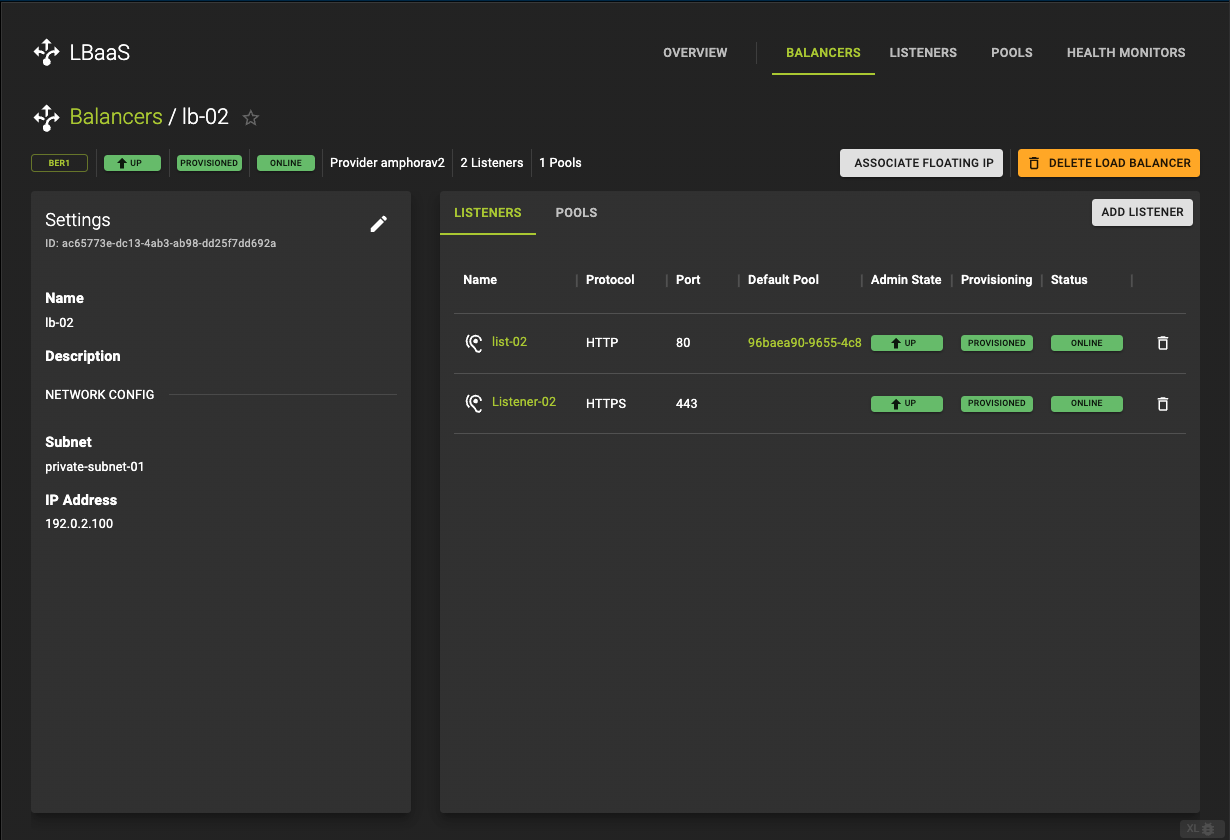 In the detail view you find basic information in the
 settings card and information about Listeners and Pools under the Listener and Pools tabs in the resource card.
Settings Card
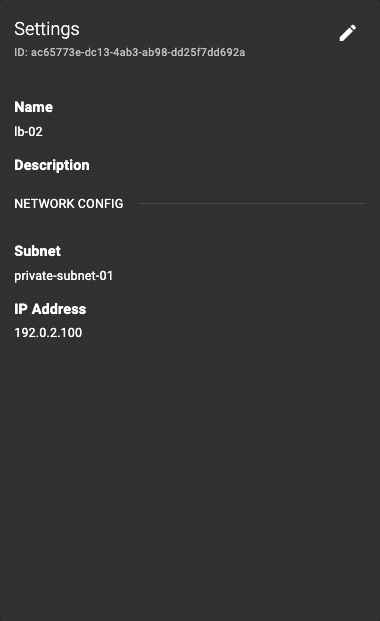
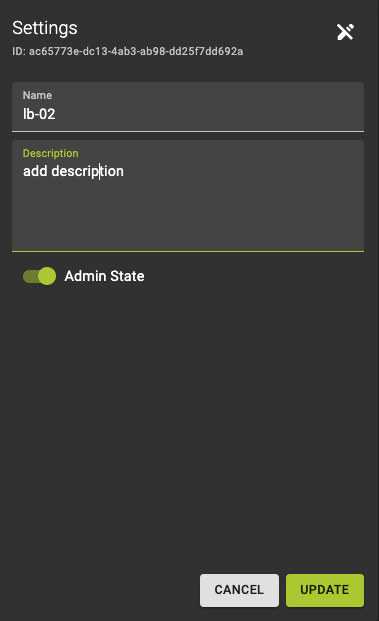 Enter edit mode by clicking the button.
Now you are able to change the
Name and Description of your load balancer as well as toggle the admin state
Confirm changes by clicking Update
Listeners Tab
The listener directs incoming requests to a pool of backend servers.
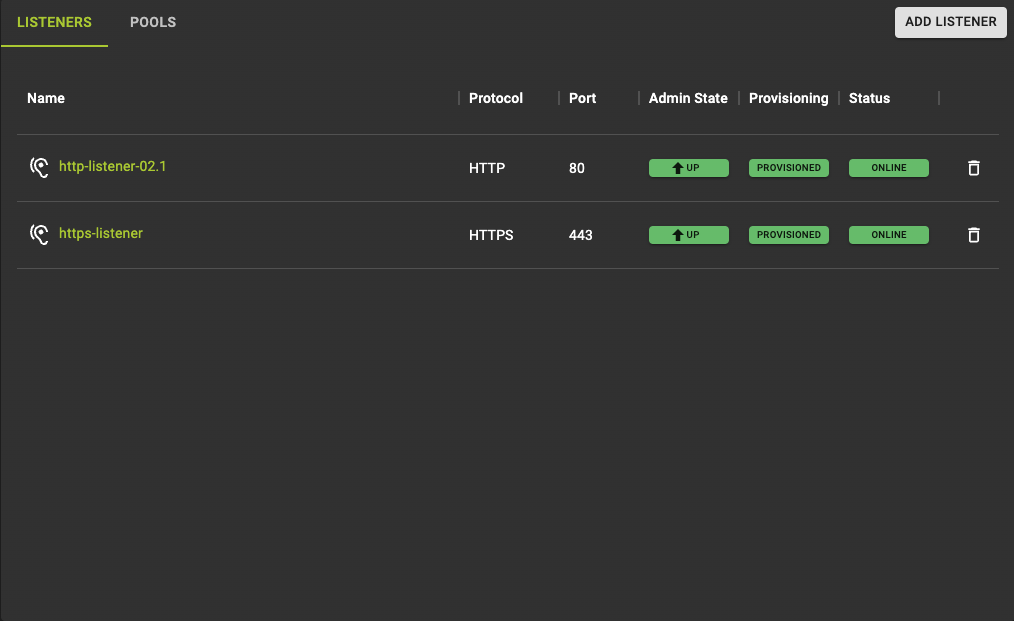 The listeners tab lists all listeners connected to your load balancer. You also find information such as:
- The
protocol, - The
portit is listening on - The
stateit currently is in.
By clicking Add Listener you will reach the listener creation form with the load balancer you are currently editing preselected.
If you click the listener name you reach the listener details view where you can make changes to the listener itself.
To delete your listener, click the icon at the end of each row.
Pools Tab
The pool consists of multiple servers that the load balancer distributes traffic to.
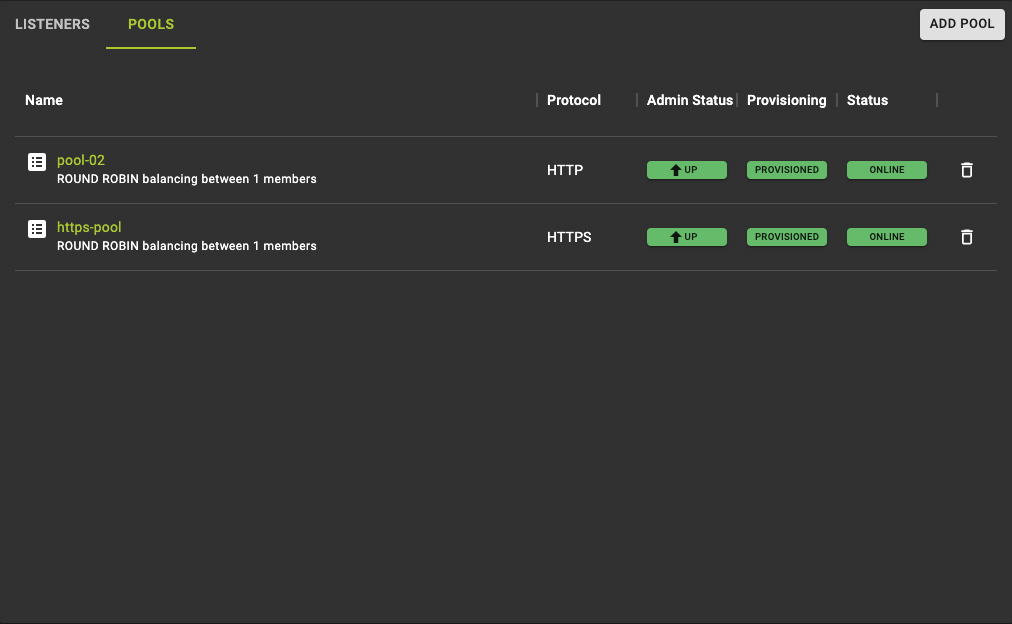 The pools tab lists all pools connected to your load balancer. Each pool is connected to one listener. You also find information such as:
- The
protocol, - The
statethe pool currently is in.
By clicking Add Pool you will reach the pool creation form with the option to either choose a load balancer or to choose a listener if there is a listener without a default pool.
If you click the pool name you reach the pool details view where you can make changes to the pool itself.
To delete your pool click the icon in the end of each row.
You can update the values of the loadbalancer object by adding a --flag with the key name. In the example we change the load balancers name. You could add more than one flag.
Configure CLI Usage
openstack loadbalancer set <LOADBALANCER_ID or LOADBALANCER_NAME> --name <NAME>
Example
+--------------------------------------+-------------+----------------------------------+-------------+---------------------+------------------+-----------+
| id                                   | name        | project_id                       | vip_address | provisioning_status | operating_status | provider  |
+--------------------------------------+-------------+----------------------------------+-------------+---------------------+------------------+-----------+
| 9a444163-db45-426c-ab04-cc006e6374ff | balancer-02 | 0c12ce74a0084c0b8fef8e15d4a3377d | 20.0.0.58   | ACTIVE              | ONLINE           | amphorav2 |
+--------------------------------------+-------------+----------------------------------+-------------+---------------------+------------------+-----------+

openstack loadbalancer set 9a444163-db45-426c-ab04-cc006e6374ff --name balancer-02_updated
Output
openstack loadbalancer list

+--------------------------------------+---------------------+----------------------------------+-------------+---------------------+------------------+-----------+
| id                                   | name                | project_id                       | vip_address | provisioning_status | operating_status | provider  |
+--------------------------------------+---------------------+----------------------------------+-------------+---------------------+------------------+-----------+
| 9a444163-db45-426c-ab04-cc006e6374ff | balancer-02_updated | 0c12ce74a0084c0b8fef8e15d4a3377d | 20.0.0.58   | ACTIVE              | ONLINE           | amphorav2 |
+--------------------------------------+---------------------+----------------------------------+-------------+---------------------+------------------+-----------+
Example: Update Load Balancer
Modify the terraform files and run
The complete example, including the cloud-init assets for the app instances, is available in our terraform-examples repository.
Delete Load Balancer
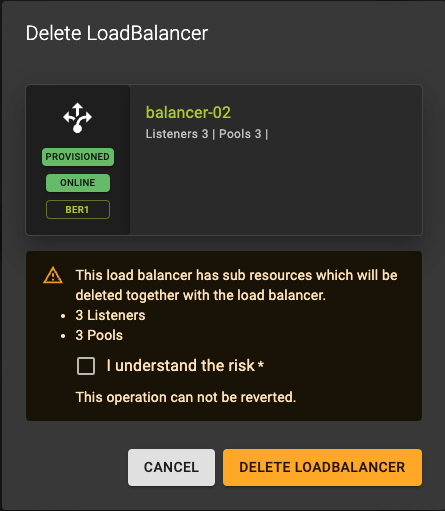
You can delete a Load Balancers in two ways:
- From the list view click the icon.
- From the details view click the DELETE option at the top of the page.
Check the checkbox and click Delete Loadbalancer
Usage
openstack loadbalancer delete <LOADBALANCER_ID or LOADBALANCER_NAME>
Example
openstack loadbalancer list

+--------------------------------------+-------------+----------------------------------+-------------+---------------------+------------------+-----------+
| id                                   | name        | project_id                       | vip_address | provisioning_status | operating_status | provider  |
+--------------------------------------+-------------+----------------------------------+-------------+---------------------+------------------+-----------+
| 9f9102c6-9506-4c77-9fd3-82abbffe654d | balancer-01 | 0c12ce74a0084c0b8fef8e15d4a3377d | 192.0.2.54  | ACTIVE              | ONLINE           | amphorav2 |
| 9a444163-db45-426c-ab04-cc006e6374ff | balancer-02 | 0c12ce74a0084c0b8fef8e15d4a3377d | 20.0.0.58   | ACTIVE              | ONLINE           | amphorav2 |
| a2080e5f-f393-4cc9-95ba-e859bbb1c8e5 | balancer-03 | 0c12ce74a0084c0b8fef8e15d4a3377d | 20.0.0.170  | ACTIVE              | ONLINE           | amphorav2 |
| 3fa3312f-b07b-4b32-a407-d85cb48fd94c | balancer-04 | 0c12ce74a0084c0b8fef8e15d4a3377d | 100.0.0.11  | ACTIVE              | ONLINE           | amphorav2 |
+--------------------------------------+-------------+----------------------------------+-------------+---------------------+------------------+-----------+

openstack loadbalancer delete a2080e5f-f393-4cc9-95ba-e859bbb1c8e5
Output
openstack loadbalancer list

+--------------------------------------+-------------+----------------------------------+-------------+---------------------+------------------+-----------+
| id                                   | name        | project_id                       | vip_address | provisioning_status | operating_status | provider  |
+--------------------------------------+-------------+----------------------------------+-------------+---------------------+------------------+-----------+
| 9f9102c6-9506-4c77-9fd3-82abbffe654d | balancer-01 | 0c12ce74a0084c0b8fef8e15d4a3377d | 192.0.2.54  | ACTIVE              | ONLINE           | amphorav2 |
| 9a444163-db45-426c-ab04-cc006e6374ff | balancer-02 | 0c12ce74a0084c0b8fef8e15d4a3377d | 20.0.0.58   | ACTIVE              | ONLINE           | amphorav2 |
| 3fa3312f-b07b-4b32-a407-d85cb48fd94c | balancer-04 | 0c12ce74a0084c0b8fef8e15d4a3377d | 100.0.0.11  | ACTIVE              | ONLINE           | amphorav2 |
+--------------------------------------+-------------+----------------------------------+-------------+---------------------+------------------+-----------+
Example: Delete complete Load Balancer
The complete example, including the cloud-init assets for the app instances, is available in our terraform-examples repository.
Manage Listeners
List Listeners
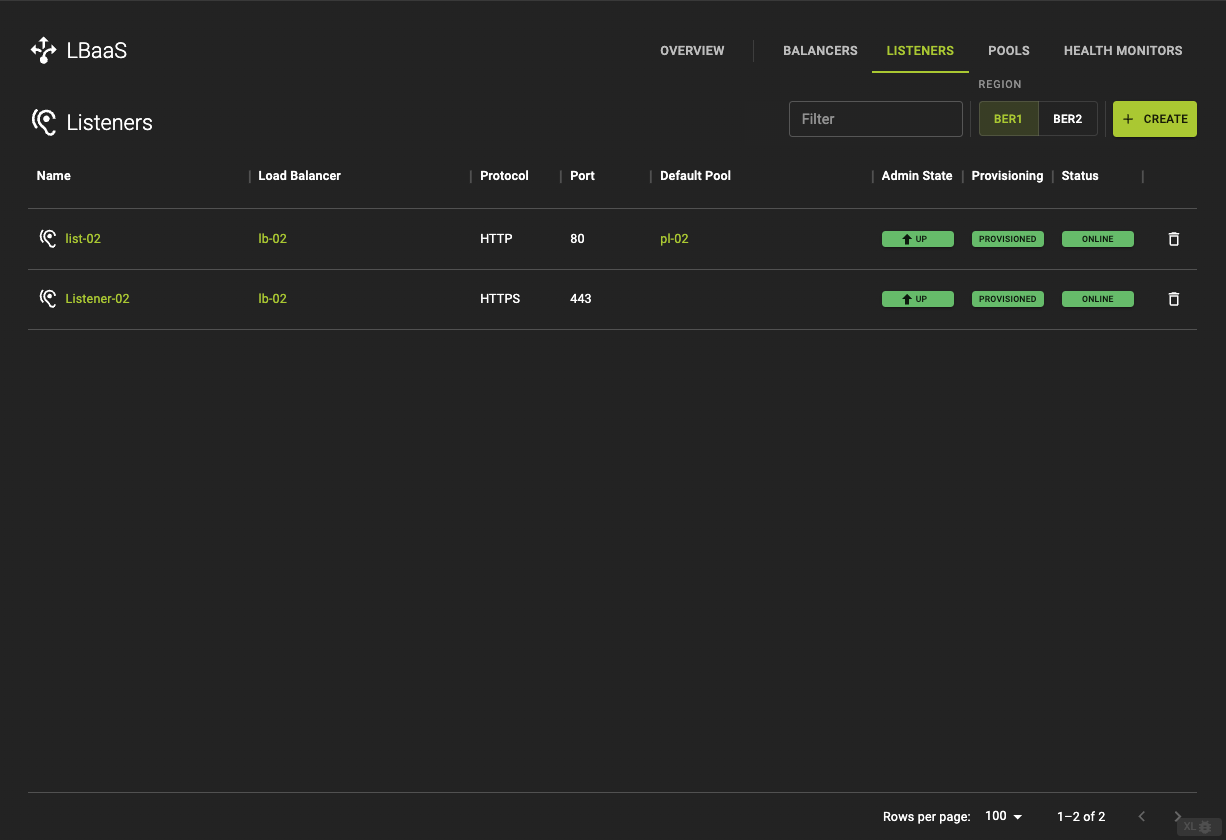 The get a list of all listeners click the LISTENERS in the title bar
Configure CLI Usage
openstack loadbalancer list
Output
+--------------------------------------+-------------+----------------------------------+-------------+---------------------+------------------+-----------+
| id                                   | name        | project_id                       | vip_address | provisioning_status | operating_status | provider  |
+--------------------------------------+-------------+----------------------------------+-------------+---------------------+------------------+-----------+
| 9f9102c6-9506-4c77-9fd3-82abbffe654d | balancer-01 | 0c12ce74a0084c0b8fef8e15d4a3377d | 192.0.2.54  | ACTIVE              | ONLINE           | amphorav2 |
| 9a444163-db45-426c-ab04-cc006e6374ff | balancer-02 | 0c12ce74a0084c0b8fef8e15d4a3377d | 20.0.0.58   | ACTIVE              | ONLINE           | amphorav2 |
+--------------------------------------+-------------+----------------------------------+-------------+---------------------+------------------+-----------+
The complete example, including the cloud-init assets for the app instances, is available in our terraform-examples repository.
Create Listener
A listener is a configuration that specifies the protocol and port on which the load balancer will listen for incoming requests. For instance, you can create a listener that listens on port 80 for HTTP traffic or on port 443 for HTTPS traffic. The listener is responsible for receiving traffic and passing it to the appropriate backend pool based on the load balancing rules.
To create a Listener navigate to the Listeners tab and click the Create button in the titlebar.
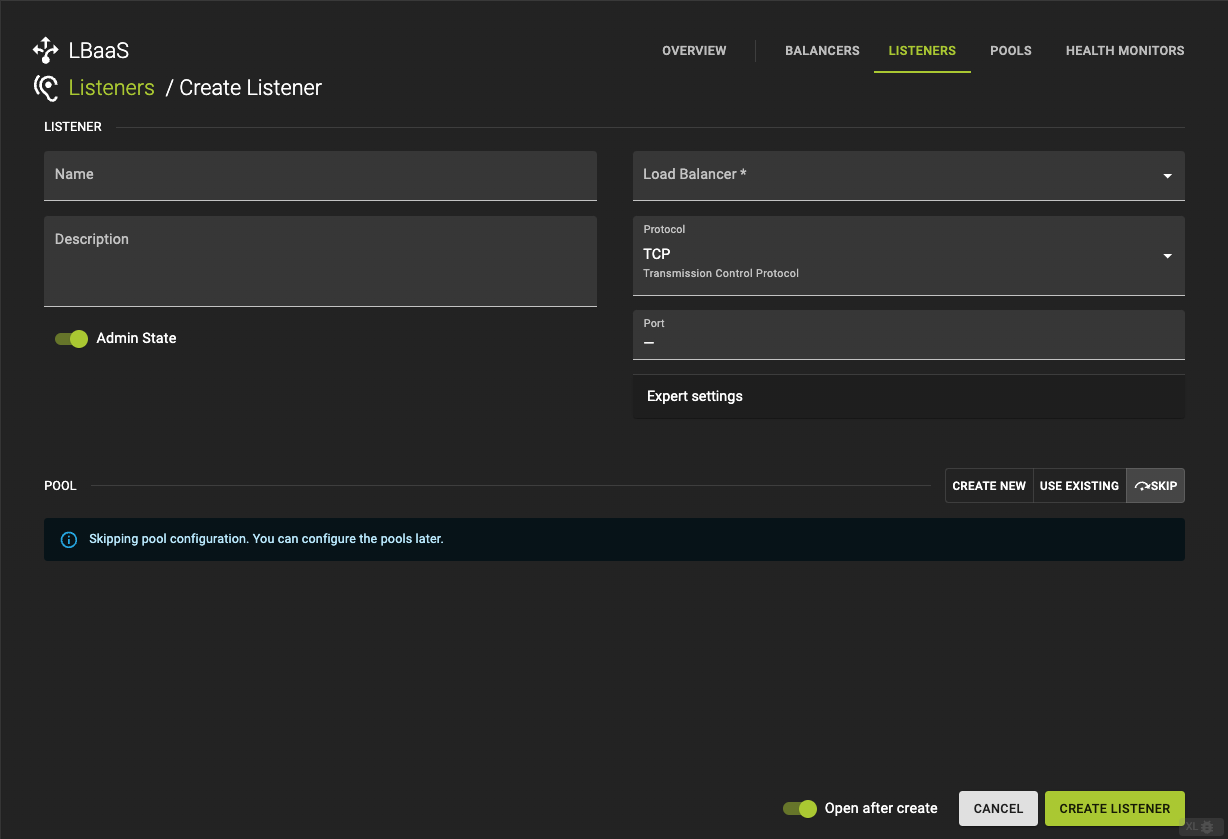
-
Name and describe your Listener (optional).
-
Protocol (required)
- Choose a
Protocol. Options areTCP,HTTPandHTTPs
- Choose a
-
Port (required)
- Define a
Port
- Define a
Expert Settings
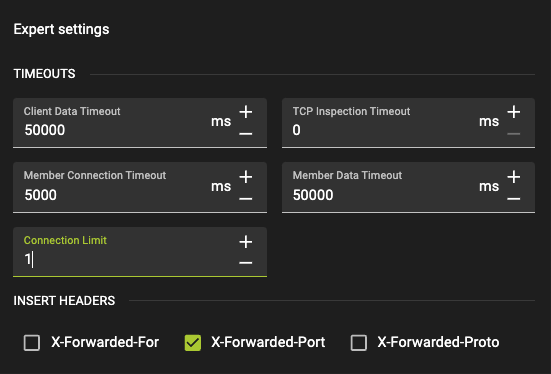
-
Client Data Timeout -
TCP Inspection Timeout -
Member Connection Timeout -
Member Data Timeout -
Connection Limit
If you choose HTTP or HTTPs as protocols you also have the option to define Insert Headers such as
-
X-Forwarded-For -
X-Forwarded-Port -
X-Forwarded-Porto
Skip the next steps by clicking Skip in order to only create a Listener.
Click Create Listener to trigger the creation of a Listener
Configure CLI Usage
openstack loadbalancer listener create --name <LISTENER_NAME> --protocol <PROTOCOL> --protocol-port 80 <LOADBALANCER_NAME or LOADBALANCER_ID>
--name: The name of the listener.--protocol: The protocol used by the listener (e.g., HTTP, HTTPS, TCP).--protocol-port: The port on which the listener will accept traffic.--loadbalancer: The name or ID of the load balancer to which this listener will be attached.
Example
openstack loadbalancer listener create --name example-listener --protocol HTTP --protocol-port 80 example-lb
Output
openstack loadbalancer listener show example-listener

+-----------------------------+--------------------------------------+
| Field                       | Value                                |
+-----------------------------+--------------------------------------+
| admin_state_up              | True                                 |
| connection_limit            | -1                                   |
| created_at                  | 2024-08-21T08:08:35                  |
| default_pool_id             | None                                 |
| default_tls_container_ref   | None                                 |
| description                 |                                      |
| id                          | 9257cf12-3a6c-4e2a-a486-ea45a43888c0 |
| insert_headers              | None                                 |
| l7policies                  |                                      |
| loadbalancers               | 3ae8541d-76e7-4b15-aaaa-ef749db5f761 |
| name                        | example-listener                     |
| operating_status            | ONLINE                               |
| project_id                  | 0c12ce74a0084c0b8fef8e15d4a3377d     |
| protocol                    | HTTP                                 |
| protocol_port               | 80                                   |
| provisioning_status         | ACTIVE                               |
| sni_container_refs          | []                                   |
| timeout_client_data         | 50000                                |
| timeout_member_connect      | 5000                                 |
| timeout_member_data         | 50000                                |
| timeout_tcp_inspect         | 0                                    |
| updated_at                  | 2024-08-21T08:08:40                  |
| client_ca_tls_container_ref | None                                 |
| client_authentication       | NONE                                 |
| client_crl_container_ref    | None                                 |
| allowed_cidrs               | None                                 |
| tls_ciphers                 | None                                 |
| tls_versions                | None                                 |
| alpn_protocols              | None                                 |
| tags                        |                                      |
| hsts_max_age                |                                      |
| hsts_include_subdomains     |                                      |
| hsts_preload                |                                      |
+-----------------------------+--------------------------------------+
The complete example, including the cloud-init assets for the app instances, is available in our terraform-examples repository.
Update Listeners
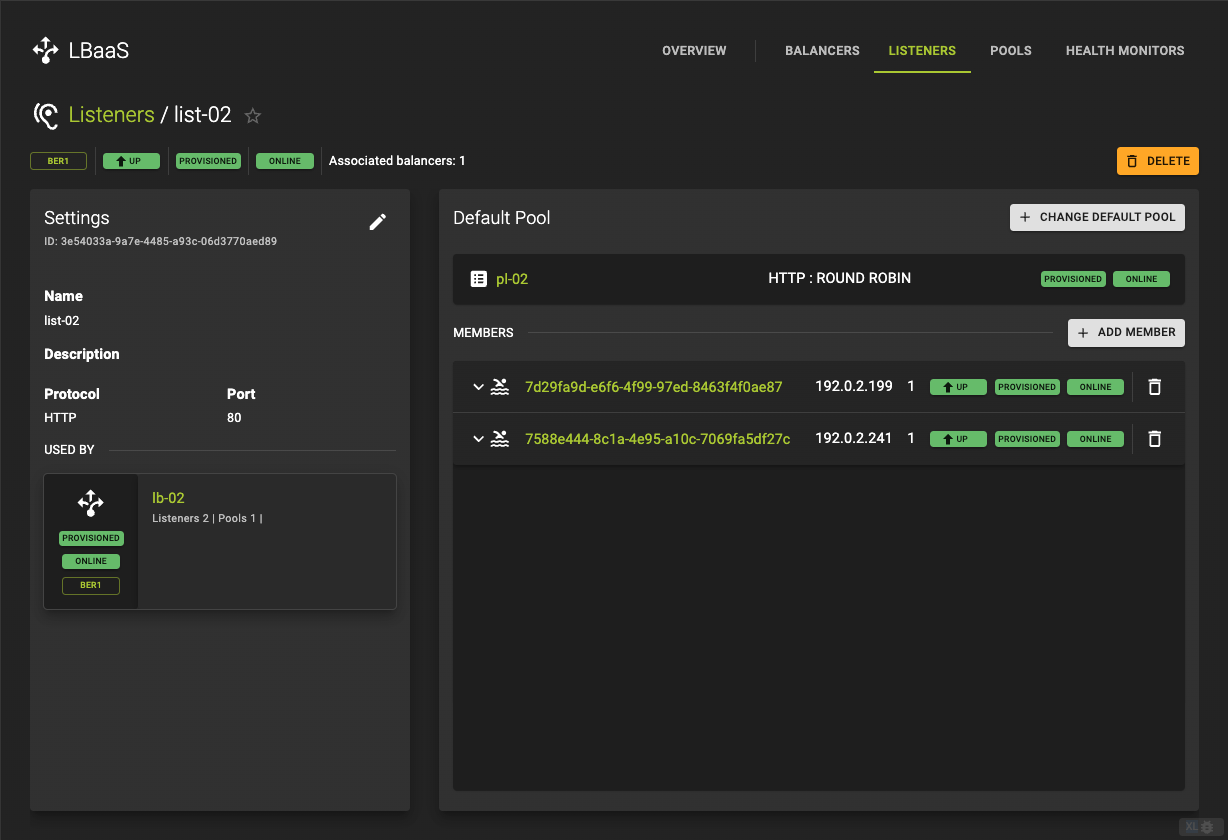 In the listeners detail view you find basic information in the settings card and information about Pools and Pool Members in the
 default pool card.
Settings Card
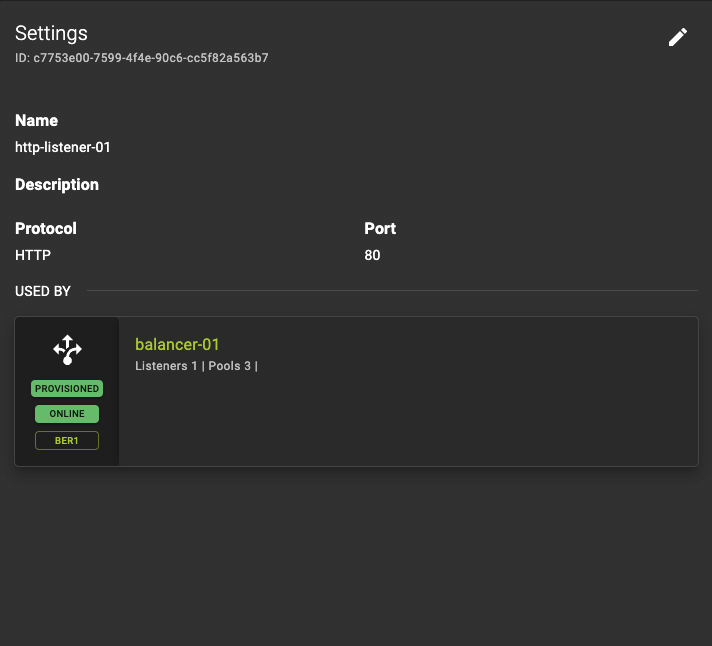
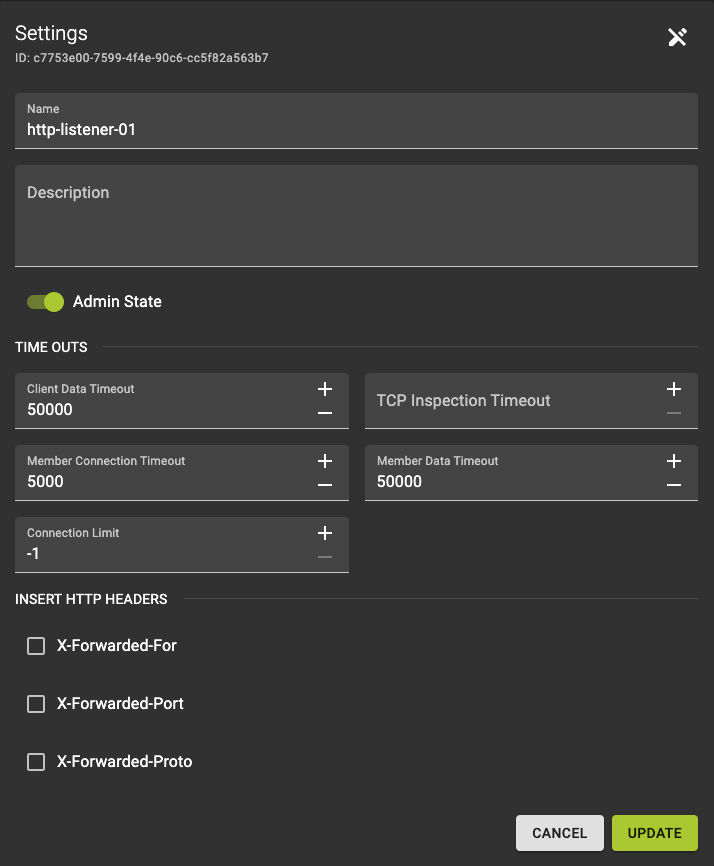 Enter edit mode by clicking the button.
Now you are able to change the
Name and Description of your listener as well as toggle the admin state
Confirm changes by clicking Update
Default Pool Card
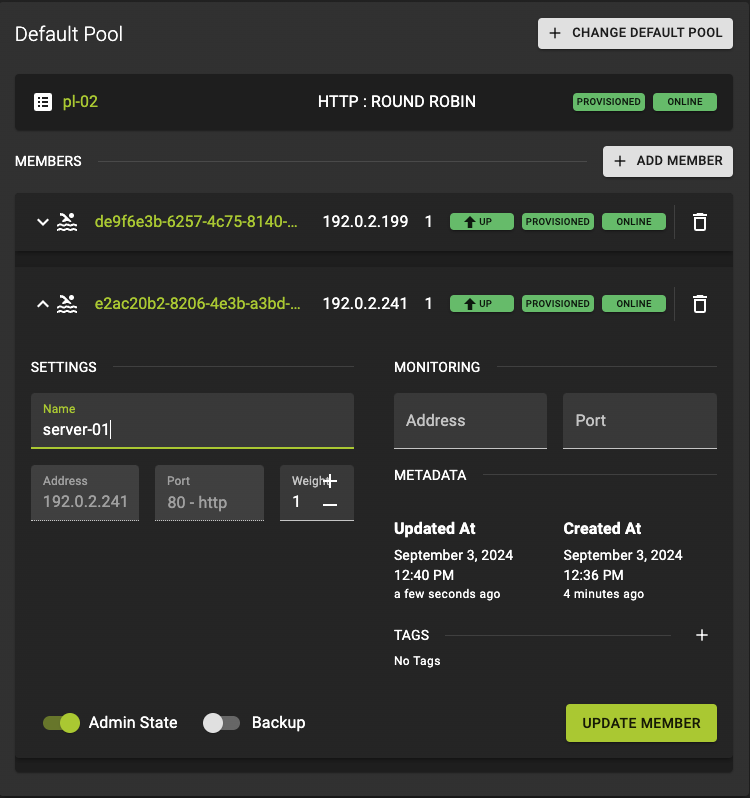 The members row can be extended by clicking it. There you can update:
- The members
name - The
weightthe member should balance compared to other members IP addressandportthe member should be monitored on
Submit your changes by clicking Update Member
Add Pool
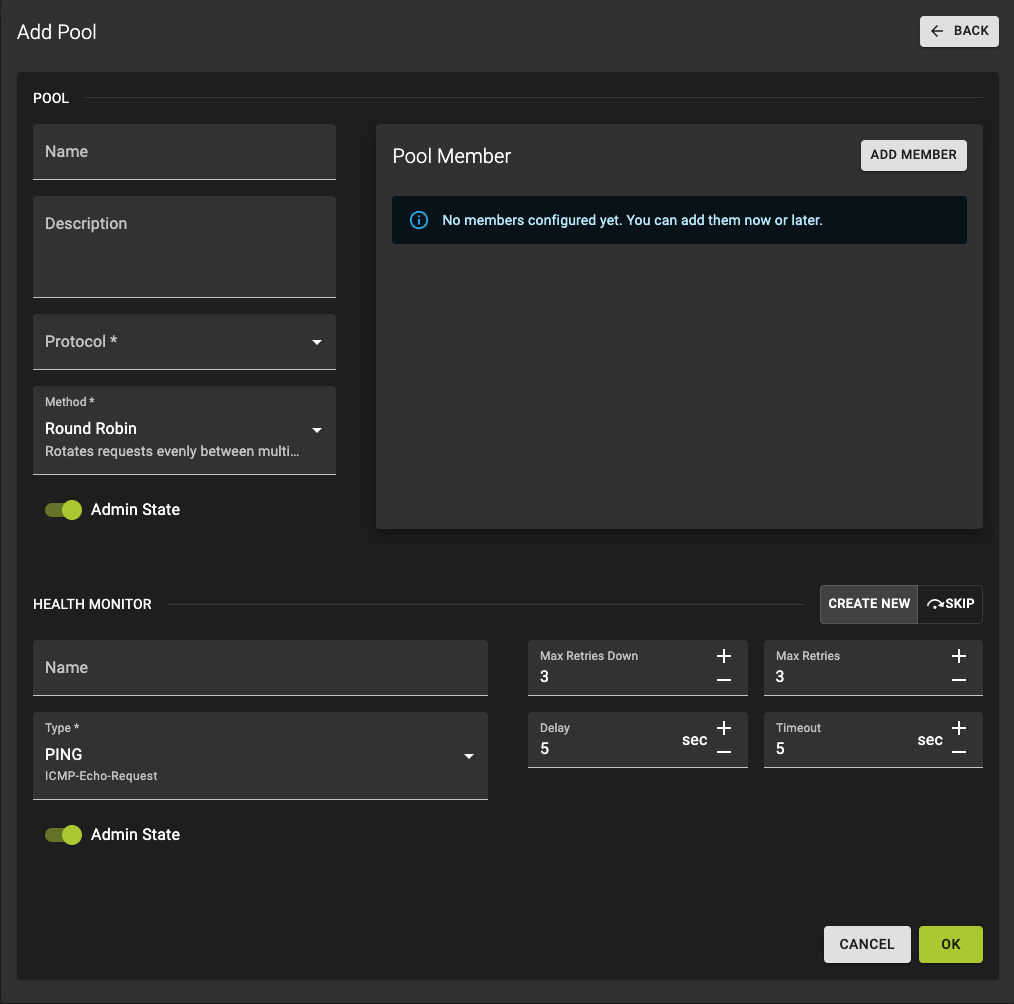
Click the Change Default Pool Button to open the add pool form in the default pool card.
For detailed instructions see how to create a pool
Add Pool Member
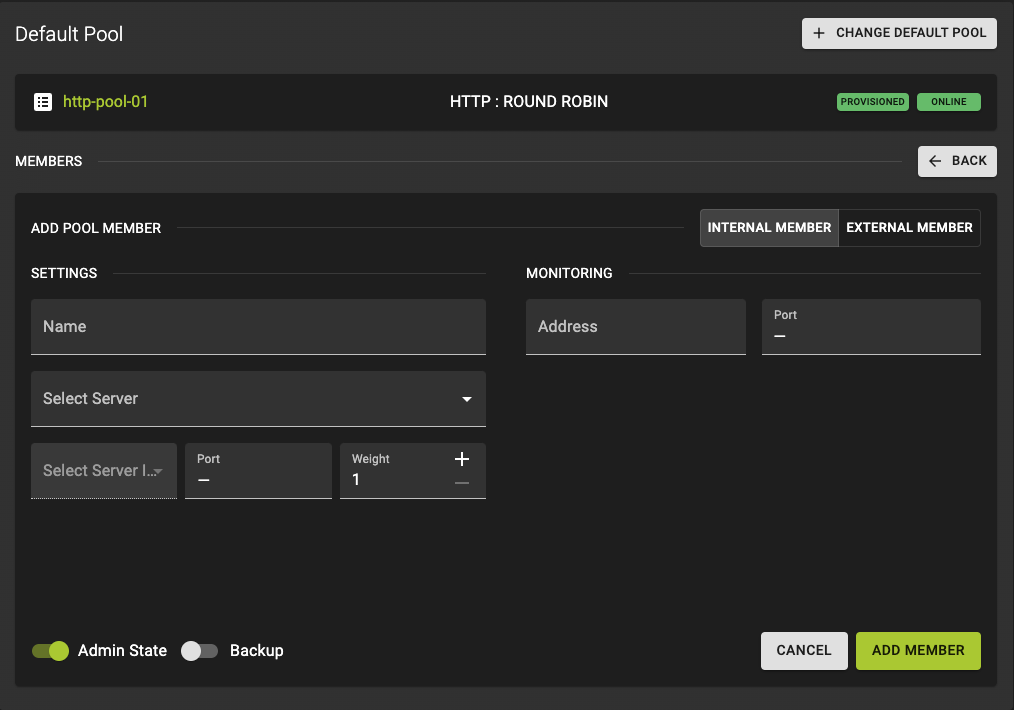 Click the Add Member Button to open the
 add member form in the default pool card.
For detailed instructions see how to create add pool members
You can update the values of the load balancer object by adding a --flag with the key name you would like to update. In the example we change the listeners allowed cidr range. You could add more than one flag.
Usage
openstack loadbalancer listener set <LISTENER_ID or LISTENER_NAME> --allowed-cidr <CIDR>
Example
openstack loadbalancer listener set 4e335933-e84a-4c56-a8f1-7d0bb5c1a7a4 --allowed-cidr 100.0.0.0/24
Output
openstack loadbalancer listener show 4e335933-e84a-4c56-a8f1-7d0bb5c1a7a4

+-----------------------------+--------------------------------------+
| Field                       | Value                                |
+-----------------------------+--------------------------------------+
| admin_state_up              | True                                 |
| connection_limit            | -1                                   |
| created_at                  | 2024-09-03T13:00:33                  |
| default_pool_id             | None                                 |
| default_tls_container_ref   | None                                 |
| description                 |                                      |
| id                          | 4e335933-e84a-4c56-a8f1-7d0bb5c1a7a4 |
| insert_headers              | None                                 |
| l7policies                  |                                      |
| loadbalancers               | 9f9102c6-9506-4c77-9fd3-82abbffe654d |
| name                        |                                      |
| operating_status            | ONLINE                               |
| project_id                  | 0c12ce74a0084c0b8fef8e15d4a3377d     |
| protocol                    | HTTPS                                |
| protocol_port               | 443                                  |
| provisioning_status         | ACTIVE                               |
| sni_container_refs          | []                                   |
| timeout_client_data         | 50000                                |
| timeout_member_connect      | 5000                                 |
| timeout_member_data         | 50000                                |
| timeout_tcp_inspect         | 0                                    |
| updated_at                  | 2024-09-03T13:11:32                  |
| client_ca_tls_container_ref | None                                 |
| client_authentication       | NONE                                 |
| client_crl_container_ref    | None                                 |
| allowed_cidrs               | 100.0.0.0/24                         |
| tls_ciphers                 | None                                 |
| tls_versions                | None                                 |
| alpn_protocols              | None                                 |
| tags                        |                                      |
| hsts_max_age                |                                      |
| hsts_include_subdomains     |                                      |
| hsts_preload                |                                      |
+-----------------------------+--------------------------------------+
The complete example, including the cloud-init assets for the app instances, is available in our terraform-examples repository.
Delete Listeners
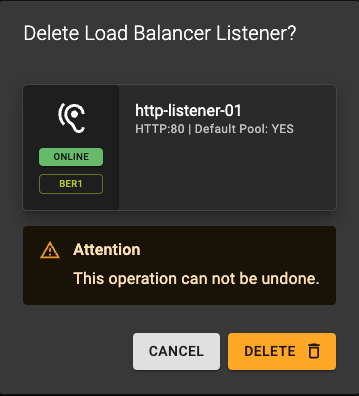
You can delete a listeners in two ways:
From the list view click the icon.
From the details view click the DELETE option at the top of the page.
Usage
openstack loadbalancer listener delete <LISTENER_ID or LISTENER_NAME>
Example
openstack loadbalancer listener list --loadbalancer 9f9102c6-9506-4c77-9fd3-82abbffe654d

+--------------------------------------+--------------------------------------+---------+----------------------------------+----------+---------------+----------------+
| id                                   | default_pool_id                      | name    | project_id                       | protocol | protocol_port | admin_state_up |
+--------------------------------------+--------------------------------------+---------+----------------------------------+----------+---------------+----------------+
| c7753e00-7599-4f4e-90c6-cc5f82a563b7 | 26fac6b8-4ba2-443d-bdd4-3e9da41f2f44 | list-02 | 0c12ce74a0084c0b8fef8e15d4a3377d | HTTP     |            80 | True           |
| 4e335933-e84a-4c56-a8f1-7d0bb5c1a7a4 | None                                 | list-01 | 0c12ce74a0084c0b8fef8e15d4a3377d | HTTPS    |           443 | True           |
+--------------------------------------+--------------------------------------+---------+----------------------------------+----------+---------------+----------------+

openstack loadbalancer listener delete list-01
Output
openstack loadbalancer listener list --loadbalancer 9f9102c6-9506-4c77-9fd3-82abbffe654d

+--------------------------------------+--------------------------------------+---------+----------------------------------+----------+---------------+----------------+
| id                                   | default_pool_id                      | name    | project_id                       | protocol | protocol_port | admin_state_up |
+--------------------------------------+--------------------------------------+---------+----------------------------------+----------+---------------+----------------+
| c7753e00-7599-4f4e-90c6-cc5f82a563b7 | 26fac6b8-4ba2-443d-bdd4-3e9da41f2f44 | list-02 | 0c12ce74a0084c0b8fef8e15d4a3377d | HTTP     |            80 | True           |
+--------------------------------------+--------------------------------------+---------+----------------------------------+----------+---------------+----------------+
The complete example, including the cloud-init assets for the app instances, is available in our terraform-examples repository.
Manage Pools
List Pools
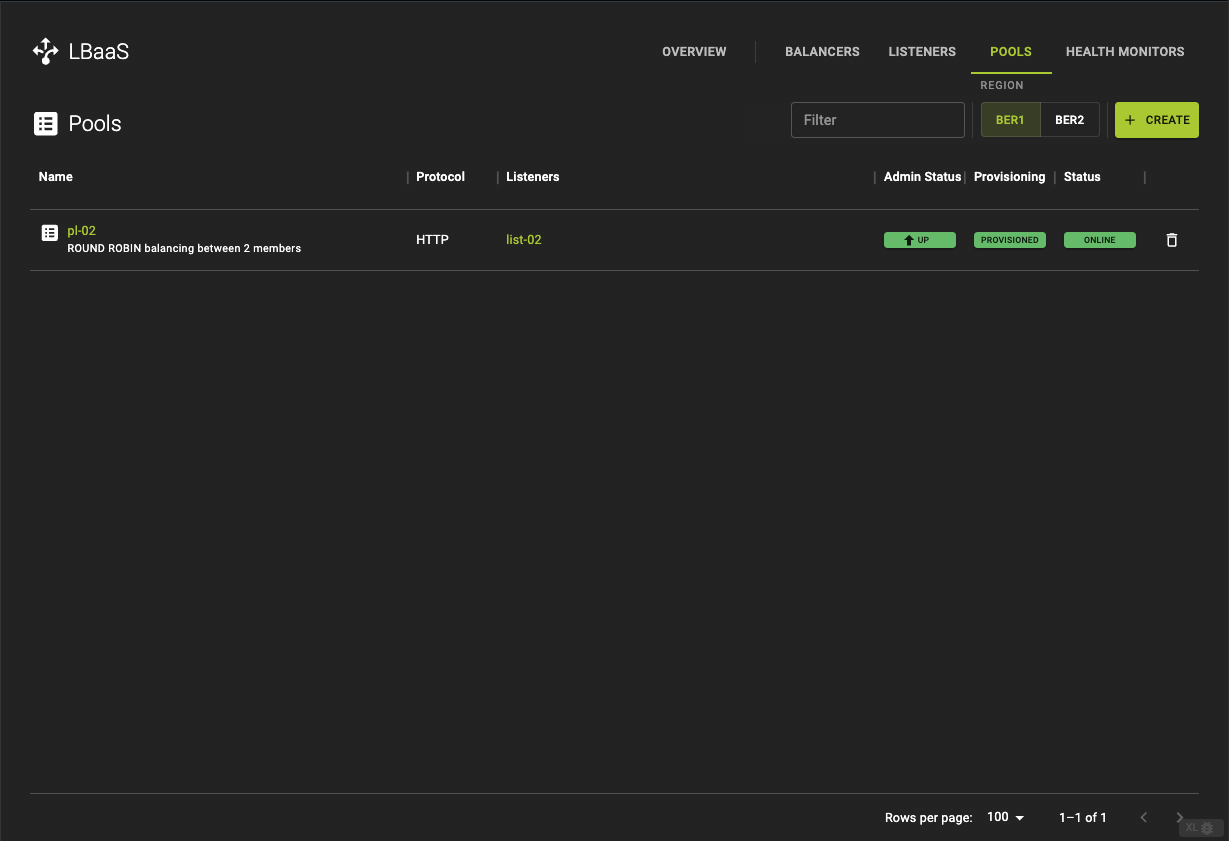 The get a list of all pools click the POOLS in the title bar
Usage
openstack loadbalancer pool create --protocol <PROTOCOL> --lb-algorithm <METHOD> --listener <LISTENER_ID or LISTENER_NAME> or --loadbalancer <LOADBALANCER_ID or LOADBALANCER_NAME>
Example
openstack loadbalancer listener list

+--------------------------------------+--------------------------------------+---------------------+----------------------------------+----------+---------------+----------------+
| id                                   | default_pool_id                      | name                | project_id                       | protocol | protocol_port | admin_state_up |
+--------------------------------------+--------------------------------------+---------------------+----------------------------------+----------+---------------+----------------+
| c7753e00-7599-4f4e-90c6-cc5f82a563b7 | 26fac6b8-4ba2-443d-bdd4-3e9da41f2f44 | list-02             | 0c12ce74a0084c0b8fef8e15d4a3377d | HTTP     |            80 | True           |
| f3a3d712-01dd-43af-b3ac-4d35ad819ba3 | 85da1112-2416-47fa-b501-9bae20337092 | http-listener-02.1  | 0c12ce74a0084c0b8fef8e15d4a3377d | HTTP     |            80 | True           |
| 8aef0f51-63fd-42dc-aad6-9b1172e198cd | 3e2a9f6f-15ff-48f5-9de2-01b0e048747d | https-listener      | 0c12ce74a0084c0b8fef8e15d4a3377d | HTTPS    |           443 | True           |
| eb58c03a-ced5-4bac-9dff-854cf08b72de | None                                 | tcp-listener        | 0c12ce74a0084c0b8fef8e15d4a3377d | TCP      |             1 | True           |
+--------------------------------------+--------------------------------------+---------------------+----------------------------------+----------+---------------+----------------+

openstack loadbalancer pool create --protocol tcp --lb-algorithm round_robin --listener eb58c03a-ced5-4bac-9dff-854cf08b72de
Output
+----------------------+--------------------------------------+
| Field                | Value                                |
+----------------------+--------------------------------------+
| admin_state_up       | True                                 |
| created_at           | 2024-09-03T14:05:03                  |
| description          |                                      |
| healthmonitor_id     |                                      |
| id                   | 14bd6fc6-bf5b-4717-a2af-1cbe2e4fed7f |
| lb_algorithm         | ROUND_ROBIN                          |
| listeners            | eb58c03a-ced5-4bac-9dff-854cf08b72de |
| loadbalancers        | 9a444163-db45-426c-ab04-cc006e6374ff |
| members              |                                      |
| name                 |                                      |
| operating_status     | OFFLINE                              |
| project_id           | 0c12ce74a0084c0b8fef8e15d4a3377d     |
| protocol             | TCP                                  |
| provisioning_status  | PENDING_CREATE                       |
| session_persistence  | None                                 |
| updated_at           | None                                 |
| tls_container_ref    | None                                 |
| ca_tls_container_ref | None                                 |
| crl_container_ref    | None                                 |
| tls_enabled          | False                                |
| tls_ciphers          | None                                 |
| tls_versions         | None                                 |
| tags                 |                                      |
| alpn_protocols       | None                                 |
+----------------------+--------------------------------------+

openstack loadbalancer listener list

+--------------------------------------+--------------------------------------+---------------------+----------------------------------+----------+---------------+----------------+
| id                                   | default_pool_id                      | name                | project_id                       | protocol | protocol_port | admin_state_up |
+--------------------------------------+--------------------------------------+---------------------+----------------------------------+----------+---------------+----------------+
| c7753e00-7599-4f4e-90c6-cc5f82a563b7 | 26fac6b8-4ba2-443d-bdd4-3e9da41f2f44 | list-02             | 0c12ce74a0084c0b8fef8e15d4a3377d | HTTP     |            80 | True           |
| f3a3d712-01dd-43af-b3ac-4d35ad819ba3 | 85da1112-2416-47fa-b501-9bae20337092 | http-listener-02.1  | 0c12ce74a0084c0b8fef8e15d4a3377d | HTTP     |            80 | True           |
| 8aef0f51-63fd-42dc-aad6-9b1172e198cd | 3e2a9f6f-15ff-48f5-9de2-01b0e048747d | https-listener      | 0c12ce74a0084c0b8fef8e15d4a3377d | HTTPS    |           443 | True           |
| eb58c03a-ced5-4bac-9dff-854cf08b72de | 14bd6fc6-bf5b-4717-a2af-1cbe2e4fed7f | tcp-listener        | 0c12ce74a0084c0b8fef8e15d4a3377d | TCP      |             1 | True           |
+--------------------------------------+--------------------------------------+---------------------+----------------------------------+----------+---------------+----------------+
The complete example, including the cloud-init assets for the app instances, is available in our terraform-examples repository.
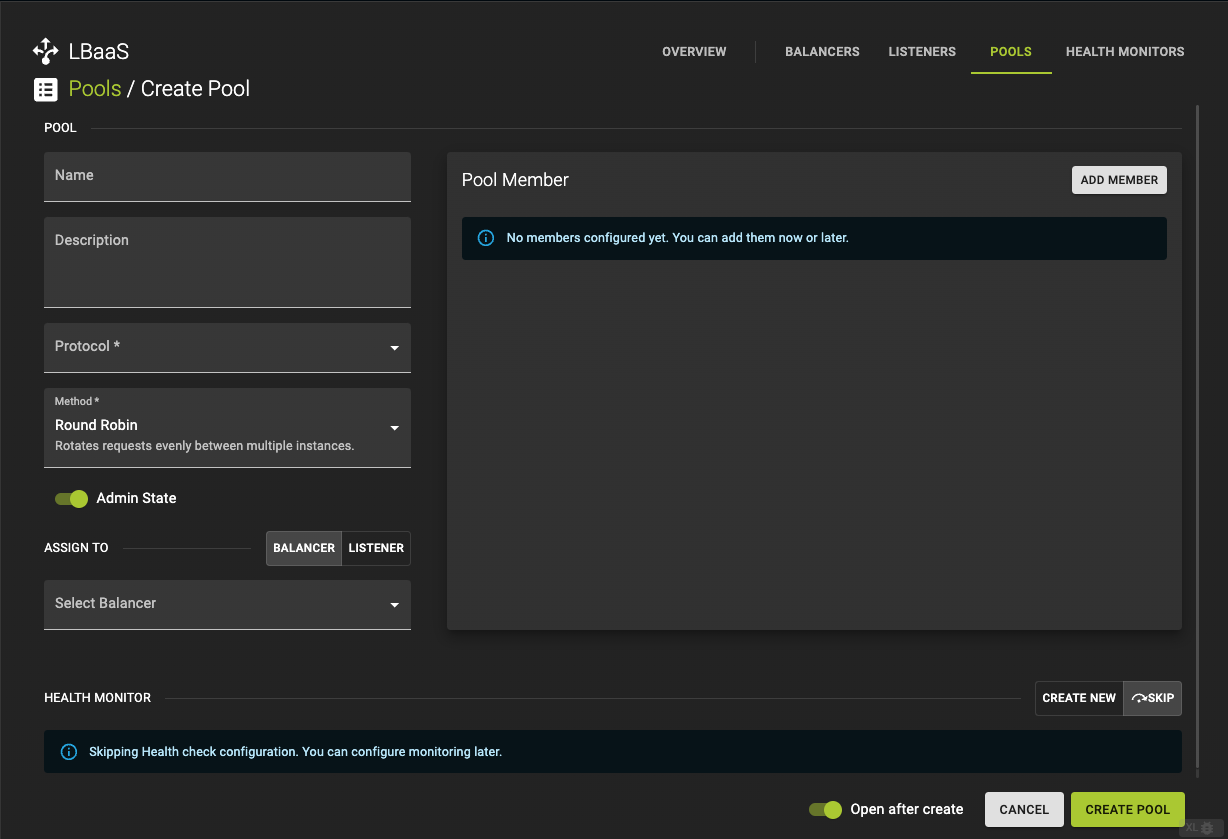
Create Pool
A pool is a group of servers (pool members) that will handle the traffic forwarded by the listener.
To create a Listener navigate to the Pools tab and click the Create button in the titlebar.
Configures the pool which contains the server Instances which the data requests are distributed to. You can create a new Pool or use Use Existing pool
-
Name and describe your Listener (optional).
-
Protocol (required)
- Choose a
Protocol. Options areTCP,HTTPandHTTPs
- Choose a
-
Method (required)
-
Choose a
Methodafter which the Requests are distributed between pool members. Options are: -
Source IP -
Round Robin -
Least Connections
-
Skip the next steps by clicking Skip in order to only create a Pool.
Click Create Pool to trigger the creation of a Pool
Usage
openstack loadbalancer pool create --name <POOL_NAME> --lb-algorithm <METHOD> --listener <LISTENER_NAME or LISTENER_ID> --protocol <PROTOCOL>
--name: The name of the pool.--lb-algorithm: The load balancing method used (e.g., ROUND_ROBIN, LEAST_CONNECTIONS, SOURCE_IP).--listener: The name or ID of the listener associated with this pool.--protocol: The protocol used by the pool members (e.g., HTTP, HTTPS, TCP).
Example
openstack loadbalancer pool create --name example-pool --lb-algorithm ROUND_ROBIN --listener example-listener --protocol HTTP
Output
openstack loadbalancer pool show example-pool

+----------------------+--------------------------------------+
| Field                | Value                                |
+----------------------+--------------------------------------+
| admin_state_up       | True                                 |
| created_at           | 2024-08-21T08:12:58                  |
| description          |                                      |
| healthmonitor_id     |                                      |
| id                   | ff8c8186-2b06-49a4-b737-c8b1d8b9a149 |
| lb_algorithm         | ROUND_ROBIN                          |
| listeners            | 9257cf12-3a6c-4e2a-a486-ea45a43888c0 |
| loadbalancers        | 3ae8541d-76e7-4b15-aaaa-ef749db5f761 |
| members              |                                      |
| name                 | example-pool                         |
| operating_status     | ONLINE                               |
| project_id           | 0c12ce74a0084c0b8fef8e15d4a3377d     |
| protocol             | HTTP                                 |
| provisioning_status  | ACTIVE                               |
| session_persistence  | None                                 |
| updated_at           | 2024-08-21T08:13:01                  |
| tls_container_ref    | None                                 |
| ca_tls_container_ref | None                                 |
| crl_container_ref    | None                                 |
| tls_enabled          | False                                |
| tls_ciphers          | None                                 |
| tls_versions         | None                                 |
| tags                 |                                      |
| alpn_protocols       | None                                 |
+----------------------+--------------------------------------+
The complete example, including the cloud-init assets for the app instances, is available in our terraform-examples repository.
Update Pools
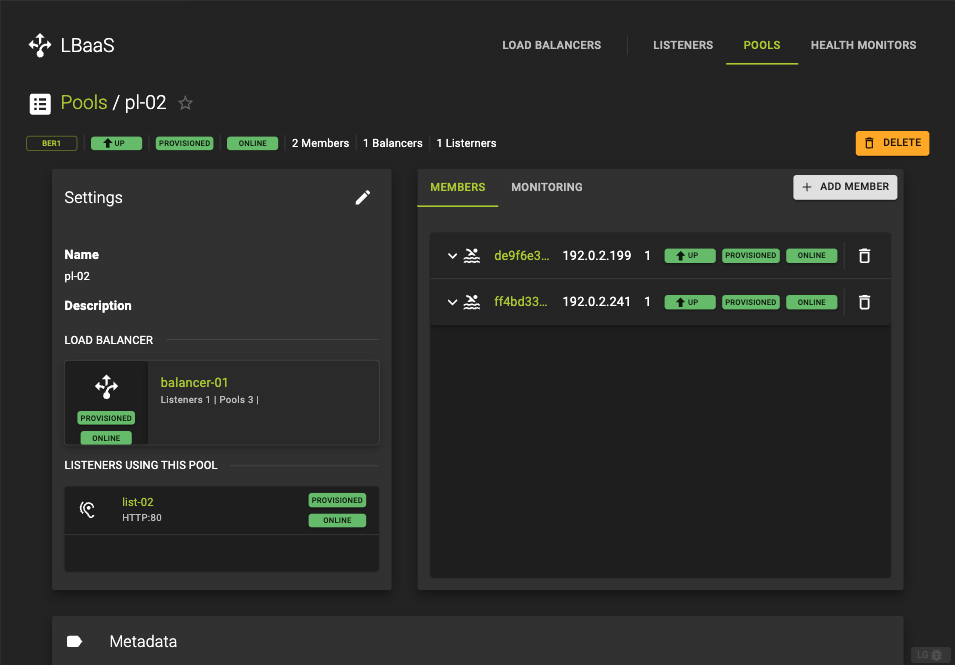 In the pool detail view, you can find basic information in the settings card, along with details about Pool Members and Monitoring in the respective members and monitoring tabs.
Settings Card
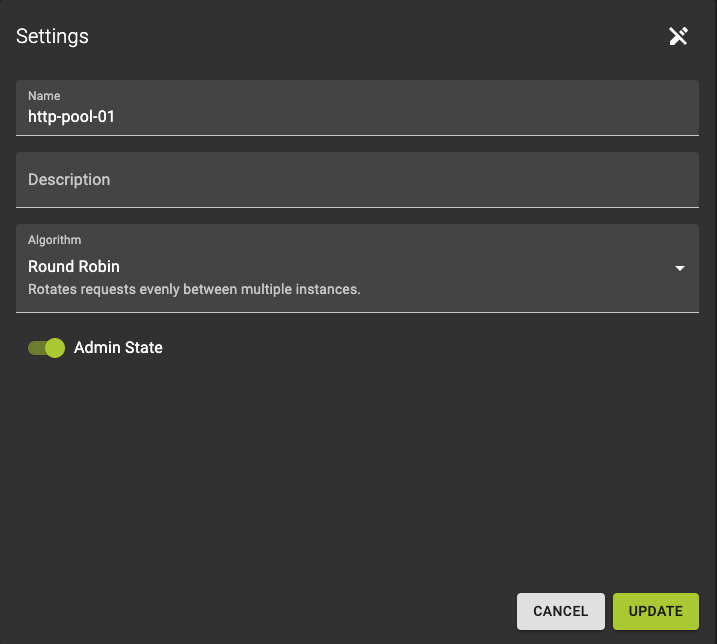
To enter the edit mode, click the button.
Now you can change the Name, Description, and Method of your pool, as well as toggle the admin state.
Confirm your changes by clicking Update
Members and Monitoring Card
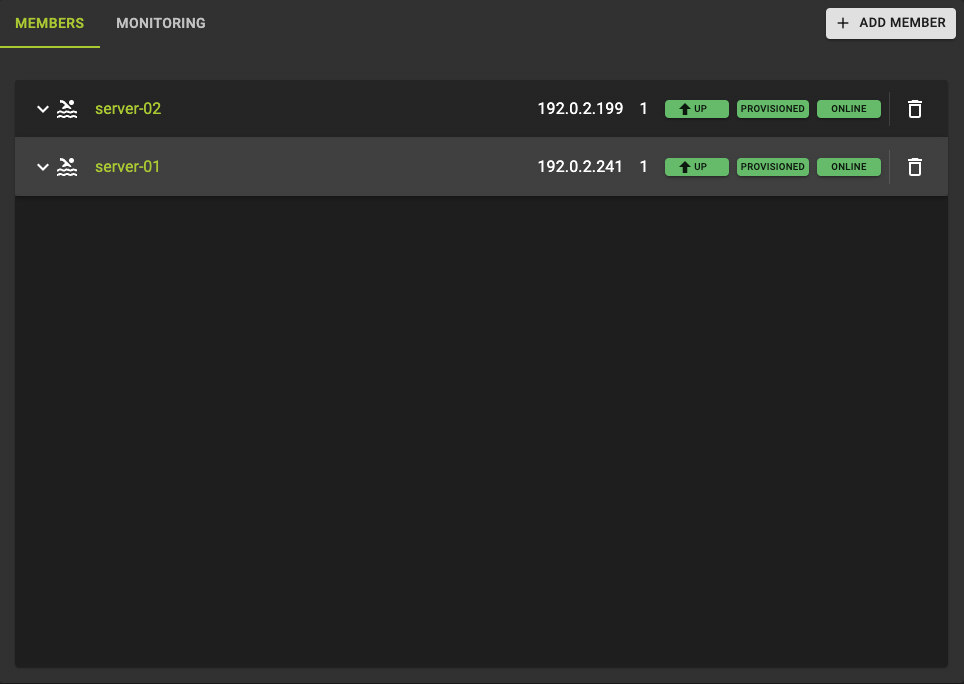 The members and monitoring card displays the members of a pool and the monitoring options to check the health of the members
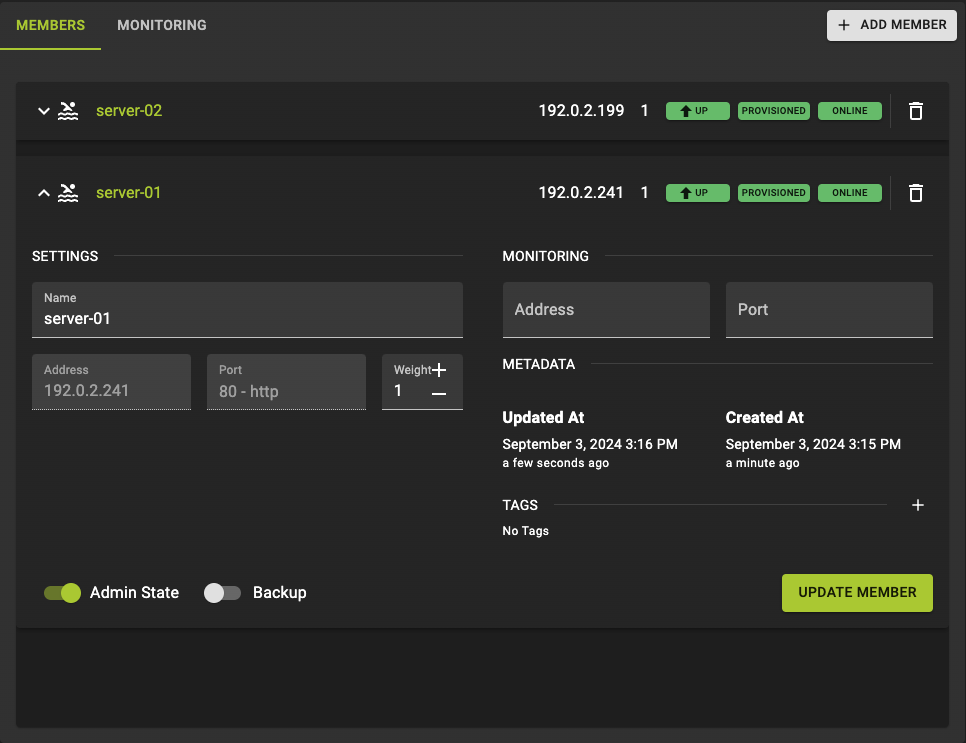 Click on a member to expand the section, which will display more information and allow you to update the member's details.
- Change the members
name - Change the
weight - Change the
IP-AddressandPortthe health monitor should check on.
Click Update Member to submit your changes
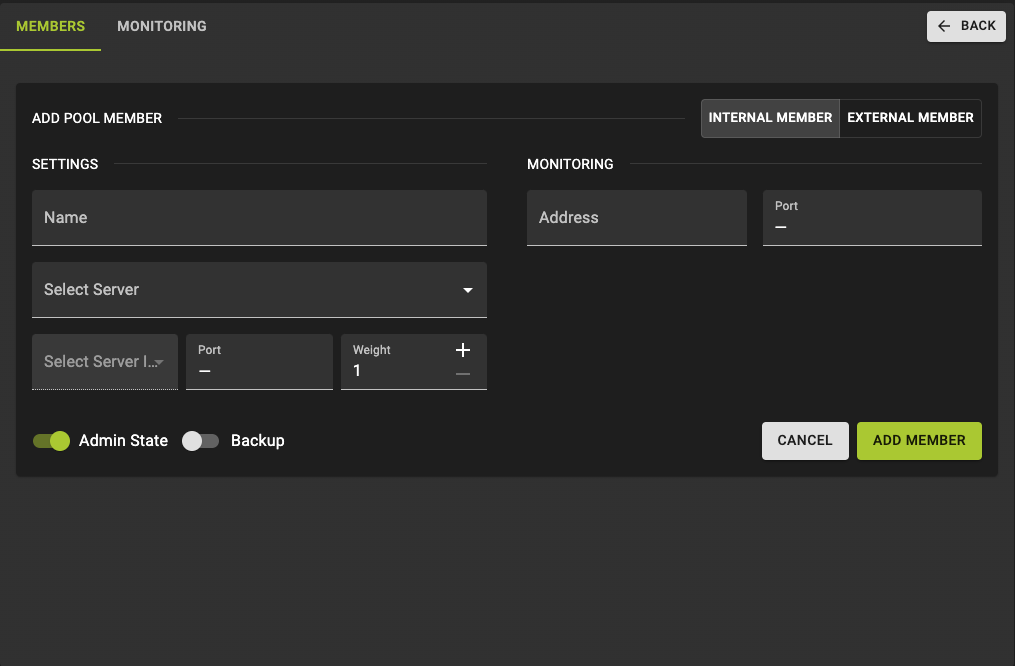
You can add members by clicking Add Members
For detailed instructions see how to add pool members
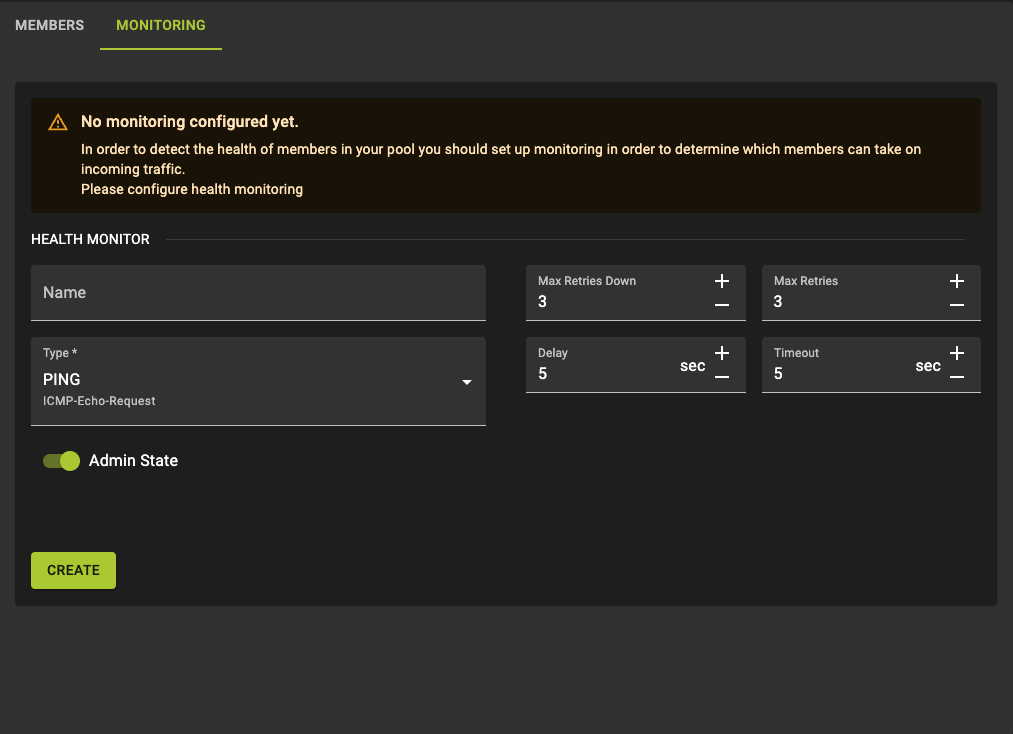
You can create Health Monitoring for the pool by clicking on MONITORING
For detailed instructions see how to add health monitoring
You can update the values of the load balancer object by adding a --flag with the key name you would like to update. You could add more than one flag.
In the example we change the pool's load balancer algorithm from round obin to least connections.
Usage
openstack loadbalancer pool set <POOL_ID or POOL_NAME> --lb-algorithm <METHOD>
Example
openstack loadbalancer pool show 14bd6fc6-bf5b-4717-a2af-1cbe2e4fed7f

+----------------------+--------------------------------------+
| Field                | Value                                |
+----------------------+--------------------------------------+
| admin_state_up       | True                                 |
| created_at           | 2024-09-03T14:05:03                  |
| description          |                                      |
| healthmonitor_id     |                                      |
| id                   | 14bd6fc6-bf5b-4717-a2af-1cbe2e4fed7f |
| lb_algorithm         | ROUND_ROBIN                          |
| listeners            | eb58c03a-ced5-4bac-9dff-854cf08b72de |
| loadbalancers        | 9a444163-db45-426c-ab04-cc006e6374ff |
| members              |                                      |
| name                 |                                      |
| operating_status     | ONLINE                               |
| project_id           | 0c12ce74a0084c0b8fef8e15d4a3377d     |
| protocol             | TCP                                  |
| provisioning_status  | ACTIVE                               |
| session_persistence  | None                                 |
| updated_at           | 2024-09-03T14:05:11                  |
| tls_container_ref    | None                                 |
| ca_tls_container_ref | None                                 |
| crl_container_ref    | None                                 |
| tls_enabled          | False                                |
| tls_ciphers          | None                                 |
| tls_versions         | None                                 |
| tags                 |                                      |
| alpn_protocols       | None                                 |
+----------------------+--------------------------------------+

openstack loadbalancer pool set 14bd6fc6-bf5b-4717-a2af-1cbe2e4fed7f --lb-algorithm LEAST_CONNECTIONS
Output
openstack loadbalancer pool show 14bd6fc6-bf5b-4717-a2af-1cbe2e4fed7f

+----------------------+--------------------------------------+
| Field                | Value                                |
+----------------------+--------------------------------------+
| admin_state_up       | True                                 |
| created_at           | 2024-09-03T14:05:03                  |
| description          |                                      |
| healthmonitor_id     |                                      |
| id                   | 14bd6fc6-bf5b-4717-a2af-1cbe2e4fed7f |
| lb_algorithm         | LEAST_CONNECTIONS                    |
| listeners            | eb58c03a-ced5-4bac-9dff-854cf08b72de |
| loadbalancers        | 9a444163-db45-426c-ab04-cc006e6374ff |
| members              |                                      |
| name                 |                                      |
| operating_status     | ONLINE                               |
| project_id           | 0c12ce74a0084c0b8fef8e15d4a3377d     |
| protocol             | TCP                                  |
| provisioning_status  | ACTIVE                               |
| session_persistence  | None                                 |
| updated_at           | 2024-09-03T14:16:55                  |
| tls_container_ref    | None                                 |
| ca_tls_container_ref | None                                 |
| crl_container_ref    | None                                 |
| tls_enabled          | False                                |
| tls_ciphers          | None                                 |
| tls_versions         | None                                 |
| tags                 |                                      |
| alpn_protocols       | None                                 |
+----------------------+--------------------------------------+
The complete example, including the cloud-init assets for the app instances, is available in our terraform-examples repository.
Delete Pools
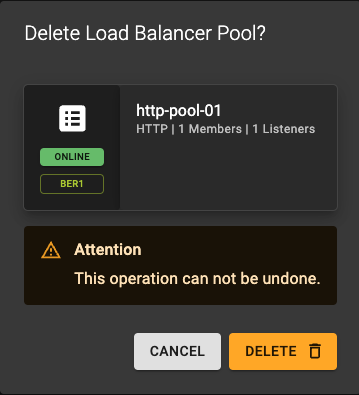
You can delete a pools in two ways:
- from the list view click the icon.
- from the details view click the DELETE option at the top of the page.
Usage
openstack loadbalancer pool delete <POOL_ID or POOL_NAME>
Example
openstack loadbalancer pool list

+--------------------------------------+-------------+----------------------------------+---------------------+----------+-------------------+----------------+
| id                                   | name        | project_id                       | provisioning_status | protocol | lb_algorithm      | admin_state_up |
+--------------------------------------+-------------+----------------------------------+---------------------+----------+-------------------+----------------+
| 26fac6b8-4ba2-443d-bdd4-3e9da41f2f44 | pl-02       | 0c12ce74a0084c0b8fef8e15d4a3377d | ACTIVE              | HTTP     | ROUND_ROBIN       | True           |
| 6cd8373e-f2a5-4660-bc1f-92ef6aff0640 | tcp-pool    | 0c12ce74a0084c0b8fef8e15d4a3377d | ACTIVE              | TCP      | ROUND_ROBIN       | True           |
| 85da1112-2416-47fa-b501-9bae20337092 | pool-02     | 0c12ce74a0084c0b8fef8e15d4a3377d | ACTIVE              | HTTP     | ROUND_ROBIN       | True           |
| 3e2a9f6f-15ff-48f5-9de2-01b0e048747d | https-pool  | 0c12ce74a0084c0b8fef8e15d4a3377d | ACTIVE              | HTTPS    | ROUND_ROBIN       | True           |
| 14bd6fc6-bf5b-4717-a2af-1cbe2e4fed7f | tcp-pool-lc | 0c12ce74a0084c0b8fef8e15d4a3377d | ACTIVE              | TCP      | LEAST_CONNECTIONS | True           |
+--------------------------------------+-------------+----------------------------------+---------------------+----------+-------------------+----------------+

openstack loadbalancer pool delete pl-02
Output
openstack loadbalancer pool list

+--------------------------------------+-------------+----------------------------------+---------------------+----------+-------------------+----------------+
| id                                   | name        | project_id                       | provisioning_status | protocol | lb_algorithm      | admin_state_up |
+--------------------------------------+-------------+----------------------------------+---------------------+----------+-------------------+----------------+
| 6cd8373e-f2a5-4660-bc1f-92ef6aff0640 | tcp-pool    | 0c12ce74a0084c0b8fef8e15d4a3377d | ACTIVE              | TCP      | ROUND_ROBIN       | True           |
| 85da1112-2416-47fa-b501-9bae20337092 | pool-02     | 0c12ce74a0084c0b8fef8e15d4a3377d | ACTIVE              | HTTP     | ROUND_ROBIN       | True           |
| 3e2a9f6f-15ff-48f5-9de2-01b0e048747d | https-pool  | 0c12ce74a0084c0b8fef8e15d4a3377d | ACTIVE              | HTTPS    | ROUND_ROBIN       | True           |
| 14bd6fc6-bf5b-4717-a2af-1cbe2e4fed7f | tcp-pool-lc | 0c12ce74a0084c0b8fef8e15d4a3377d | ACTIVE              | TCP      | LEAST_CONNECTIONS | True           |
+--------------------------------------+-------------+----------------------------------+---------------------+----------+-------------------+----------------+
The complete example, including the cloud-init assets for the app instances, is available in our terraform-examples repository.
Manage Pool Members
List Pool Members
You can get a list of pool members of one pool by going to the detail view of one pool. In the Pool Card you will find a list of pool members.
The complete example, including the cloud-init assets for the app instances, is available in our terraform-examples repository.
Create Pool Members
Pool members are the individual backend servers that will handle the requests. Each member must be in the same subnet as the load balancer.
To add a member to the pool click the Add Member button in the card title of the Pools tab.
You can choose to add an external members instead of an internal member by clicking the External member button in the card title. This will navigate you to a dialog where you can enter the IP-Address of your external member
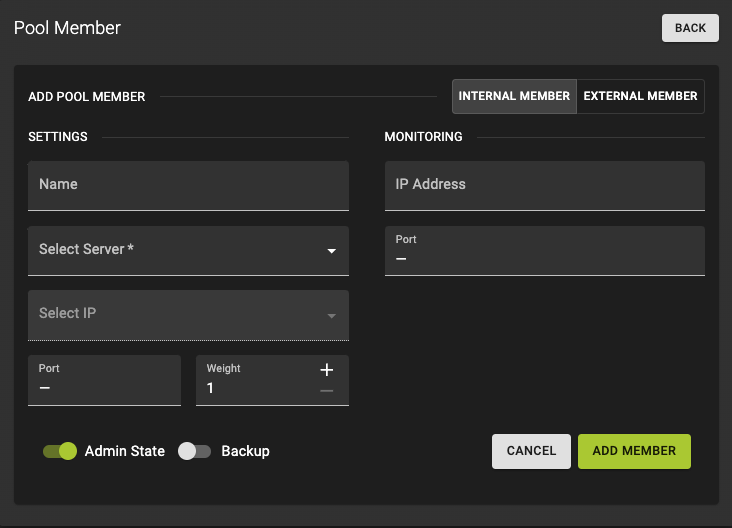
Settings:
-
Name and describe your Listener (optional).
-
Select Server (required)
Select Server: Choose a server from the selector. If you do not have servers configured yet, you can do so here
-
Select Server IP (required)
- Choose an IP from
Server IPs
- Choose an IP from
-
Select a
port(required) -
Choose
weight: A valid value is from 0 to 256. Default is 1.- The weight of a member determines the portion of requests or connections it services compared to the other members of the pool. A value of 0 means the member does not receive new connections but continues to service existing connections.
Monitoring:
IP-Address(Optional): An alternate IP address used for health monitoring a backend member. Default isnullwhich monitors the member address.Port(Optional): An alternate protocol port used for health monitoring a backend member. Default isnullwhich monitors the member protocol_port
Click Add Member button to confirm your configuration.
Usage
openstack loadbalancer member create --subnet-id <SUBNET_ID> --address <SERVER_IP> --protocol-port <PORT> --name <MEMBER_NAME> <POOL_NAME or POOL_ID>
--subnet-id: The subnet ID where the pool member resides.--address: The IP address of the pool member.--protocol-port: The port on which the pool member will accept traffic.--name: The name of the pool member.
Example
openstack loadbalancer member create --subnet-id a7d7e676-d668-4ec7-8b7d-3c28f68caab3 --address 192.0.2.199 --protocol-port 80 --name server-01 example-pool
Output
openstack loadbalancer member show server-01

+---------------------+--------------------------------------+
| Field               | Value                                |
+---------------------+--------------------------------------+
| address             | 192.0.2.199                          |
| admin_state_up      | True                                 |
| created_at          | 2024-08-21T08:31:55                  |
| id                  | 1b16e91d-3c1f-45f8-ba62-40693fbce13e |
| name                | server-01                            |
| operating_status    | NO_MONITOR                           |
| project_id          | 0c12ce74a0084c0b8fef8e15d4a3377d     |
| protocol_port       | 80                                   |
| provisioning_status | ACTIVE                               |
| subnet_id           | a7d7e676-d668-4ec7-8b7d-3c28f68caab3 |
| updated_at          | 2024-08-21T08:31:58                  |
| weight              | 1                                    |
| monitor_port        | None                                 |
| monitor_address     | None                                 |
| backup              | False                                |
| tags                |                                      |
+---------------------+--------------------------------------+
The complete example, including the cloud-init assets for the app instances, is available in our terraform-examples repository.
Update Pool Members
By clicking the pool members accordions you find further information about the members status. You can also edit the name and weight of the member or add IP Address and port for monitoring.
You can update the values of the members object by adding a --flag with the key name you would like to update. You could add more than one flag.
In the example we change the members name from server-01 to member-01.
Usage
openstack loadbalancer member set
--name <name>
--disable-backup | --enable-backup
--weight <weight>
--monitor-port <monitor_port>
--monitor-address <monitor_address>
--enable | --disable
--tag <tag> --no-tag
<MEMBER_ID or MEMBER_NAME> <POOL_ID or POOL_NAME>
Example
openstack loadbalancer member list 1b16e91d-3c1f-45f8-ba62-40693fbce13e

+--------------------------------------+-----------+----------------------------------+---------------------+-------------+---------------+------------------+--------+
| id                                   | name      | project_id                       | provisioning_status | address     | protocol_port | operating_status | weight |
+--------------------------------------+-----------+----------------------------------+---------------------+-------------+---------------+------------------+--------+
| 1b16e91d-3c1f-45f8-ba62-40693fbce13e | server-01 | 0c12ce74a0084c0b8fef8e15d4a3377d | ACTIVE              | 192.0.2.114 |            80 | NO_MONITOR       |      1 |
+--------------------------------------+-----------+----------------------------------+---------------------+-------------+---------------+------------------+--------+

openstack loadbalancer member set --name member-01 example-pool ea06a63e-3824-4293-9d12-0ae89b350802
Output
openstack loadbalancer member show example-pool member-01

+---------------------+--------------------------------------+
| Field               | Value                                |
+---------------------+--------------------------------------+
| address             | 192.0.2.114                          |
| admin_state_up      | True                                 |
| created_at          | 2024-09-09T16:16:14                  |
| id                  | 1b16e91d-3c1f-45f8-ba62-40693fbce13e |
| name                | member-01                            |
| operating_status    | NO_MONITOR                           |
| project_id          | 0c12ce74a0084c0b8fef8e15d4a3377d     |
| protocol_port       | 80                                   |
| provisioning_status | ACTIVE                               |
| subnet_id           | None                                 |
| updated_at          | 2024-09-09T16:18:33                  |
| weight              | 1                                    |
| monitor_port        | None                                 |
| monitor_address     | None                                 |
| backup              | False                                |
| tags                |                                      |
+---------------------+--------------------------------------+
The complete example, including the cloud-init assets for the app instances, is available in our terraform-examples repository.
Delete Pool Members
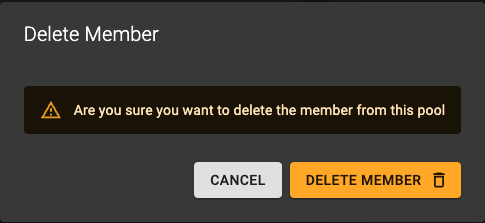 You can delete pool members by clicking the icon in the list.
In the confirmation dialog, click the DELETE button to confirm the deletion of the pool members. Please note that this action will not delete the server.
Usage
openstack loadbalancer member delete <POOL_ID or POOL_NAME> <MEMBER_ID or MEMBER_NAME>
Example
openstack loadbalancer member list example-pool

+--------------------------------------+-----------+----------------------------------+---------------------+-------------+---------------+------------------+--------+
| id                                   | name      | project_id                       | provisioning_status | address     | protocol_port | operating_status | weight |
+--------------------------------------+-----------+----------------------------------+---------------------+-------------+---------------+------------------+--------+
| 6c8595aa-f089-465f-93b6-ffd6d38d5199 |           | 0c12ce74a0084c0b8fef8e15d4a3377d | ACTIVE              | 192.0.2.241 |            80 | NO_MONITOR       |      1 |
| 1b16e91d-3c1f-45f8-ba62-40693fbce13e | server-01 | 0c12ce74a0084c0b8fef8e15d4a3377d | ACTIVE              | 192.0.2.114 |            80 | NO_MONITOR       |      1 |
+--------------------------------------+-----------+----------------------------------+---------------------+-------------+---------------+------------------+--------+

openstack loadbalancer member delete example-pool 6c8595aa-f089-465f-93b6-ffd6d38d5199
Output
openstack loadbalancer member list example-pool

+--------------------------------------+-----------+----------------------------------+---------------------+-------------+---------------+------------------+--------+
| id                                   | name      | project_id                       | provisioning_status | address     | protocol_port | operating_status | weight |
+--------------------------------------+-----------+----------------------------------+---------------------+-------------+---------------+------------------+--------+
| 1b16e91d-3c1f-45f8-ba62-40693fbce13e | server-01 | 0c12ce74a0084c0b8fef8e15d4a3377d | ACTIVE              | 192.0.2.114 |            80 | NO_MONITOR       |      1 |
+--------------------------------------+-----------+----------------------------------+---------------------+-------------+---------------+------------------+--------+
The complete example, including the cloud-init assets for the app instances, is available in our terraform-examples repository.
Manage Health Monitoring
List Health Monitoring
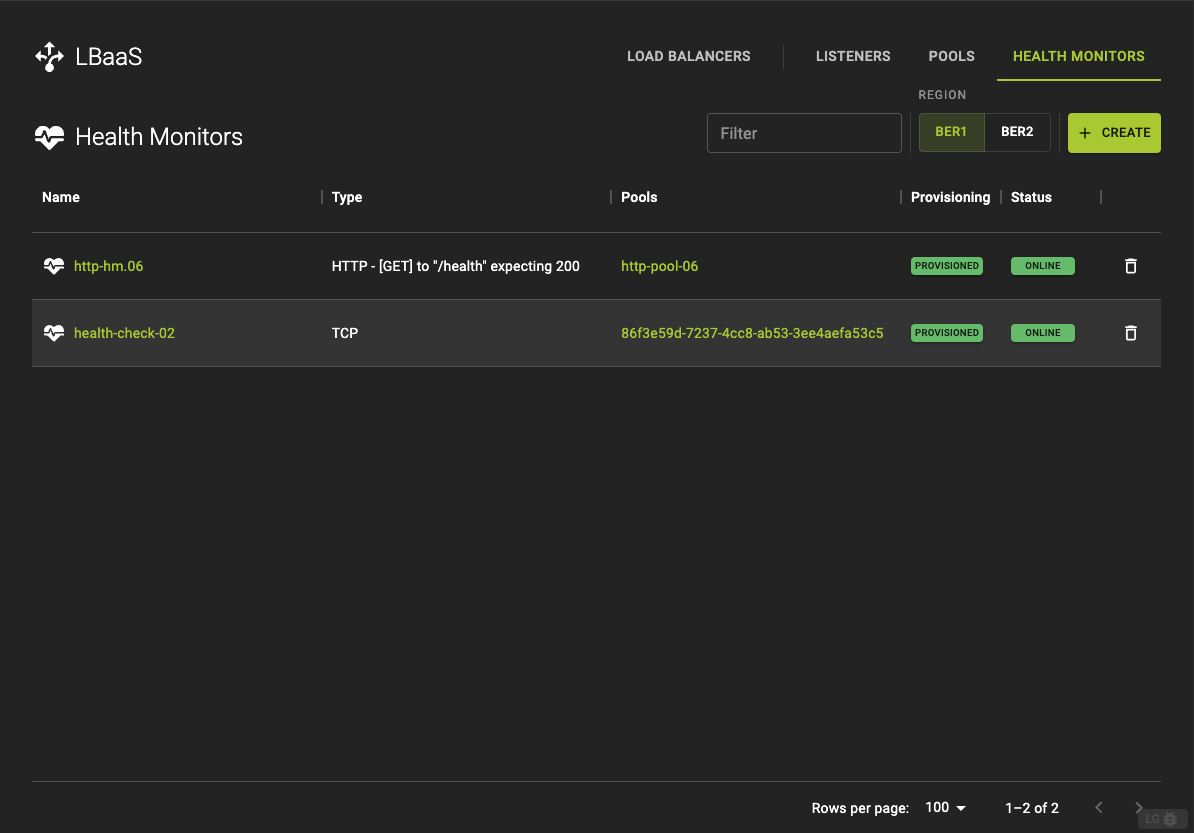 The get a list of all health monitors click the HEALTH MONITORS in the title bar
Usage
openstack loadbalancer healthmonitor list
Example
openstack loadbalancer healthmonitor list
Output
+--------------------------------------+-----------------+----------------------------------+------+----------------+
| id                                   | name            | project_id                       | type | admin_state_up |
+--------------------------------------+-----------------+----------------------------------+------+----------------+
| d7f87967-ab10-40d7-8e0a-ee3cb21faea2 | http-hm.06      | 0c12ce74a0084c0b8fef8e15d4a3377d | HTTP | True           |
| 2eb908d4-7b92-4771-8b40-43956e232479 | health-check-02 | 0c12ce74a0084c0b8fef8e15d4a3377d | TCP  | True           |
+--------------------------------------+-----------------+----------------------------------+------+----------------+
The complete example, including the cloud-init assets for the app instances, is available in our terraform-examples repository.
Create Health Monitoring
A Health Monitor checks the health of pool members and ensures that traffic is only routed to healthy servers.
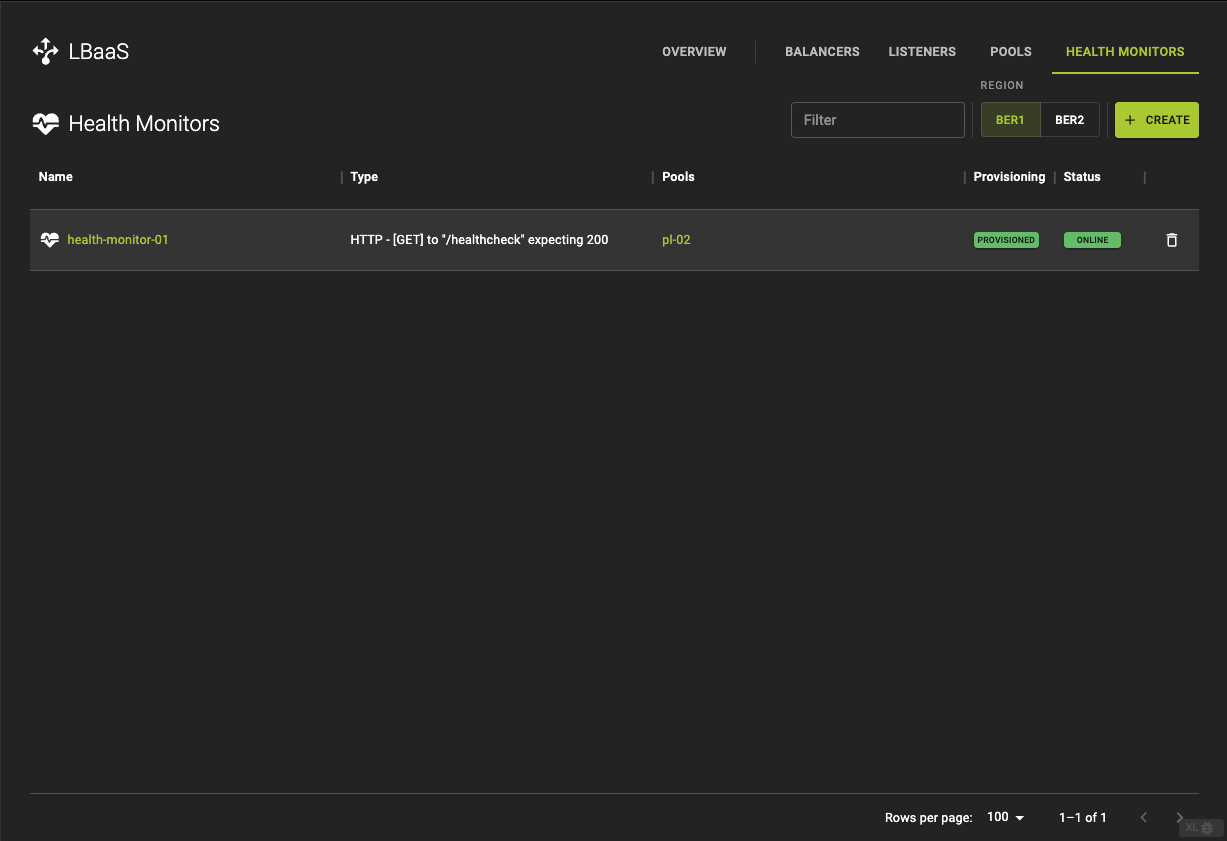 To create Health Monitoring navigate to the Health Monitors Tab and click the Create button in the titlebar.
-
Name your Health Monitor (optional).
-
Type(required): Options are:HTTP,HTTPS,PING,TCPandTLS-HELLO.- When choosing
HTTPorHTTPS, you also have the choice of anULR-Path, aMethodand anExpected Statusto get back from the Health Check.
- When choosing
Click Create Monitoring to trigger the creation of the Health Monitor.
Usage
openstack loadbalancer healthmonitor create --name <HEALTHMONITOR_NAME> --delay <DELAY> --timeout <TIMEOUT> --max-retries <MAX_RETRIES> --type <TYPE> --url-path <URL_PATH> <POOL_NAME>
--name: The name of the health monitor.--delay: The time in seconds between health checks.--timeout: The maximum time in seconds that a health check is allowed to take.--max-retries: The number of failed health checks before a member is marked as unhealthy.--max-retries-down: The number of allowed check failures before changing the operating status of the member to ERROR. A valid value is from 1 to 10. The default is 3.--type: The type of health check (e.g., HTTP, HTTPS, TCP).--pool: The name or ID of the pool to which this health monitor is associated.--url-path: The path that the health monitor will request (only for HTTP/HTTPS monitors).
Example
openstack loadbalancer healthmonitor create --name example-healthmonitor --delay 5 --timeout 3 --max-retries 3 --type HTTP --url-path /healthcheck example-pool
Output
openstack loadbalancer healthmonitor show example-healthmonitor

+---------------------+--------------------------------------+
| Field               | Value                                |
+---------------------+--------------------------------------+
| project_id          | 0c12ce74a0084c0b8fef8e15d4a3377d     |
| name                | example-healthmonitor                |
| admin_state_up      | True                                 |
| pools               | ff8c8186-2b06-49a4-b737-c8b1d8b9a149 |
| created_at          | 2024-08-21T08:40:11                  |
| provisioning_status | ACTIVE                               |
| updated_at          | 2024-08-21T08:40:12                  |
| delay               | 5                                    |
| expected_codes      | 200                                  |
| max_retries         | 3                                    |
| http_method         | GET                                  |
| timeout             | 3                                    |
| max_retries_down    | 3                                    |
| url_path            | /healthcheck                         |
| type                | HTTP                                 |
| id                  | 9655c388-41b3-4c24-8902-822e3d007f3b |
| operating_status    | ONLINE                               |
| http_version        | None                                 |
| domain_name         | None                                 |
| tags                |                                      |
+---------------------+--------------------------------------+
The complete example, including the cloud-init assets for the app instances, is available in our terraform-examples repository.
Update Health Monitoring
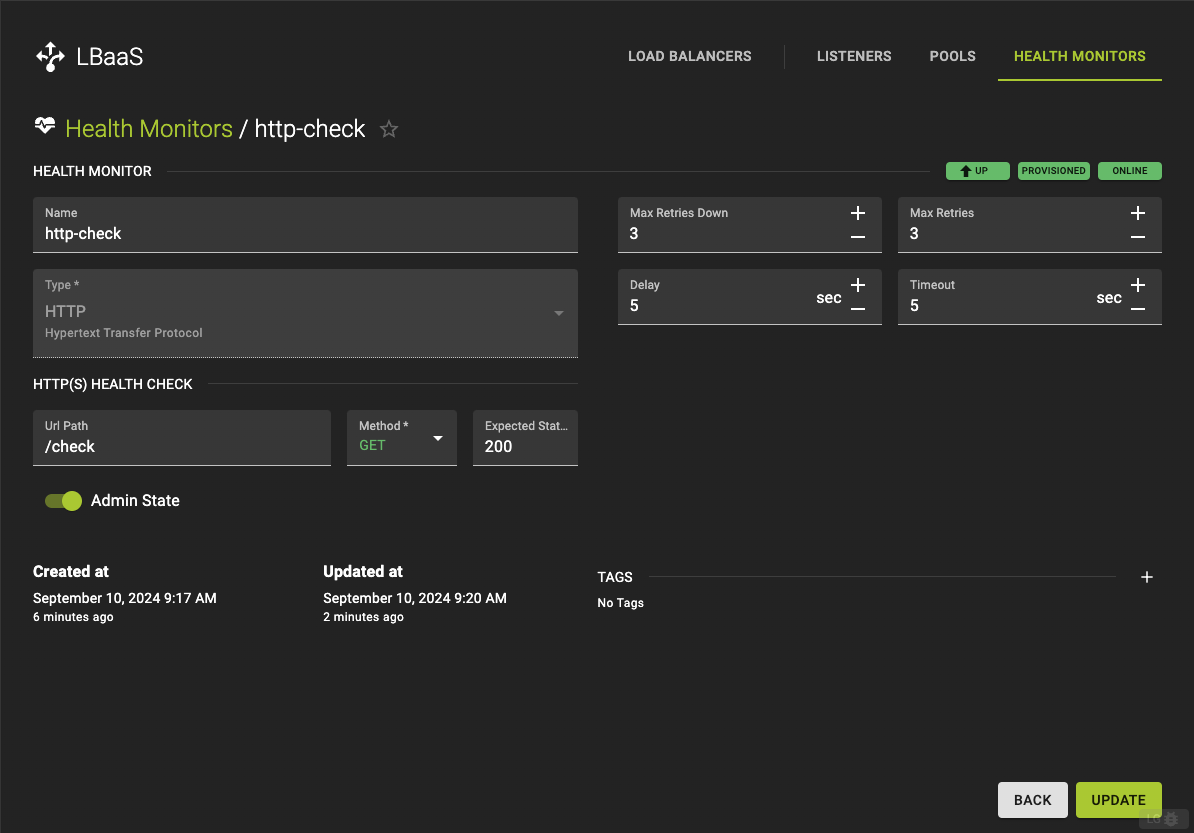
There are two ways to update health monitors:
- Go to Health Monitor List by clicking the HEALTH MONITORS tab in the title bar Choose the Health Monitor you want to update and click the Name to enter detail view. Here you have the option to update:
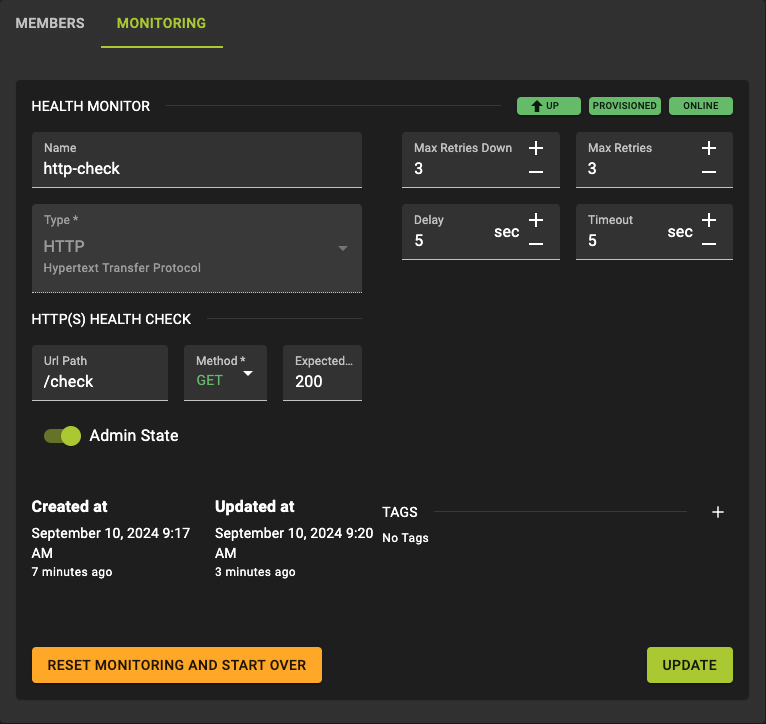 You can also update the policy, which is bound to a pool, from the pool detail view. If you click on the Monitoring tab in the card bar you will end up in the same view where you can update:
--name: The name of the health monitor.--delay: The time in seconds between health checks.--timeout: The maximum time in seconds that a health check is allowed to take.--max-retries: The number of failed health checks before a member is marked as unhealthy.--max-retries-down: The number of allowed check failures before changing the operating status of the member to ERROR. A valid value is from 1 to 10. The default is 3.
Click UPDATE to confirm your changes.
You can update the values of the health monitor object by adding a --flag with the key name you would like to update. You could add more than one flag.
In the example we are changing the url-path the monitor uses to check the pool members health and add a tag
Usage
openstack loadbalancer healthmonitor set <HEALTHMONITOR_NAME or HEALTHMONITOR_ID>

--name <name>
--delay <delay>
--domain-name <domain_name> HTTP Version must be specified
--expected-codes <codes>
--http-method {GET,POST,DELETE,PUT,HEAD,OPTIONS,PATCH,CONNECT,TRACE}
--http-version <http_version>
--timeout <timeout>
--max-retries <max_retries>
--max-retries-down <max_retries_down>
--url-path <url_path> When type HTTP or HTTPS. Has to start with "/"
--enable | --disable
--tag <tag> | --no-tag
Example
openstack loadbalancer healthmonitor show http-hm.06

+---------------------+--------------------------------------+
| Field               | Value                                |
+---------------------+--------------------------------------+
| project_id          | 0c12ce74a0084c0b8fef8e15d4a3377d     |
| name                | http-hm.06                           |
| admin_state_up      | True                                 |
| pools               | c61cc981-0b8f-4d84-a81a-80a4208803fe |
| created_at          | 2024-09-10T07:44:08                  |
| provisioning_status | ACTIVE                               |
| updated_at          | 2024-09-10T07:45:33                  |
| delay               | 5                                    |
| expected_codes      | 200                                  |
| max_retries         | 3                                    |
| http_method         | GET                                  |
| timeout             | 5                                    |
| max_retries_down    | 3                                    |
| url_path            | /health                              |
| type                | HTTP                                 |
| id                  | d7f87967-ab10-40d7-8e0a-ee3cb21faea2 |
| operating_status    | ONLINE                               |
| http_version        | None                                 |
| domain_name         | None                                 |
| tags                |                                      |
+---------------------+--------------------------------------+

openstack loadbalancer healthmonitor set http-hm.06 --url-path /health-checks --tag http-pool-06
Output
openstack loadbalancer healthmonitor show http-hm.06

+---------------------+--------------------------------------+
| Field               | Value                                |
+---------------------+--------------------------------------+
| project_id          | 0c12ce74a0084c0b8fef8e15d4a3377d     |
| name                | http-hm.06                           |
| admin_state_up      | True                                 |
| pools               | c61cc981-0b8f-4d84-a81a-80a4208803fe |
| created_at          | 2024-09-10T07:44:08                  |
| provisioning_status | ACTIVE                               |
| updated_at          | 2024-09-10T14:00:15                  |
| delay               | 5                                    |
| expected_codes      | 200                                  |
| max_retries         | 3                                    |
| http_method         | GET                                  |
| timeout             | 5                                    |
| max_retries_down    | 3                                    |
| url_path            | /health-checks                       |
| type                | HTTP                                 |
| id                  | d7f87967-ab10-40d7-8e0a-ee3cb21faea2 |
| operating_status    | ONLINE                               |
| http_version        | None                                 |
| domain_name         | None                                 |
| tags                |                                      |
+---------------------+--------------------------------------+
The complete example, including the cloud-init assets for the app instances, is available in our terraform-examples repository.
Delete Health Monitoring
You can delete a health monitor directly from the Monitoring Tab in the pools detail view by clicking Reset Monitoring and Start over
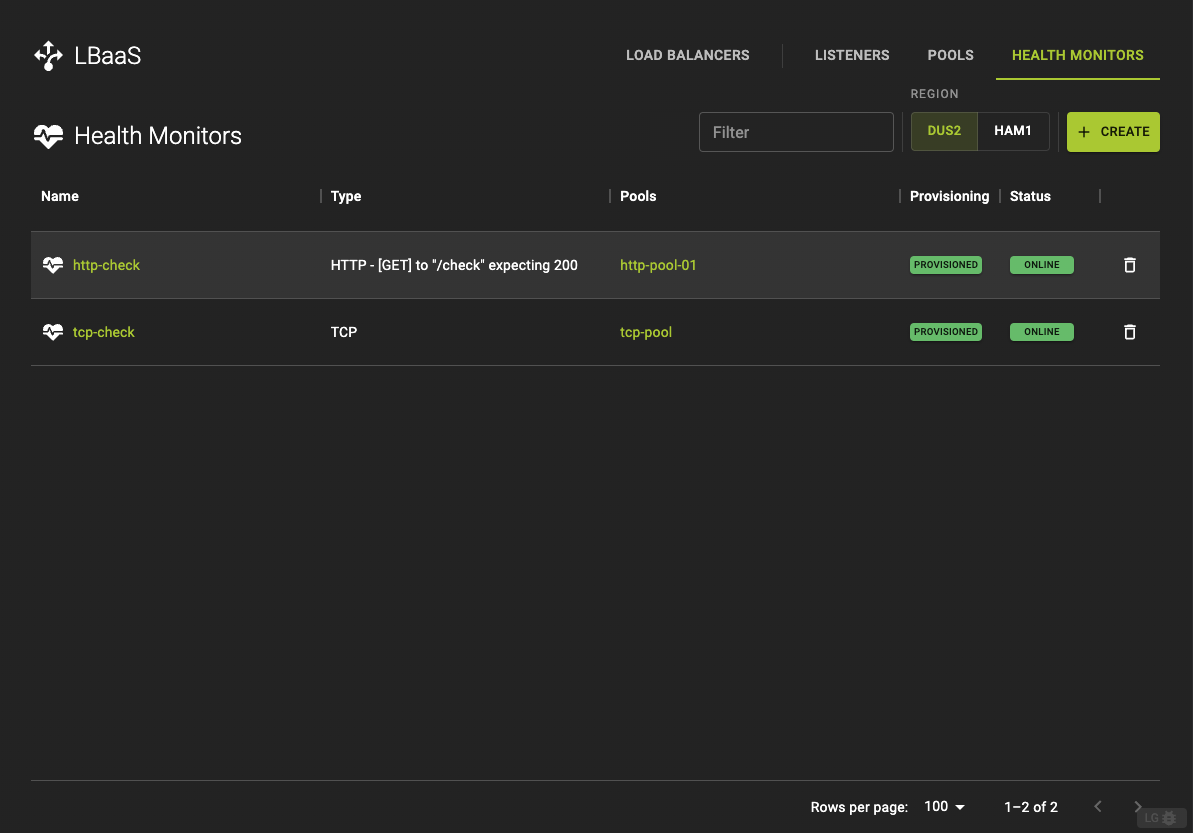
You can also delete monitors by clicking the icon in the Health Monitor list
You can delete a health monitor directly from the Monitoring Tab in the pools detail view by clicking Reset Monitoring and Start over
You can also delete monitors by clicking the icon in the Health Monitor list
Usage
openstack loadbalancer healthmonitor delete <HEALTHMONITOR_ID or HEALTHMONITOR_NAME>

openstack loadbalancer healthmonitor delete <HEALTHMONITOR_ID or HEALTHMONITOR_NAME>
Example
openstack loadbalancer healthmonitor list

+--------------------------------------+------------+----------------------------------+------+----------------+
| id                                   | name       | project_id                       | type | admin_state_up |
+--------------------------------------+------------+----------------------------------+------+----------------+
| d7f87967-ab10-40d7-8e0a-ee3cb21faea2 | http-hm.06 | 0c12ce74a0084c0b8fef8e15d4a3377d | HTTP | True           |
| bc00e8f6-e8b0-4467-97ac-834ea3d6edc9 |            | 0c12ce74a0084c0b8fef8e15d4a3377d | PING | True           |
+--------------------------------------+------------+----------------------------------+------+----------------+
openstack loadbalancer healthmonitor delete bc00e8f6-e8b0-4467-97ac-834ea3d6edc9

openstack loadbalancer healthmonitor list

+--------------------------------------+------------+----------------------------------+------+----------------+
| id                                   | name       | project_id                       | type | admin_state_up |
+--------------------------------------+------------+----------------------------------+------+----------------+
| d7f87967-ab10-40d7-8e0a-ee3cb21faea2 | http-hm.06 | 0c12ce74a0084c0b8fef8e15d4a3377d | HTTP | True           |
| bc00e8f6-e8b0-4467-97ac-834ea3d6edc9 |            | 0c12ce74a0084c0b8fef8e15d4a3377d | PING | True           |
+--------------------------------------+------------+----------------------------------+------+----------------+
openstack loadbalancer healthmonitor delete bc00e8f6-e8b0-4467-97ac-834ea3d6edc9
Output
openstack loadbalancer healthmonitor list

+--------------------------------------+------------+----------------------------------+------+----------------+
| id                                   | name       | project_id                       | type | admin_state_up |
+--------------------------------------+------------+----------------------------------+------+----------------+
| d7f87967-ab10-40d7-8e0a-ee3cb21faea2 | http-hm.06 | 0c12ce74a0084c0b8fef8e15d4a3377d | HTTP | True           |
+--------------------------------------+------------+----------------------------------+------+----------------+

openstack loadbalancer healthmonitor list

+--------------------------------------+------------+----------------------------------+------+----------------+
| id                                   | name       | project_id                       | type | admin_state_up |
+--------------------------------------+------------+----------------------------------+------+----------------+
| d7f87967-ab10-40d7-8e0a-ee3cb21faea2 | http-hm.06 | 0c12ce74a0084c0b8fef8e15d4a3377d | HTTP | True           |
+--------------------------------------+------------+----------------------------------+------+----------------+
The complete example, including the cloud-init assets for the app instances, is available in our terraform-examples repository.
Log forwarding
Logs from Load Balancers can be forwarded to Provisioned Observability by
setting the tag sys11_provisioned_logs on the Load Balancer resource.
Configure CLI Usage
openstack loadbalancer set --tag sys11_provisioned_logs

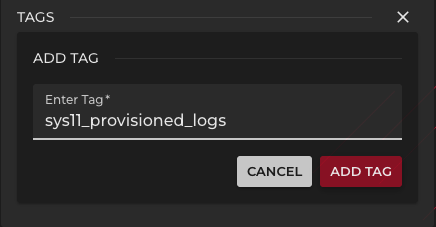 To create a new tag click the plus button and enter
 sys11_provisioned_logs as tag name. Click Add Tag to add the tag to the Load Balancer and activate the log forwarding
The complete example, including the cloud-init assets for the app instances, is available in our terraform-examples repository.
BETA
Log forwarding is currently in BETA state and subject to further changes.