Connecting your IdP via OIDC
We support connecting external identity providers (IdPs) via OpenID Connect (OIDC), allowing users to log in using an external identity provider.
To connect an external IdP via OIDC, please contact our support. We need information about your IdP, including the discovery endpoint, client ID and secret, PKCE support, and client authentication method.
Alpha Feature
This feature is available upon request.
Login Process for Federated Accounts
Once you have connected your external IdP, any user from your federated account can log in to the Cloud platform using their existing credentials. After entering their email address, the login redirects the user to your Identity Provider.
We create the user account automatically on first login. If you invite a user from a federated domain to join an organization, the system creates their account as part of the invitation flow.
Additional account creation steps
In some cases, a federated user may also need to link their federated IdP account to their user account. This happens when an account already exists without a connection to the federated IdP account, for example if accounts predate your external IdP connection.
To link your federated account with your existing account, follow these steps:
- Click
ADD TO EXISTING ACCOUNTto proceed.
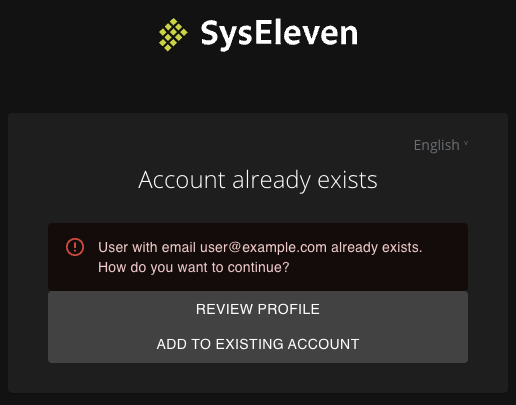
- Prove ownership of the account by confirming your email address. You will see the following screen:
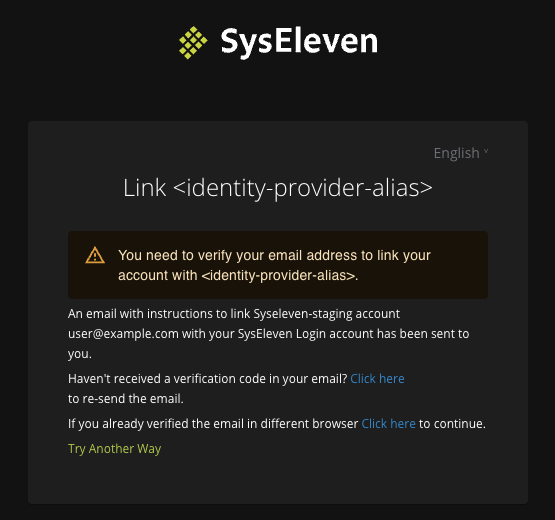
- Open the confirmation email and click the link inside to confirm the linking of the federated account.
You can now log in to the Cloud platform with a redirect to your IdP for authentication.