IPv6 Support
BETA
Enable IPv6 support before you use this feature. The feature is in BETA state and may change.
MetaKube Core provides comprehensive IPv6 support for Kubernetes clusters, enabling modern networking capabilities and future-proofing your infrastructure. Enabling IPv6 gives the cluster dual-stack networking (both IPv4 and IPv6) for enhanced connectivity options.
IPv6 Features
MetaKube Core's IPv6 implementation provides the following capabilities:
- Dual-stack networking: Clusters support both IPv4 and IPv6 simultaneously
- Automatic node configuration: Worker nodes are automatically configured with IPv6 addresses
- Pod networking: Pods receive both IPv4 and IPv6 addresses
- Load balancer support: Services of type LoadBalancer can receive either IPv4 or IPv6 external IPs (but not both simultaneously due to OpenStack limitations)
- Service networking: Kubernetes services support IPv6 cluster IPs
Enabling IPv6
Prerequisites
Before enabling IPv6 for your cluster, ensure that:
- IPv6 support is active in your MetaKube Core feature flags
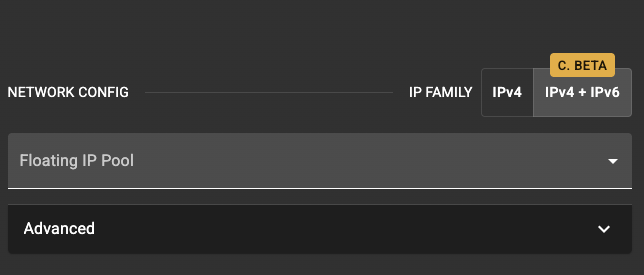
To enable IPv6 through the MetaKube Core UI:
- Navigate to the cluster creation workflow
- In the networking configuration section, locate the IPv6 settings
- Enable the "IPv4 + IPv6" option
- Configure any additional IPv6-specific network settings as needed
Example: Deploying with IPv6
Once your cluster has IPv6 active, you can deploy applications that use IPv6 networking. Here's a complete example that demonstrates creating a deployment and exposing it via a LoadBalancer with IPv6 support.
Sample Application Deployment
Create a simple web application deployment:
apiVersion: apps/v1
kind: Deployment
metadata:
  name: ipv6-web-app
  labels:
    app: ipv6-web-app
spec:
  replicas: 3
  selector:
    matchLabels:
      app: ipv6-web-app
  template:
    metadata:
      labels:
        app: ipv6-web-app
    spec:
      containers:
      - name: web-server
        image: nginx:1.25
        ports:
        - containerPort: 80
          name: http
        env:
        - name: LISTEN_IPV6
          value: "true"
        resources:
          requests:
            memory: "64Mi"
            cpu: "50m"
          limits:
            memory: "128Mi"
            cpu: "100m"
IPv6-enabled LoadBalancer Service
OpenStack LoadBalancer Limitation
OpenStack Octavia load balancers lack true dual-stack support. While you can specify both IPv4 and IPv6 in spec.ipFamilies, the load balancer receives a single external IP address based on the first family in the list. This means you cannot assign both IPv4 and IPv6 external IPs to the same LoadBalancer service.
For more details, see the OpenStack Cloud Provider documentation.
Create a LoadBalancer service that will receive either an IPv4 or IPv6 external IP:
IPv6-First LoadBalancer Service
This example creates a service that receives an IPv6 external IP (IPv6 appears first):
apiVersion: v1
kind: Service
metadata:
  name: ipv6-web-service
spec:
  type: LoadBalancer
  # Use Local traffic policy for better performance
  externalTrafficPolicy: Local
  ipFamilyPolicy: PreferDualStack
  ipFamilies:
    - IPv6  # This will be the external IP family
    - IPv4
  selector:
    app: ipv6-web-app
  ports:
    - name: http
      port: 80
      targetPort: 80
      protocol: TCP
IPv4-First LoadBalancer Service
This example creates a service that receives an IPv4 external IP (IPv4 appears first):
apiVersion: v1
kind: Service
metadata:
  name: ipv4-web-service
spec:
  type: LoadBalancer
  externalTrafficPolicy: Local
  ipFamilyPolicy: PreferDualStack
  ipFamilies:
    - IPv4  # This will be the external IP family
    - IPv6
  selector:
    app: ipv6-web-app
  ports:
    - name: http
      port: 80
      targetPort: 80
      protocol: TCP
Deploying the Example
Apply the manifests to your IPv6-enabled cluster:
# Apply the deployment
kubectl apply -f ipv6-deployment.yaml

# Apply the service (using IPv6-first example)
kubectl apply -f ipv6-service.yaml

# Check the deployment status
kubectl get deployments ipv6-web-app

# Verify the service has received an external IP
kubectl get service ipv6-web-service
Expected output for IPv6-first service:
NAME               TYPE           CLUSTER-IP    EXTERNAL-IP           PORT(S)        AGE
ipv6-web-service   LoadBalancer   10.240.0.15   2001:db8:1234::10    80:32000/TCP   2m
Expected output for IPv4-first service:
NAME               TYPE           CLUSTER-IP    EXTERNAL-IP    PORT(S)        AGE
ipv4-web-service   LoadBalancer   10.240.0.15   203.0.113.10   80:32000/TCP   2m
Testing Connectivity
Once deployed, you can test connectivity based on which IP family your service received:
# For IPv6-first service, test IPv6 connectivity (note the square brackets for IPv6 addresses)
curl http://[2001:db8:1234::10]

# For IPv4-first service, test IPv4 connectivity
curl http://203.0.113.10

# Test from within the cluster using IPv6
kubectl run test-pod --image=curlimages/curl --rm -it --restart=Never -- \
  curl -6 http://[2001:db8:1234::10]

# Test from within the cluster using IPv4
kubectl run test-pod --image=curlimages/curl --rm -it --restart=Never -- \
  curl http://203.0.113.10
Network Architecture with IPv6
Enabling IPv6 extends the MetaKube Core network architecture to support dual-stack configuration:
Default IPv6 CIDRs
- Pod Network IPv6: Random
/48CIDR - Service Network IPv6: Random
/108CIDR - Node Network: Configured automatically by OpenStack networking
CNI Plugin: Cilium with IPv6
Cilium in MetaKube Core fully supports IPv6 networking features:
- Dual-stack direct routing: Pod traffic uses both IPv4 and IPv6 without encapsulation
- IPv6 service load balancing: Efficient service networking for both IP families
- IPv6 network policies: Fine-grained network security for IPv6 traffic
- eBPF IPv6 optimization: High-performance data path for IPv6 packets
Limitations and Considerations
Current Limitations
- IPv6 support is in beta --- test thoroughly before production use.
- IPv6-only clusters not supported: Worker nodes need IPv4 addresses during initialization because the OpenStack metadata service, which cloud-init depends on, communicates over IPv4.
- LoadBalancer limitation: OpenStack load balancers do not support true dual-stack external IPs. Services receive either an IPv4 or IPv6 external IP, not both.
- Some third-party applications may require updates to support dual-stack networking.
- Network policies must cover both IPv4 and IPv6 traffic.
Best Practices
- Test dual-stack compatibility: Verify that your applications work with both IPv4 and IPv6.
- Monitor both IP families: Set up monitoring for both IPv4 and IPv6 connectivity.
- Security considerations: Configure firewalls and security groups for both IP families.
- Load balancer configuration: Use
externalTrafficPolicy: Localfor optimal performance.
Troubleshooting
Common Issues
Pod not receiving IPv6 address
Check if the pod's namespace has IPv6 enabled:
Service not getting IPv6 external IP
Verify the service configuration and OpenStack IPv6 support:
kubectl describe service <service-name>
kubectl get events --field-selector involvedObject.name=<service-name>
Network connectivity issues
Test connectivity within the cluster:
# Test IPv6 connectivity between pods
kubectl exec <pod-name> -- ping6 <ipv6-address>

# Check IPv6 routes
kubectl exec <pod-name> -- ip -6 route
For more troubleshooting guidance, contact MetaKube Core support.