Firewall Groups (FWaaS)
Firewall as a Service (FWaaS) is an extension of the OpenStack networking service that allows to deploy firewall groups to protect your networks. A firewall group consists of an ingress and an egress policy which in turn contain ordered firewall rules. A firewall rule defines what action (allow, deny) to take for a given set of packet attributes.
Note
Firewall Groups protect router ports. For protecting ports of servers, you can use Security Groups.
-
Firewall Group
A firewall group is the combination of an ingress and an egress firewall policy. The firewall group can be applied to one or multiple router ports to protect the attached networks. There will always be a default firewall group with policies that deny everything. -
Firewall Policy
A firewall policy consists of an ordered list of rules that describe what kind of packets are allowed or denied. -
Firewall Rule
A firewall rule defines what action to take (allow, deny) for a specific set of packet attributes such as source/destination IP address, source/destination port, IP protocol and IP version.
Note
Rules are implemented as stateless ACLs. That is, allowing TCP connections to a certain port
requires two rules: an allow rule for the ingress policy opening the destination port and an
allow rule for the egress policy opening the source port.
Firewall Groups
A firewall group is the combination of an ingress and an egress firewall policy. The firewall group can be applied to one or multiple router ports to protect the attached networks. There will always be a default firewall group with policies that deny everything.
List Firewall Groups
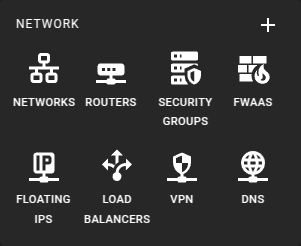
To List Firewall Groups select FWaaS from the sidebar in the openstack section. Select the Groups tab if not already selected.
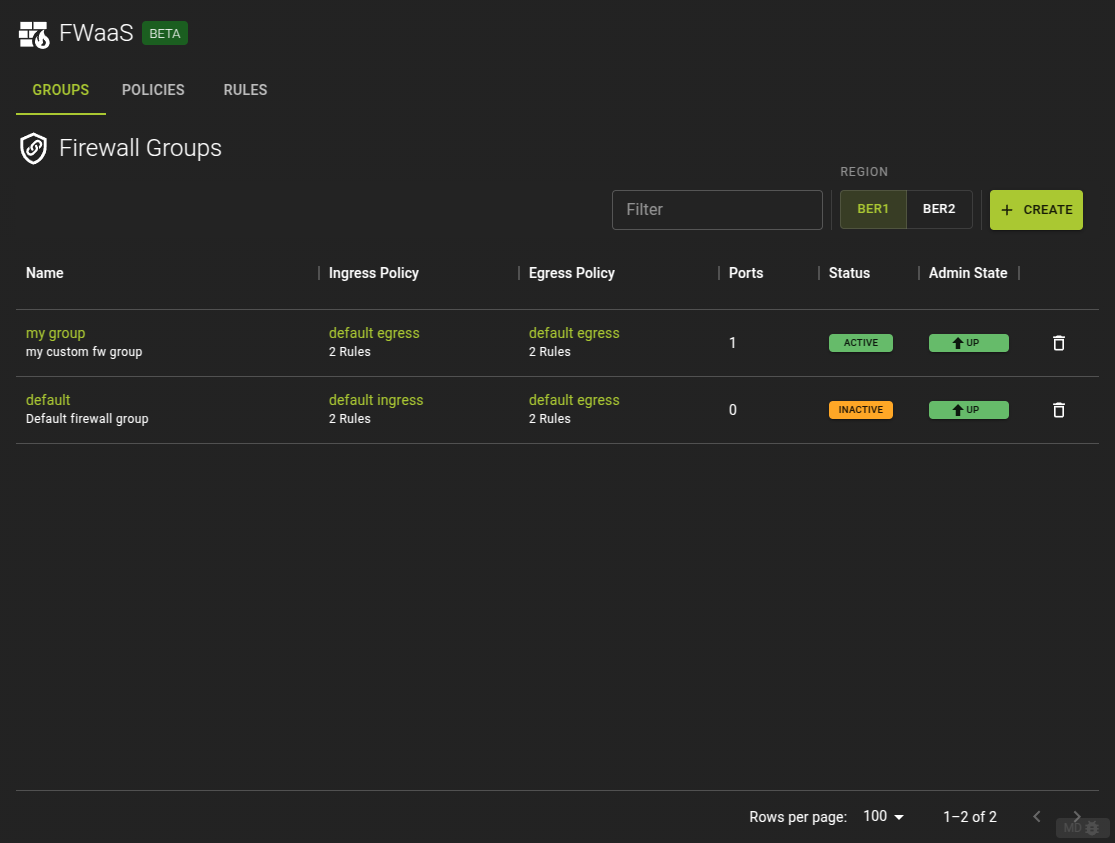
Here you will find all Firewall groups currently defined and you can
- Navigate to a groups details by clicking its name in the list
- Delete a firewall group by clicking the icon
Usage
openstack firewall group list
Output
+--------------------------------------+---------+--------------------------------------+--------------------------------------+
| ID                                   | Name    | Ingress Policy ID                    | Egress Policy ID                     |
+--------------------------------------+---------+--------------------------------------+--------------------------------------+
| 4bb05dc6-f089-4195-9e9b-2375d44cbd97 | default | 4342afee-e334-42ec-b460-46f389b7d1ae | f0d1a962-bf12-45dd-9c48-4eae81a593db |
+--------------------------------------+---------+--------------------------------------+--------------------------------------+
Create Firewall Group
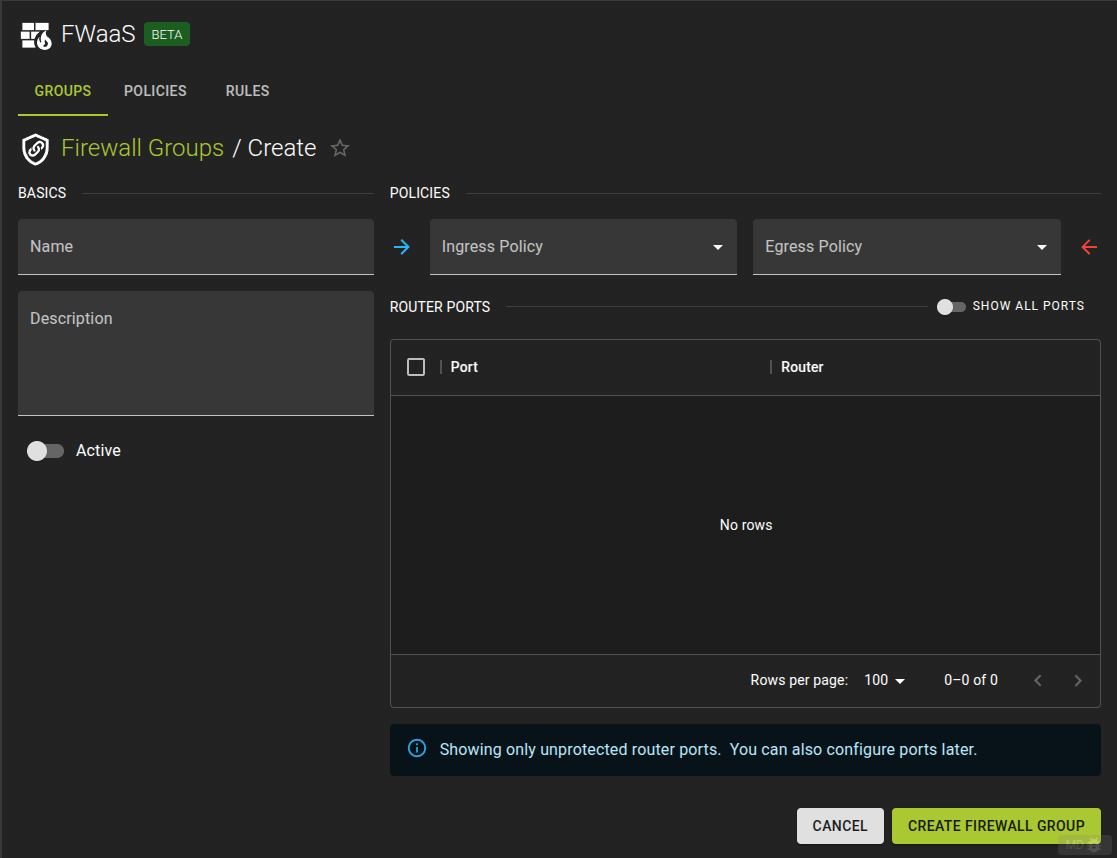 To create a new Firewall Group click the Create button on the list view
- Name the group
- Add an optional description
- Select a Policy for ingress and egress traffic
- Select the ports to be protected by the firewall group
- Complete the operation by clicking the Create Firewall Group button.
Usage
openstack firewall group create [-h] [-f {json,shell,table,value,yaml}] [-c COLUMN] [--noindent] [--prefix PREFIX]
                                [--max-width <integer>] [--fit-width] [--print-empty] [--name NAME]
                                [--description <description>]
                                [--ingress-firewall-policy <ingress-firewall-policy> | --no-ingress-firewall-policy]
                                [--egress-firewall-policy <egress-firewall-policy> | --no-egress-firewall-policy]
                                [--share | --no-share] [--enable | --disable]
                                [--port <port> | --no-port]
-h,--help: Show help message and exit--name: Name for the firewall group--description: Description of the firewall group--ingress-firewall-policy: Ingress firewall policy (name or ID)--no-ingress-firewall-policy: Detach ingress firewall policy from the firewall group--egress-firewall-policy: Egress firewall policy (name or ID)--no-egress-firewall-policy: Detach egress firewall policy from the firewall group--share: Share the firewall group to be used in all projects (by default, it is restricted to be used by the current project).--no-share: Restrict use of the firewall group to the current project--enable: Enable firewall group--disable: Disable firewall group--port: Port(s) (name or ID) to apply firewall group. This option can be repeated.--no-port: Detach all port from the firewall group
Example
openstack firewall group create --name firewall_group \
                                --ingress-firewall-policy policy_ingress \
                                --egress-firewall-policy policy_egress
Output
+-------------------+--------------------------------------+
| Field             | Value                                |
+-------------------+--------------------------------------+
| Description       |                                      |
| Egress Policy ID  | 565825d6-351b-47cb-8099-de51e5841099 |
| ID                | 6844e39d-8701-4343-b94e-61c8db07ecd6 |
| Ingress Policy ID | 337c8751-f543-4a83-a972-840807493910 |
| Name              | firewall_group                       |
| Ports             | []                                   |
| Project           | 7c84018c4ae842259f6a58303635e665     |
| Shared            | False                                |
| State             | UP                                   |
| Status            | INACTIVE                             |
| project_id        | 7c84018c4ae842259f6a58303635e665     |
+-------------------+--------------------------------------+
View and Modify Firewall Group
To view and modify a firewall group navigate to its detail page by clicking its name in the list of groups.
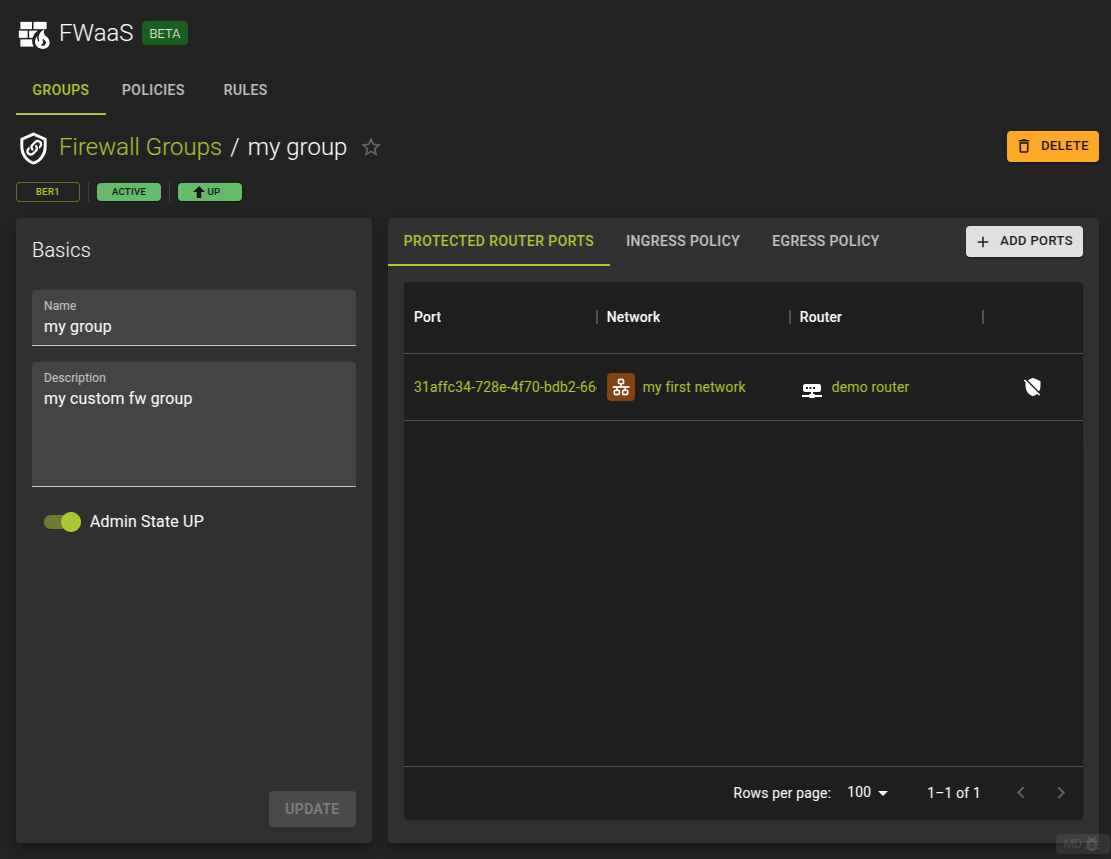
On the detail page you can
- Modify direct properties of the firewall groups such as name and description
- Activate / Deactivate the firewall group
- Control which router ports are protected by the firewall group
- View and change the policies for ingress and egress traffic
Usage
openstack firewall group set [-h] [-f {json,shell,table,value,yaml}] [-c COLUMN] [--noindent] [--prefix PREFIX]
                                [--max-width <integer>] [--fit-width] [--print-empty] [--name NAME]
                                [--description <description>]
                                [--ingress-firewall-policy <ingress-firewall-policy> | --no-ingress-firewall-policy]
                                [--egress-firewall-policy <egress-firewall-policy> | --no-egress-firewall-policy]
                                [--share | --no-share] [--enable | --disable]
                                [--port <port> | --no-port]
-h,--help: Show help message and exit--name: Name for the firewall group--description: Description of the firewall group--ingress-firewall-policy: Ingress firewall policy (name or ID)--no-ingress-firewall-policy: Detach ingress firewall policy from the firewall group--egress-firewall-policy: Egress firewall policy (name or ID)--no-egress-firewall-policy: Detach egress firewall policy from the firewall group--share: Share the firewall group to be used in all projects (by default, it is restricted to be used by the current project).--no-share: Restrict use of the firewall group to the current project--enable: Enable firewall group--disable: Disable firewall group--port: Port(s) (name or ID) to apply firewall group. This option can be repeated.--no-port: Detach all port from the firewall group
Example
resource "openstack_fw_group_v2" "group_1" {
  name                       = "firewall_group"
  ingress_firewall_policy_id = openstack_fw_policy_v2.policy_1.id
  egress_firewall_policy_id  = openstack_fw_policy_v2.policy_2.id
}
Arguments
name: Name for the firewall groupdescription: Description of the firewall groupingress_firewall_policy_id: Ingress firewall policy (name or ID)egress_firewall_policy_id: Egress firewall policy (name or ID)shared: Set totrueto share the firewall group to be used in all projects, set tofalse(default) so it is restricted to be used by the current project.admin_state_up: Administrative state up/down status of the firewall group. Set totrue(default) orfalseports: Array of router port IDs to associate the firewall group to
Manage Protected Router Ports
You can manage the ports that are protected by the firewall group by switching to the Ports tab in the details page of the fireall group details.
Add a Port
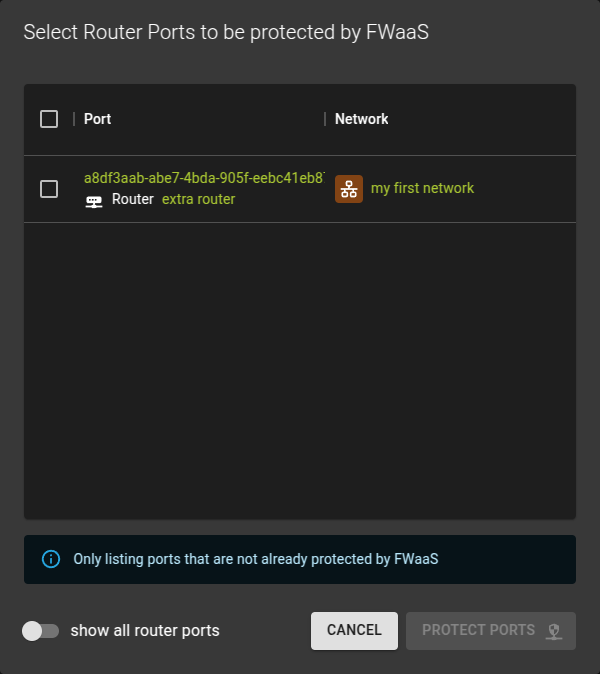
Add a port for protection by the firewall group by clicking the Add Ports button.
In the emerging dialog simply - Check the ports to be protected - Click Protect Ports to complete the operation
Remove a Port
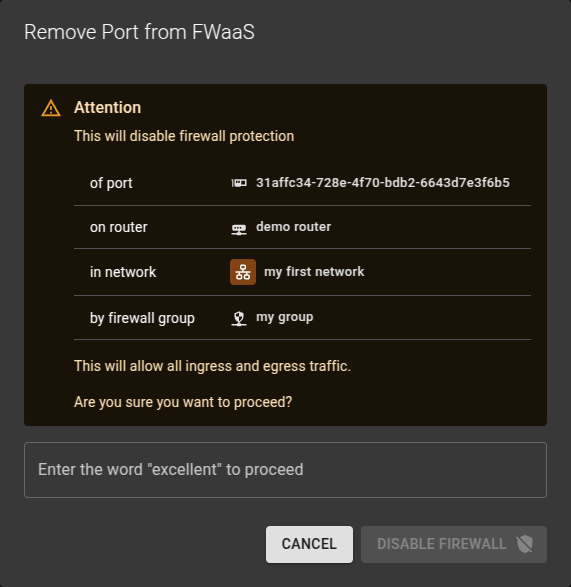
To stop protecting a port by the firewall group
- Click on the icon
- Confirm the operation in the emerging prompt
Firewall groups can be associated with router ports.
To list router ports:
openstack port list --router router_name_or_id

+--------------------------------------+------+-------------------+----------------------------------------------------------------------------+--------+
| ID                                   | Name | MAC Address       | Fixed IP Addresses                                                         | Status |
+--------------------------------------+------+-------------------+----------------------------------------------------------------------------+--------+
| 9477dc21-eb8f-4823-9c83-2a4d371576df |      | fa:16:3e:63:9f:9e | ip_address='192.168.1.1', subnet_id='77ec9f92-404f-4988-942a-90527581d2ad' | ACTIVE |
| cf49f4d9-8a96-4967-9195-bce6f66d04a1 |      | fa:16:3e:ed:b8:35 | ip_address='192.168.2.1', subnet_id='7ba3ea5f-7cdf-403f-bbc9-ff50b7a20e07' | ACTIVE |
+--------------------------------------+------+-------------------+----------------------------------------------------------------------------+--------+
Add a router port to a firewall group with an update to the group. In the CLI command the --port option can be repeated to add multiple ports at once.
openstack firewall group set <firewall-group> --port <port>
Example
openstack firewall group set firewall_group --port 9477dc21-eb8f-4823-9c83-2a4d371576df --port cf49f4d9-8a96-4967-9195-bce6f66d04a1
Remove a port from the firewall group using the unset subcommand:
openstack firewall group unset <firewall-group> --port <port>
Remove all ports from the firewall group:
openstack firewall group set <firewall-group> --no-port
Assuming there are two subnets attached to a router like so
resource "openstack_networking_router_interface_v2" "router_interface_1" {
    router_id = openstack_networking_router_v2.router.id
    subnet_id = openstack_networking_subnet_v2.subnet_1.id
}

resource "openstack_networking_router_interface_v2" "router_interface_2" {
    router_id = openstack_networking_router_v2.router.id
    subnet_id = openstack_networking_subnet_v2.subnet_2.id
}
Example to set up the firewall group to apply to the two ports:
resource "openstack_fw_group_v2" "group_1" {
  name                       = "firewall_group"
  ingress_firewall_policy_id = openstack_fw_policy_v2.policy_1.id
  egress_firewall_policy_id  = openstack_fw_policy_v2.policy_2.id
  ports = [
    openstack_networking_router_interface_v2.router_interface_1.id,
    openstack_networking_router_interface_v2.router_interface_2.id,
  ]
}
The ports argument must always be the full list of ports the firewall shall be associated with. To remove all ports set ports = [].
View and Change Policy
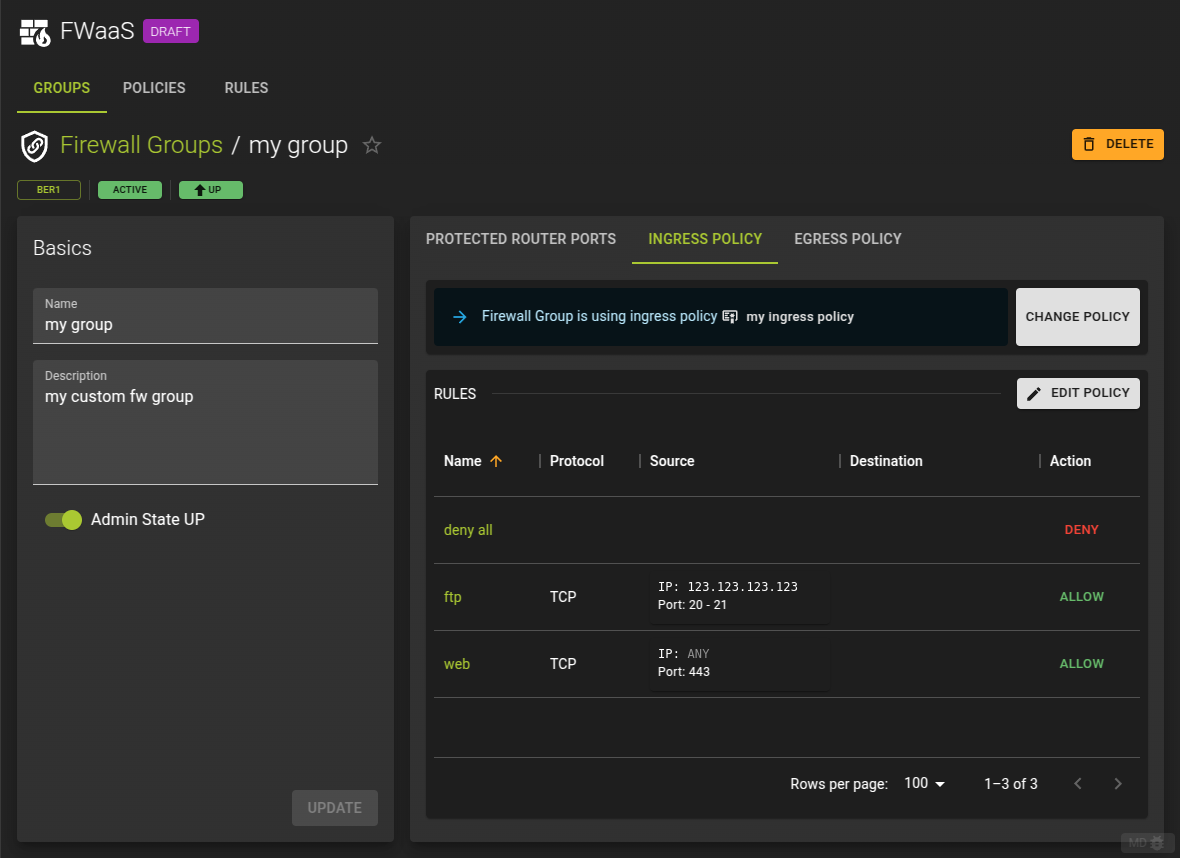
To view and modify the policy for ingress and egress traffic switch to the Ingress Policy or Egress Policy tab on the details page of the firewall group
Change Policy
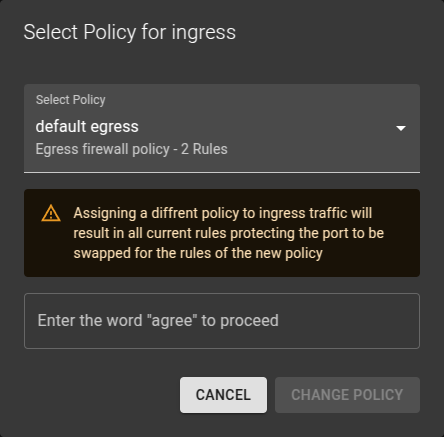
- Click the Change Policy button
- In the emerging dialog
- Select the new policy
- Enter the requested word for confirmation
- Click the Change Policy button to complete
Edit Policy
To edit a policy click on the Edit Policy button.This will navigate you to the details page of the policy where you can edit the policy as needed.
Usage
openstack firewall group set [-h] [-f {json,shell,table,value,yaml}] [-c COLUMN] [--noindent] [--prefix PREFIX]
                                [--max-width <integer>] [--fit-width] [--print-empty] [--name NAME]
                                [--description <description>]
                                [--ingress-firewall-policy <ingress-firewall-policy> | --no-ingress-firewall-policy]
                                [--egress-firewall-policy <egress-firewall-policy> | --no-egress-firewall-policy]
                                [--share | --no-share] [--enable | --disable]
                                [--port <port> | --no-port]
-h,--help: Show help message and exit--name: Name for the firewall group--description: Description of the firewall group--ingress-firewall-policy: Ingress firewall policy (name or ID)--no-ingress-firewall-policy: Detach ingress firewall policy from the firewall group--egress-firewall-policy: Egress firewall policy (name or ID)--no-egress-firewall-policy: Detach egress firewall policy from the firewall group--share: Share the firewall group to be used in all projects (by default, it is restricted to be used by the current project).--no-share: Restrict use of the firewall group to the current project--enable: Enable firewall group--disable: Disable firewall group--port: Port(s) (name or ID) to apply firewall group. This option can be repeated.--no-port: Detach all port from the firewall group
Example
resource "openstack_fw_group_v2" "group_1" {
  name                       = "firewall_group"
  ingress_firewall_policy_id = openstack_fw_policy_v2.policy_1.id
  egress_firewall_policy_id  = openstack_fw_policy_v2.policy_2.id
}
Arguments
name: Name for the firewall groupdescription: Description of the firewall groupingress_firewall_policy_id: Ingress firewall policy (name or ID)egress_firewall_policy_id: Egress firewall policy (name or ID)shared: Set totrueto share the firewall group to be used in all projects, set tofalse(default) so it is restricted to be used by the current project.admin_state_up: Administrative state up/down status of the firewall group. Set totrue(default) orfalseports: Array of router port IDs to associate the firewall group to
Delete Firewall Group
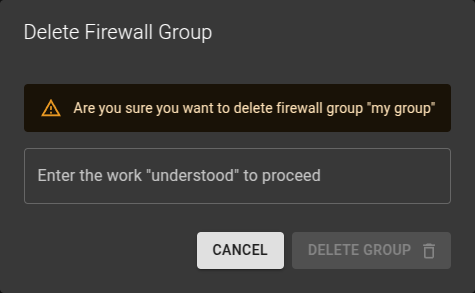
To delete a firewall group
- Either click on the icon at the end of a row in the firewall groups list
- Or click the delete group button on a firewall groups detail page.
Confirm the deletion in the emerging dialog.
Usage
openstack firewall group delete <firewall-group> [<firewall-group> ...]
<firewall-group>: Firewall group(s) to delete (name or ID)
Firewall Policies
A firewall policy consists of an ordered list of rules that describe what kind of packets are allowed or denied.
List Firewall Policies
To list all Firewall Policies select the Policies tab.
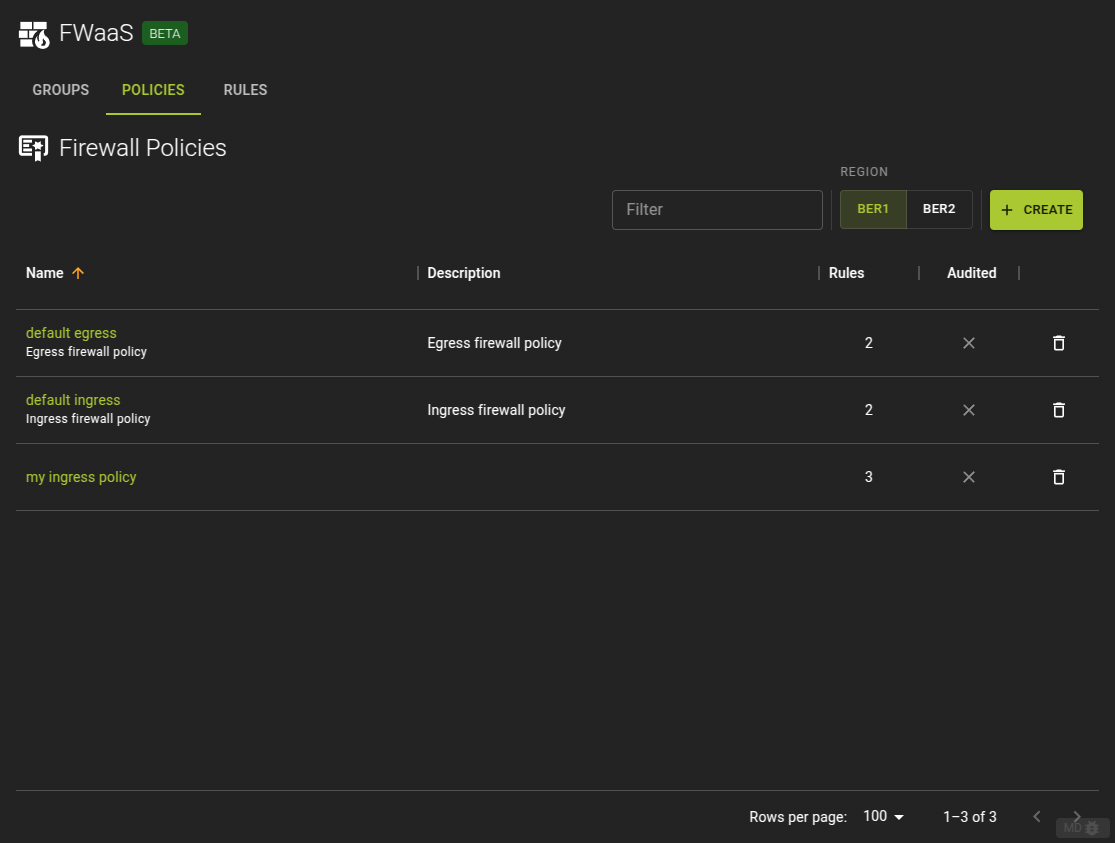
From here you can
- Navigate to the details page of a policy by clicking its name in the list
- Delete a firewall policy by clicking the icon at the end of each row.
Usage
openstack firewall group policy list
Output
+--------------------------------------+-----------------+----------------------------------------------------------------------------------+
| ID                                   | Name            | Firewall Rules                                                                   |
+--------------------------------------+-----------------+----------------------------------------------------------------------------------+
| 4342afee-e334-42ec-b460-46f389b7d1ae | default ingress | ['e5ee00be-4412-4ab0-ac3c-83290ae6801b', '1fb32784-c7b5-4555-8237-d9c762723a26'] |
| f0d1a962-bf12-45dd-9c48-4eae81a593db | default egress  | ['7bf679c7-a3aa-4e91-b1be-ae7723ec184c', '1e822429-eb95-4575-8bd9-dd8ddf1f0b44'] |
+--------------------------------------+-----------------+----------------------------------------------------------------------------------+
Create Firewall Policy
To create a firewall policy click on the create button in the list view.
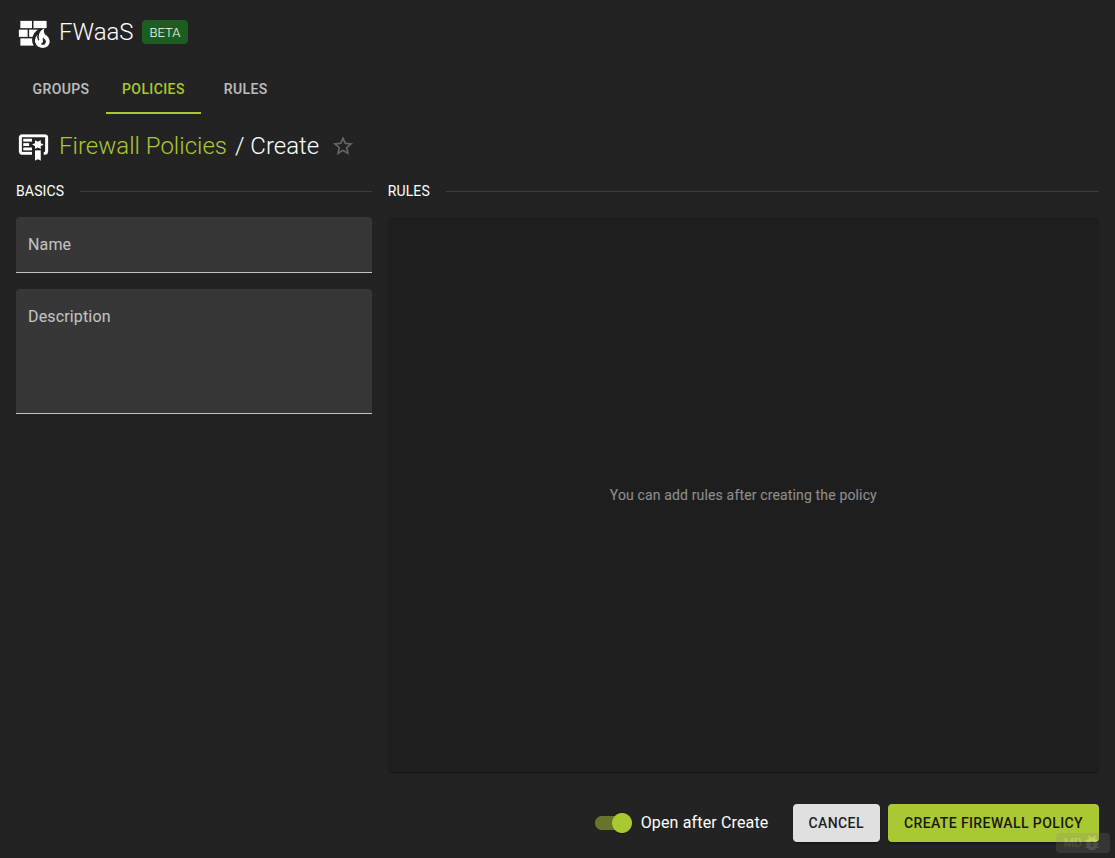
- Provide a name and an optional description
- Complete the operation by click the create button
Note
The policy will initially not contain any rules but you can add them as soon as the policy is created from the policies detail page.
Usage
openstack firewall group policy create [-h] [-f {json,shell,table,value,yaml}] [-c COLUMN] [--noindent]
                                       [--prefix PREFIX] [--max-width <integer>] [--fit-width] [--print-empty]
                                       [--description DESCRIPTION] [--audited | --no-audited] [--share | --no-share]
                                       [--firewall-rule <firewall-rule> | --no-firewall-rule]
                                       <name>
-h,--help: Show help message and exit--description: Description of the firewall policy--audited: Enable auditing for the policy--no-audited: Disable auditing for the policy--share: Share the firewall policy to be used in all projects (by default, it is restricted to be used by the current project).--no-share: Restrict use of the firewall policy to the current project--firewall-rule: Firewall rule to apply (name or ID). Can be repeated. The order is important.--no-firewall-rule: Unset all firewall rules from firewall policy
Add a rule
openstack firewall group policy add rule [-h] [--insert-before <firewall-rule>] [--insert-after <firewall-rule>]
                                         <firewall-policy> <firewall-rule>
-h,--help: Show help message and exit--insert-before: Insert the new rule before this existing rule (name or ID)--insert-after: Insert the new rule after this existing rule (name or ID)
Remove a rule
openstack firewall group policy remove rule [-h] <firewall-policy> <firewall-rule>
Example
openstack firewall group policy create policy_ingress \
                                       --firewall-rule rule_allow_ssh_in_ipv4 \
                                       --firewall-rule rule_deny_ipv4

openstack firewall group policy add rule policy_ingress rule_allow_icmp --insert-before rule_deny_ipv4

openstack firewall group policy show policy_ingress
Output
+----------------+----------------------------------------------------------------------------------+
| Field          | Value                                                                            |
+----------------+----------------------------------------------------------------------------------+
| Audited        | False                                                                            |
| Description    |                                                                                  |
| Firewall Rules | ['f488213a-8fea-4909-99fe-ac17eee7dfdc', 'fba21759-fbed-4175-a9e6-d8bd1b31f3da'] |
| ID             | 337c8751-f543-4a83-a972-840807493910                                             |
| Name           | policy_ingress                                                                   |
| Project        | 7c84018c4ae842259f6a58303635e665                                                 |
| Shared         | False                                                                            |
| project_id     | 7c84018c4ae842259f6a58303635e665                                                 |
+----------------+----------------------------------------------------------------------------------+

Inserted firewall rule 43d5addc-0ae7-4b6b-8181-24cd6b48e6dd in firewall policy policy_ingress

+----------------+--------------------------------------------------------------------------------------------------------------------------+
| Field          | Value                                                                                                                    |
+----------------+--------------------------------------------------------------------------------------------------------------------------+
| Audited        | False                                                                                                                    |
| Description    |                                                                                                                          |
| Firewall Rules | ['f488213a-8fea-4909-99fe-ac17eee7dfdc', '43d5addc-0ae7-4b6b-8181-24cd6b48e6dd', 'fba21759-fbed-4175-a9e6-d8bd1b31f3da'] |
| ID             | 337c8751-f543-4a83-a972-840807493910                                                                                     |
| Name           | policy_ingress                                                                                                           |
| Project        | 7c84018c4ae842259f6a58303635e665                                                                                         |
| Shared         | False                                                                                                                    |
| project_id     | 7c84018c4ae842259f6a58303635e665                                                                                         |
+----------------+--------------------------------------------------------------------------------------------------------------------------+
Example
resource "openstack_fw_rule_v2" "rule_1" {
  name             = "rule_allow_ssh_in_ipv4"
  description      = "Allow SSH"
  action           = "allow"
  protocol         = "tcp"
  destination_port = "22"
}

resource "openstack_fw_rule_v2" "rule_2" {
  name             = "rule_deny_ipv4"
  description      = "drop all IPv4"
  action           = "deny"
  protocol         = "any"
}

resource "openstack_fw_policy_v2" "policy_ingress" {
  name = "policy_ingress"

  rules = [
    openstack_fw_rule_v2.rule_1.id,
    openstack_fw_rule_v2.rule_2.id,
  ]
}
Arguments
description: Description of the firewall policyaudited: Set totrueto enable auditing for the policy, set tofalse(default) to disable auditingshared: Set totrueto share the firewall policy to be used in all projects, set tofalse(default) so it is restricted to be used by the current project.rules: Array of firewall group rule IDs. The order is important.
View and Modify Firewall Policy
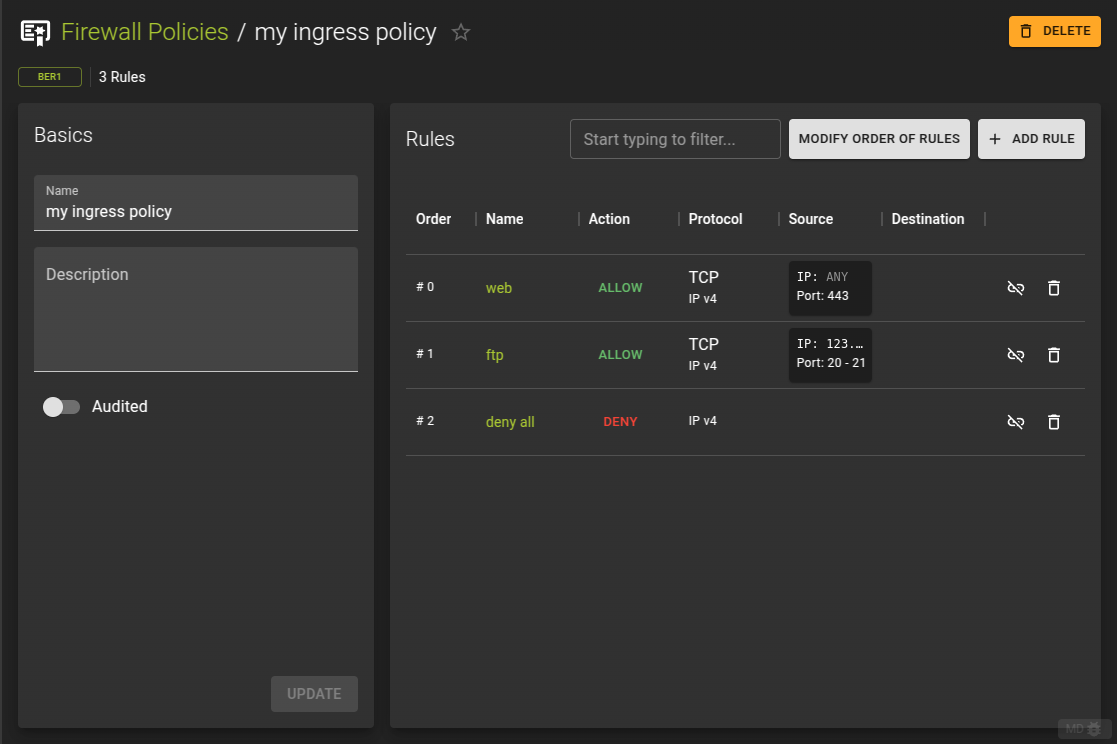
to view a policy and modify its properties and contained rules navigate to the details page of the firewall policy by clicking its name from the list view.
The details view allows you to
- Change the name and description of the policy
- Add and remove rules
- Change the order of the rules
Usage
openstack firewall group policy create [-h] [-f {json,shell,table,value,yaml}] [-c COLUMN] [--noindent]
                                       [--prefix PREFIX] [--max-width <integer>] [--fit-width] [--print-empty]
                                       [--description DESCRIPTION] [--audited | --no-audited] [--share | --no-share]
                                       [--firewall-rule <firewall-rule> | --no-firewall-rule]
                                       <name>
-h,--help: Show help message and exit--description: Description of the firewall policy--audited: Enable auditing for the policy--no-audited: Disable auditing for the policy--share: Share the firewall policy to be used in all projects (by default, it is restricted to be used by the current project).--no-share: Restrict use of the firewall policy to the current project--firewall-rule: Firewall rule to apply (name or ID). Can be repeated. The order is important.--no-firewall-rule: Unset all firewall rules from firewall policy
Add a rule
openstack firewall group policy add rule [-h] [--insert-before <firewall-rule>] [--insert-after <firewall-rule>]
                                         <firewall-policy> <firewall-rule>
-h,--help: Show help message and exit--insert-before: Insert the new rule before this existing rule (name or ID)--insert-after: Insert the new rule after this existing rule (name or ID)
Remove a rule
openstack firewall group policy remove rule [-h] <firewall-policy> <firewall-rule>
Example
openstack firewall group policy create policy_ingress \
                                       --firewall-rule rule_allow_ssh_in_ipv4 \
                                       --firewall-rule rule_deny_ipv4

openstack firewall group policy add rule policy_ingress rule_allow_icmp --insert-before rule_deny_ipv4

openstack firewall group policy show policy_ingress
Output
+----------------+----------------------------------------------------------------------------------+
| Field          | Value                                                                            |
+----------------+----------------------------------------------------------------------------------+
| Audited        | False                                                                            |
| Description    |                                                                                  |
| Firewall Rules | ['f488213a-8fea-4909-99fe-ac17eee7dfdc', 'fba21759-fbed-4175-a9e6-d8bd1b31f3da'] |
| ID             | 337c8751-f543-4a83-a972-840807493910                                             |
| Name           | policy_ingress                                                                   |
| Project        | 7c84018c4ae842259f6a58303635e665                                                 |
| Shared         | False                                                                            |
| project_id     | 7c84018c4ae842259f6a58303635e665                                                 |
+----------------+----------------------------------------------------------------------------------+

Inserted firewall rule 43d5addc-0ae7-4b6b-8181-24cd6b48e6dd in firewall policy policy_ingress

+----------------+--------------------------------------------------------------------------------------------------------------------------+
| Field          | Value                                                                                                                    |
+----------------+--------------------------------------------------------------------------------------------------------------------------+
| Audited        | False                                                                                                                    |
| Description    |                                                                                                                          |
| Firewall Rules | ['f488213a-8fea-4909-99fe-ac17eee7dfdc', '43d5addc-0ae7-4b6b-8181-24cd6b48e6dd', 'fba21759-fbed-4175-a9e6-d8bd1b31f3da'] |
| ID             | 337c8751-f543-4a83-a972-840807493910                                                                                     |
| Name           | policy_ingress                                                                                                           |
| Project        | 7c84018c4ae842259f6a58303635e665                                                                                         |
| Shared         | False                                                                                                                    |
| project_id     | 7c84018c4ae842259f6a58303635e665                                                                                         |
+----------------+--------------------------------------------------------------------------------------------------------------------------+
Example
resource "openstack_fw_rule_v2" "rule_1" {
  name             = "rule_allow_ssh_in_ipv4"
  description      = "Allow SSH"
  action           = "allow"
  protocol         = "tcp"
  destination_port = "22"
}

resource "openstack_fw_rule_v2" "rule_2" {
  name             = "rule_deny_ipv4"
  description      = "drop all IPv4"
  action           = "deny"
  protocol         = "any"
}

resource "openstack_fw_policy_v2" "policy_ingress" {
  name = "policy_ingress"

  rules = [
    openstack_fw_rule_v2.rule_1.id,
    openstack_fw_rule_v2.rule_2.id,
  ]
}
Arguments
description: Description of the firewall policyaudited: Set totrueto enable auditing for the policy, set tofalse(default) to disable auditingshared: Set totrueto share the firewall policy to be used in all projects, set tofalse(default) so it is restricted to be used by the current project.rules: Array of firewall group rule IDs. The order is important.
Add Rule to Firewall Policy
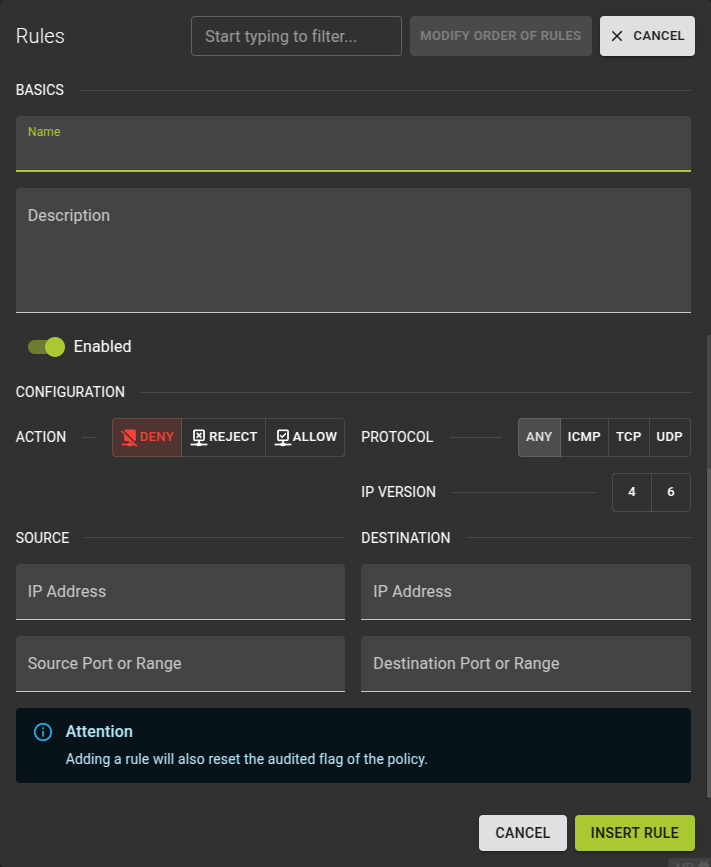 To add a rule to a firewall policy click on the Add Rule button in rules section of the details page.
Name: Naming your rule may help identifying its purpose laterDescription: an optional descriptionEnabled: Controls whether the rule will be in effect or notAction: Defines how the matching packet will be handled.Protocol: Defines what protocol to match. Also mandatory when providing a source / destination portIP Version: Version of IP protocol. Should match the type of the source / destination addresses if providedSource IP: IP Address of the sourceSource Port (or Range): The port or port range of the source. Leave blank for all ports, add a single port or a range by providing 2 ports.Destination IP: IP Address of the destinationDestination Port (or Range): The port or port range of the source. Leave blank for all ports, add a single port or a range by providing 2 ports.
Usage
openstack firewall group policy create [-h] [-f {json,shell,table,value,yaml}] [-c COLUMN] [--noindent]
                                       [--prefix PREFIX] [--max-width <integer>] [--fit-width] [--print-empty]
                                       [--description DESCRIPTION] [--audited | --no-audited] [--share | --no-share]
                                       [--firewall-rule <firewall-rule> | --no-firewall-rule]
                                       <name>
-h,--help: Show help message and exit--description: Description of the firewall policy--audited: Enable auditing for the policy--no-audited: Disable auditing for the policy--share: Share the firewall policy to be used in all projects (by default, it is restricted to be used by the current project).--no-share: Restrict use of the firewall policy to the current project--firewall-rule: Firewall rule to apply (name or ID). Can be repeated. The order is important.--no-firewall-rule: Unset all firewall rules from firewall policy
Add a rule
openstack firewall group policy add rule [-h] [--insert-before <firewall-rule>] [--insert-after <firewall-rule>]
                                         <firewall-policy> <firewall-rule>
-h,--help: Show help message and exit--insert-before: Insert the new rule before this existing rule (name or ID)--insert-after: Insert the new rule after this existing rule (name or ID)
Remove a rule
openstack firewall group policy remove rule [-h] <firewall-policy> <firewall-rule>
Example
openstack firewall group policy create policy_ingress \
                                       --firewall-rule rule_allow_ssh_in_ipv4 \
                                       --firewall-rule rule_deny_ipv4

openstack firewall group policy add rule policy_ingress rule_allow_icmp --insert-before rule_deny_ipv4

openstack firewall group policy show policy_ingress
Output
+----------------+----------------------------------------------------------------------------------+
| Field          | Value                                                                            |
+----------------+----------------------------------------------------------------------------------+
| Audited        | False                                                                            |
| Description    |                                                                                  |
| Firewall Rules | ['f488213a-8fea-4909-99fe-ac17eee7dfdc', 'fba21759-fbed-4175-a9e6-d8bd1b31f3da'] |
| ID             | 337c8751-f543-4a83-a972-840807493910                                             |
| Name           | policy_ingress                                                                   |
| Project        | 7c84018c4ae842259f6a58303635e665                                                 |
| Shared         | False                                                                            |
| project_id     | 7c84018c4ae842259f6a58303635e665                                                 |
+----------------+----------------------------------------------------------------------------------+

Inserted firewall rule 43d5addc-0ae7-4b6b-8181-24cd6b48e6dd in firewall policy policy_ingress

+----------------+--------------------------------------------------------------------------------------------------------------------------+
| Field          | Value                                                                                                                    |
+----------------+--------------------------------------------------------------------------------------------------------------------------+
| Audited        | False                                                                                                                    |
| Description    |                                                                                                                          |
| Firewall Rules | ['f488213a-8fea-4909-99fe-ac17eee7dfdc', '43d5addc-0ae7-4b6b-8181-24cd6b48e6dd', 'fba21759-fbed-4175-a9e6-d8bd1b31f3da'] |
| ID             | 337c8751-f543-4a83-a972-840807493910                                                                                     |
| Name           | policy_ingress                                                                                                           |
| Project        | 7c84018c4ae842259f6a58303635e665                                                                                         |
| Shared         | False                                                                                                                    |
| project_id     | 7c84018c4ae842259f6a58303635e665                                                                                         |
+----------------+--------------------------------------------------------------------------------------------------------------------------+
Example
resource "openstack_fw_rule_v2" "rule_1" {
  name             = "rule_allow_ssh_in_ipv4"
  description      = "Allow SSH"
  action           = "allow"
  protocol         = "tcp"
  destination_port = "22"
}

resource "openstack_fw_rule_v2" "rule_2" {
  name             = "rule_deny_ipv4"
  description      = "drop all IPv4"
  action           = "deny"
  protocol         = "any"
}

resource "openstack_fw_policy_v2" "policy_ingress" {
  name = "policy_ingress"

  rules = [
    openstack_fw_rule_v2.rule_1.id,
    openstack_fw_rule_v2.rule_2.id,
  ]
}
Arguments
description: Description of the firewall policyaudited: Set totrueto enable auditing for the policy, set tofalse(default) to disable auditingshared: Set totrueto share the firewall policy to be used in all projects, set tofalse(default) so it is restricted to be used by the current project.rules: Array of firewall group rule IDs. The order is important.
Remove Firewall Rule from Policy
To remove a rule from a policy can be achieved in two ways.
- Either by deleting the rule entirely
- Or by dissociating the rule from the policy allowing you to reassign it later.
Delete Firewall Rule
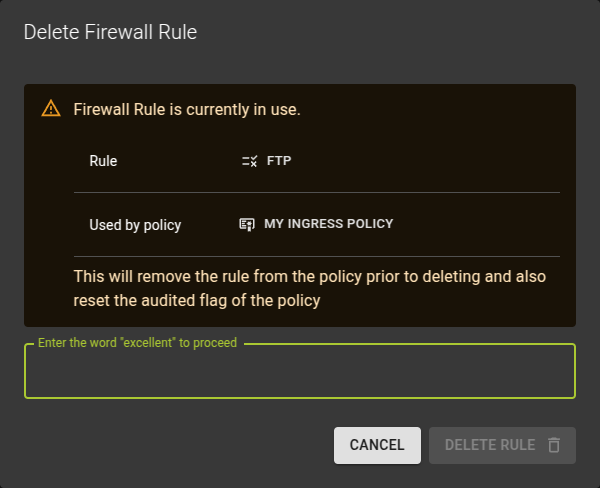
You can delete a firewall rule by:
- Either clicking on the icon at the end of each row in the list
- Or by clicking on the delete button on the details page of a rule.
Unlink Firewall Rule
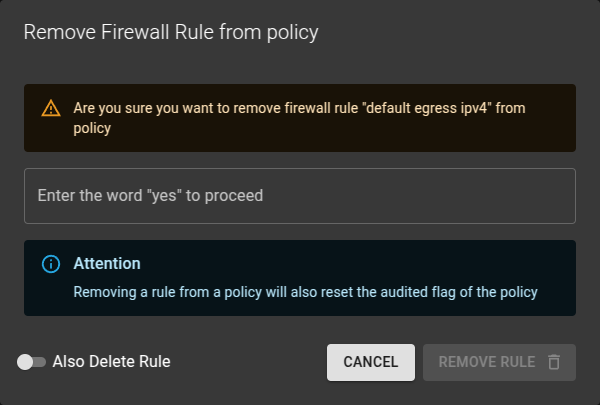
You can unlink a firewall rule by:
- Either clicking on the icon at the end of each row in the list
- Or by clicking on the unlink from policy button on the details page of a rule.
Usage
openstack firewall group policy create [-h] [-f {json,shell,table,value,yaml}] [-c COLUMN] [--noindent]
                                       [--prefix PREFIX] [--max-width <integer>] [--fit-width] [--print-empty]
                                       [--description DESCRIPTION] [--audited | --no-audited] [--share | --no-share]
                                       [--firewall-rule <firewall-rule> | --no-firewall-rule]
                                       <name>
-h,--help: Show help message and exit--description: Description of the firewall policy--audited: Enable auditing for the policy--no-audited: Disable auditing for the policy--share: Share the firewall policy to be used in all projects (by default, it is restricted to be used by the current project).--no-share: Restrict use of the firewall policy to the current project--firewall-rule: Firewall rule to apply (name or ID). Can be repeated. The order is important.--no-firewall-rule: Unset all firewall rules from firewall policy
Add a rule
openstack firewall group policy add rule [-h] [--insert-before <firewall-rule>] [--insert-after <firewall-rule>]
                                         <firewall-policy> <firewall-rule>
-h,--help: Show help message and exit--insert-before: Insert the new rule before this existing rule (name or ID)--insert-after: Insert the new rule after this existing rule (name or ID)
Remove a rule
openstack firewall group policy remove rule [-h] <firewall-policy> <firewall-rule>
Example
openstack firewall group policy create policy_ingress \
                                       --firewall-rule rule_allow_ssh_in_ipv4 \
                                       --firewall-rule rule_deny_ipv4

openstack firewall group policy add rule policy_ingress rule_allow_icmp --insert-before rule_deny_ipv4

openstack firewall group policy show policy_ingress
Output
+----------------+----------------------------------------------------------------------------------+
| Field          | Value                                                                            |
+----------------+----------------------------------------------------------------------------------+
| Audited        | False                                                                            |
| Description    |                                                                                  |
| Firewall Rules | ['f488213a-8fea-4909-99fe-ac17eee7dfdc', 'fba21759-fbed-4175-a9e6-d8bd1b31f3da'] |
| ID             | 337c8751-f543-4a83-a972-840807493910                                             |
| Name           | policy_ingress                                                                   |
| Project        | 7c84018c4ae842259f6a58303635e665                                                 |
| Shared         | False                                                                            |
| project_id     | 7c84018c4ae842259f6a58303635e665                                                 |
+----------------+----------------------------------------------------------------------------------+

Inserted firewall rule 43d5addc-0ae7-4b6b-8181-24cd6b48e6dd in firewall policy policy_ingress

+----------------+--------------------------------------------------------------------------------------------------------------------------+
| Field          | Value                                                                                                                    |
+----------------+--------------------------------------------------------------------------------------------------------------------------+
| Audited        | False                                                                                                                    |
| Description    |                                                                                                                          |
| Firewall Rules | ['f488213a-8fea-4909-99fe-ac17eee7dfdc', '43d5addc-0ae7-4b6b-8181-24cd6b48e6dd', 'fba21759-fbed-4175-a9e6-d8bd1b31f3da'] |
| ID             | 337c8751-f543-4a83-a972-840807493910                                                                                     |
| Name           | policy_ingress                                                                                                           |
| Project        | 7c84018c4ae842259f6a58303635e665                                                                                         |
| Shared         | False                                                                                                                    |
| project_id     | 7c84018c4ae842259f6a58303635e665                                                                                         |
+----------------+--------------------------------------------------------------------------------------------------------------------------+
Example
resource "openstack_fw_rule_v2" "rule_1" {
  name             = "rule_allow_ssh_in_ipv4"
  description      = "Allow SSH"
  action           = "allow"
  protocol         = "tcp"
  destination_port = "22"
}

resource "openstack_fw_rule_v2" "rule_2" {
  name             = "rule_deny_ipv4"
  description      = "drop all IPv4"
  action           = "deny"
  protocol         = "any"
}

resource "openstack_fw_policy_v2" "policy_ingress" {
  name = "policy_ingress"

  rules = [
    openstack_fw_rule_v2.rule_1.id,
    openstack_fw_rule_v2.rule_2.id,
  ]
}
Arguments
description: Description of the firewall policyaudited: Set totrueto enable auditing for the policy, set tofalse(default) to disable auditingshared: Set totrueto share the firewall policy to be used in all projects, set tofalse(default) so it is restricted to be used by the current project.rules: Array of firewall group rule IDs. The order is important.
Modify Firewall Rules Order (Priority)
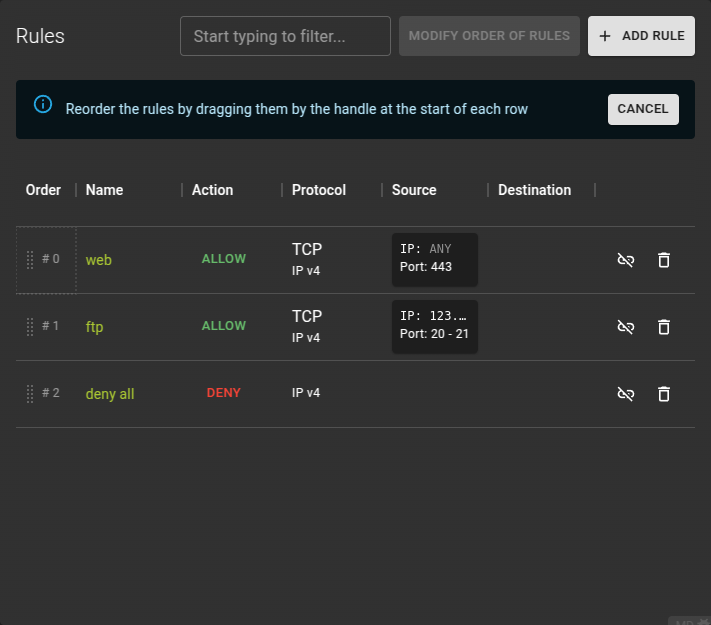
Firewall rules are applied in a specific order. Proper configuration of a Firewall Policy will require that you put the rules in the right order. The order of rules can be changed by clicking the Modify Order of Rules button and entering ordering mode.
Now you can simply drag the rules by their handles and drop them into a new order.
Once you are happy with the new order click the Save new Order button.
Confirm the operation in the emerging confirmation prompt.
Delete Firewall Policy
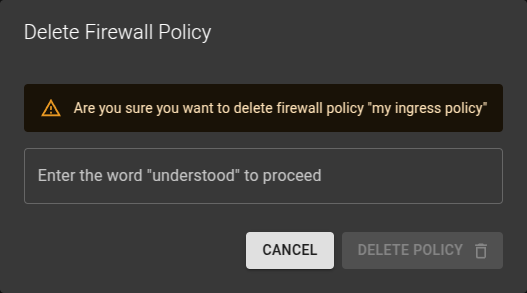 You can delete a Firewall Policy
- From the list view by clicking the icon at the end of a row
- On the details view by clicking the delete button.
Confirm the operation in the emerging prompt.
Usage
openstack firewall group policy delete <firewall-policy>
  [<firewall-policy> ...]
firewall-policy: Firewall policy(s) to delete (name or ID)
Firewall Rules
A firewall rule defines what action to take (allow, deny) for a specific set of packet attributes such as source/destination IP address, source/destination port, IP protocol and IP version.
Note
Note that firewall group rules are implemented as stateless ACLs in the underlying SDN. To allow TCP connections to a certain port two rules are necessary: one for the ingress policy to allow the destination port and one for the egress policy to allow the source port.
List Firewall Rules
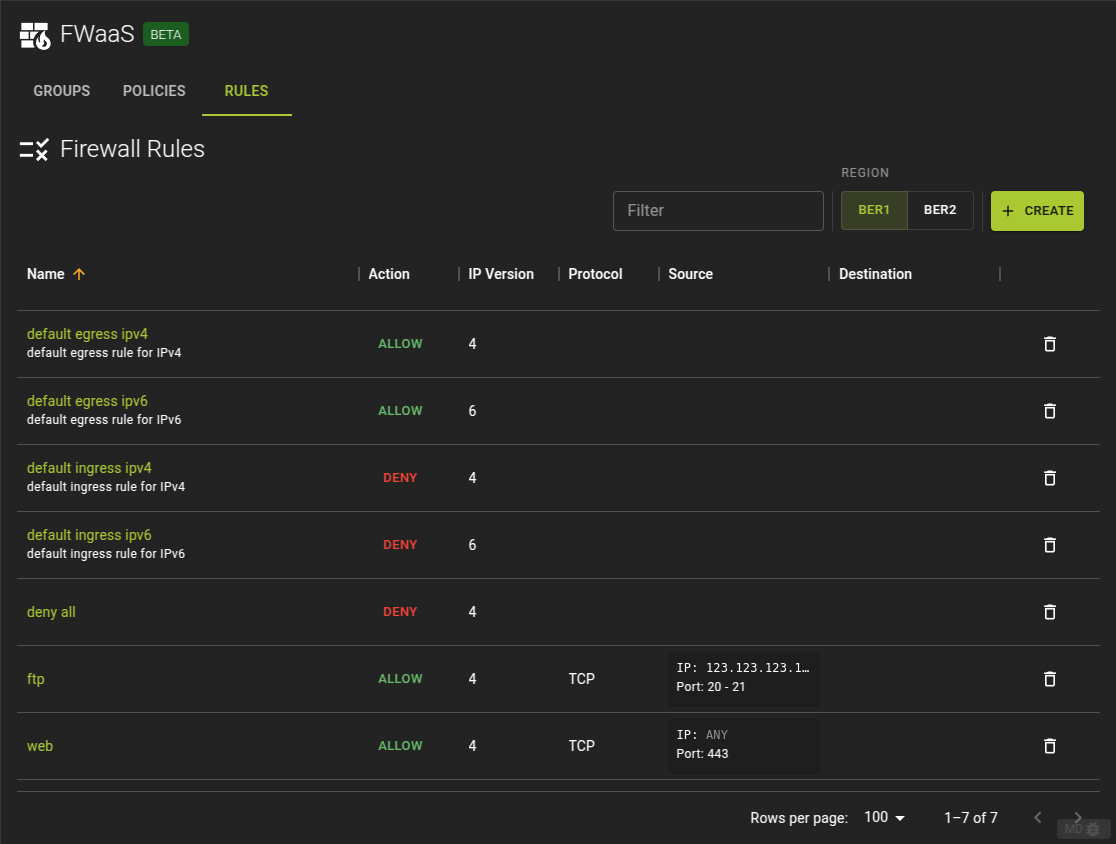
To list all Firewall Rules across all policies switch to the rules tab.
From here you can:
- navigate to the details page of a rule by clicking on its name
- delete a rule by clicking on the icon at the end of a row.
Usage
openstack firewall group rule list
Output
+--------------------------------------+----------------------+---------+------------------------------------------------+
| ID                                   | Name                 | Enabled | Summary                                        |
+--------------------------------------+----------------------+---------+------------------------------------------------+
| 1e822429-eb95-4575-8bd9-dd8ddf1f0b44 | default egress ipv6  | True    | ANY,                                           |
|                                      |                      |         |  source(port): none specified(none specified), |
|                                      |                      |         |  dest(port): none specified(none specified),   |
|                                      |                      |         |  allow                                         |
| 1fb32784-c7b5-4555-8237-d9c762723a26 | default ingress ipv6 | True    | ANY,                                           |
|                                      |                      |         |  source(port): none specified(none specified), |
|                                      |                      |         |  dest(port): none specified(none specified),   |
|                                      |                      |         |  deny                                          |
| 7bf679c7-a3aa-4e91-b1be-ae7723ec184c | default egress ipv4  | True    | ANY,                                           |
|                                      |                      |         |  source(port): none specified(none specified), |
|                                      |                      |         |  dest(port): none specified(none specified),   |
|                                      |                      |         |  allow                                         |
| e5ee00be-4412-4ab0-ac3c-83290ae6801b | default ingress ipv4 | True    | ANY,                                           |
|                                      |                      |         |  source(port): none specified(none specified), |
|                                      |                      |         |  dest(port): none specified(none specified),   |
|                                      |                      |         |  deny                                          |
+--------------------------------------+----------------------+---------+------------------------------------------------+
Create Firewall Rule
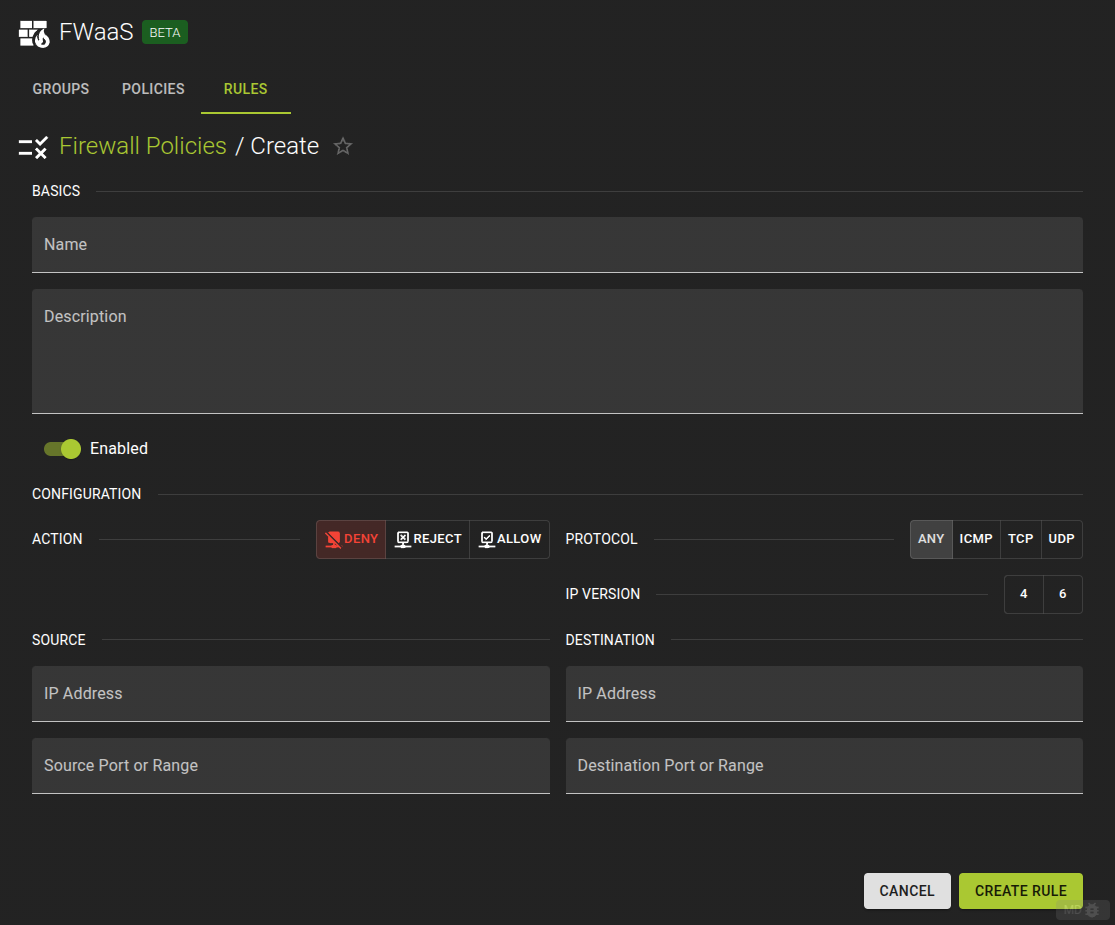
To create a new Firewall Rule click on the create button on the list view.
Name: Naming your rule may help identifying its purpose laterDescription: an optional descriptionEnabled: Controls whether the rule will be in effect or notAction: Defines how the matching packet will be handled.Protocol: Defines what protocol to match. Also mandatory when providing a source / destination portIP Version: Version of IP protocol. Should match the type of the source / destination addresses if providedSource IP: IP Address of the sourceSource Port (or Range): The port or port range of the source. Leave blank for all ports, add a single port or a range by providing 2 ports.Destination IP: IP Address of the destinationDestination Port (or Range): The port or port range of the source. Leave blank for all ports, add a single port or a range by providing 2 ports.
Note
The rule you create will initially not be assigned to any policy and can be assigned later. If you want to create a rule within an existing policy try adding a rule instead
Usage
openstack firewall group rule create [-h] [-f {json,shell,table,value,yaml}] [-c COLUMN] [--noindent]
                                     [--prefix PREFIX] [--max-width <integer>] [--fit-width] [--print-empty]
                                     [--name <name>] [--description <description>] [--protocol {tcp,udp,icmp,any}]
                                     [--action {allow,deny,reject}] [--ip-version <ip-version>]
                                     [--source-ip-address <source-ip-address> | --no-source-ip-address]
                                     [--destination-ip-address <destination-ip-address> | --no-destination-ip-address]
                                     [--source-port <source-port> | --no-source-port]
                                     [--destination-port <destination-port> | --no-destination-port] [--share | --no-share]
                                     [--enable-rule | --disable-rule]
-h,--help: show help message and exit--name: Name of the firewall rule--description: Description of the firewall rule--protocol: Protocol for the firewall rule, one oftcp,udp,icmp,any--action: Action for the firewall rule, one ofallow,deny,reject--ip-version: Set IP version 4 or 6 (default is 4)--source-ip-address: Source IP address or subnet--no-source-ip-address: Detach source IP address--destination-ip-address: Destination IP address or subnet--no-destination-ip-address: Detach destination IP address--source-port: Source port number or range (integer in [1, 65535] or range like 123:456)--no-source-port: Detach source port number or range--destination-port: Destination port number or range (integer in [1, 65535] or range like 123:456)--no-destination-port: Detach destination port number or range--share: Share the firewall rule to be used in all projects (by default, it is restricted to be used by the current project).--no-share: Restrict use of the firewall rule to the current project--enable-rule: Enable this rule (default is enabled)--disable-rule: Disable this rule
Example
openstack firewall group rule create --name rule_allow_ssh_in_ipv4 \
                                     --protocol tcp \
                                     --action allow \
                                     --source-ip-address 195.192.132.0/24 \
                                     --destination-port 22
Output
+------------------------+--------------------------------------+
| Field                  | Value                                |
+------------------------+--------------------------------------+
| Action                 | allow                                |
| Description            |                                      |
| Destination IP Address | None                                 |
| Destination Port       | 22                                   |
| Enabled                | True                                 |
| ID                     | f488213a-8fea-4909-99fe-ac17eee7dfdc |
| IP Version             | 4                                    |
| Name                   | rule_allow_ssh_in_ipv4               |
| Project                | 7c84018c4ae842259f6a58303635e665     |
| Protocol               | tcp                                  |
| Shared                 | False                                |
| Source IP Address      | 195.192.132.0/24                     |
| Source Port            | None                                 |
| firewall_policy_id     | None                                 |
| project_id             | 7c84018c4ae842259f6a58303635e665     |
+------------------------+--------------------------------------+
Example
resource "openstack_fw_rule_v2" "rule_allow_ssh_in_ipv4" {
  name              = "rule_allow_ssh_in_ipv4"
  description       = "Allow SSH"
  action            = "allow"
  protocol          = "tcp"
  destination_port  = "22"
  source_ip_address = "195.192.132.0/24"
}
Arguments
name: Name of the firewall ruledescription: Description of the firewall ruleprotocol: Protocol for the firewall rule, one oftcp,udp,icmp,anyaction: Action for the firewall rule, one ofallow,denyip_version: Set IP version 4 or 6 (default is 4)source_ip_address: Source IP address or subnetdestination_ip_address: Destination IP address or subnetsource_port: Source port number or range (integer in [1, 65535] or range like 123:456)destination_port: Destination port number or range (integer in [1, 65535] or range like 123:456)shared: Set totrueto share the firewall rule to be used in all projects, set tofalse(default) so it is restricted to be used by the current projectenabled: Set totrueto enable this rule (default), set tofalseto disable it
View and Modify Firewall Rule
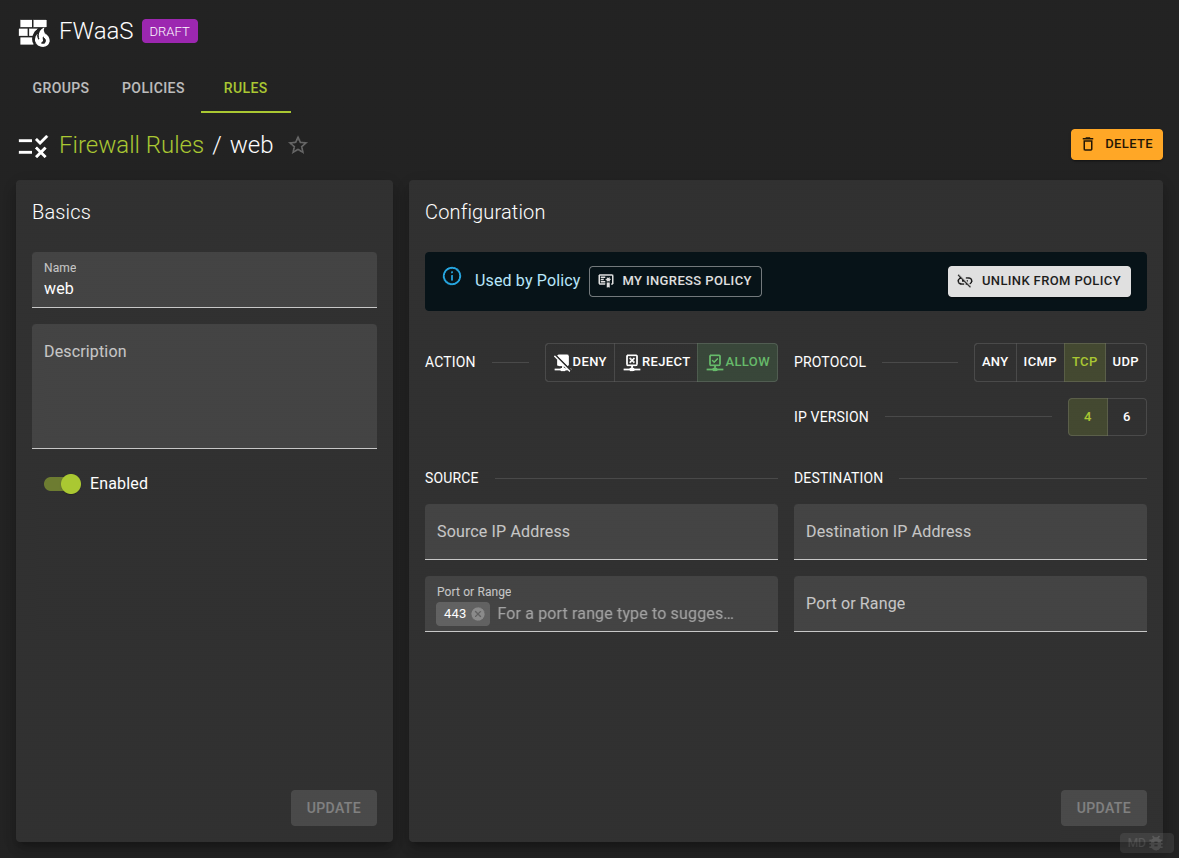
To view and modify a rule navigate to the details page by clicking the rules name from the list view
Name: Naming your rule may help identifying its purpose laterDescription: an optional descriptionEnabled: Controls whether the rule will be in effect or notAction: Defines how the matching packet will be handled.Protocol: Defines what protocol to match. Also mandatory when providing a source / destination portIP Version: Version of IP protocol. Should match the type of the source / destination addresses if providedSource IP: IP Address of the sourceSource Port (or Range): The port or port range of the source. Leave blank for all ports, add a single port or a range by providing 2 ports.Destination IP: IP Address of the destinationDestination Port (or Range): The port or port range of the source. Leave blank for all ports, add a single port or a range by providing 2 ports.
In the details page you can also link a rule to a policy or unlink it.
Usage
openstack firewall group rule set [-h] [--name <name>] [--description <description>] [--protocol {tcp,udp,icmp,any}]
                                  [--action {allow,deny,reject}] [--ip-version <ip-version>]
                                  [--source-ip-address <source-ip-address> | --no-source-ip-address]
                                  [--destination-ip-address <destination-ip-address> | --no-destination-ip-address]
                                  [--source-port <source-port> | --no-source-port]
                                  [--destination-port <destination-port> | --no-destination-port] [--share | --no-share]
                                  [--enable-rule | --disable-rule]
                                  <firewall-rule>
-h,--help: show help message and exit--name: Name of the firewall rule--description: Description of the firewall rule--protocol: Protocol for the firewall rule, one oftcp,udp,icmp,any--action: Action for the firewall rule, one ofallow,deny,reject--ip-version: Set IP version 4 or 6 (default is 4)--source-ip-address: Source IP address or subnet--no-source-ip-address: Detach source IP address--destination-ip-address: Destination IP address or subnet--no-destination-ip-address: Detach destination IP address--source-port: Source port number or range (integer in [1, 65535] or range like 123:456)--no-source-port: Detach source port number or range--destination-port: Destination port number or range (integer in [1, 65535] or range like 123:456)--no-destination-port: Detach destination port number or range--share: Share the firewall rule to be used in all projects (by default, it is restricted to be used by the current project).--no-share: Restrict use of the firewall rule to the current project--enable-rule: Enable this rule (default is enabled)--disable-rule: Disable this rule
Example
resource "openstack_fw_rule_v2" "rule_allow_ssh_in_ipv4" {
  name              = "rule_allow_ssh_in_ipv4"
  description       = "Allow SSH"
  action            = "allow"
  protocol          = "tcp"
  destination_port  = "22"
  source_ip_address = "195.192.132.0/24"
}
Arguments
name: Name of the firewall ruledescription: Description of the firewall ruleprotocol: Protocol for the firewall rule, one oftcp,udp,icmp,anyaction: Action for the firewall rule, one ofallow,denyip_version: Set IP version 4 or 6 (default is 4)source_ip_address: Source IP address or subnetdestination_ip_address: Destination IP address or subnetsource_port: Source port number or range (integer in [1, 65535] or range like 123:456)destination_port: Destination port number or range (integer in [1, 65535] or range like 123:456)shared: Set totrueto share the firewall rule to be used in all projects, set tofalse(default) so it is restricted to be used by the current projectenabled: Set totrueto enable this rule (default), set tofalseto disable it
Delete Firewall Rule
You can delete a Firewall Rule by
- Either clicking on the icon at the end of a row in the list view
- Or by clicking the delete button on the details page of a Firewall Rule.
Usage
openstack firewall group rule delete [-h] <firewall-rule> [<firewall-rule> ...]
-h,--help: show help message and exit<firewall-rule>: firewall rule id